
Power BI Embedded Pricing: What It Really Means for Sharing Reports
⏲ Read time: 9 minutes

Power BI Embedded pricing can look simple at first. You pay for capacity, embed Power BI content into an application, and avoid asking every external viewer to work inside the Power BI service.
In practice, the cost question is more nuanced. The right answer depends on what you are trying to do. Are you building analytics into a software product? Are you sharing reports with customers? Are you giving partners access to dashboards? Are you trying to reduce Power BI license friction for a large group of view-only users?
Power BI Embedded can be a strong option when you need deep application integration and control over the user experience. But it is not always the simplest or most cost-effective way to distribute existing Power BI reports to customers, partners or larger internal audiences.
This article explains how Power BI Embedded pricing works, what drives the real cost, and how to think about alternatives when your core need is secure report sharing rather than building a custom embedded analytics application.
What Power BI Embedded is designed for
Power BI Embedded is Microsoft’s embedded analytics offering. It allows organizations and software providers to embed Power BI reports, dashboards and tiles into a web application or website, rather than asking users to consume everything directly inside the Power BI service. Microsoft describes embedded analytics as a way to integrate Power BI content into applications and websites.
That distinction matters. Power BI Embedded is not primarily a cheaper sharing button. It is an architecture choice.
The typical use case is an application where analytics is part of the product experience. For example, a SaaS company may want customers to log into its own application and see interactive Power BI reports there. The application controls authentication, user experience and access logic, while Power BI provides the report content.
Microsoft also describes an “embed for your customers” scenario, where the application audience consists of external users and the application is responsible for authenticating those users. In that scenario, the application uses an embedding identity such as a service principal or master user account to access Power BI content.
That is powerful. It also introduces technical, governance and capacity planning questions that should not be underestimated.
How Power BI Embedded pricing works
Power BI Embedded pricing is primarily capacity-based. Microsoft states that Power BI embedded analytics requires capacity, such as A, EM, P or F SKU capacity, to publish embedded Power BI content. Capacity is a dedicated pool of resources, and the size of the capacity determines the amount of computation power available.
This means the core cost driver is not only the number of users. It is the amount of capacity needed to serve your reports with acceptable performance.
Capacity is affected by report complexity, semantic model size, refresh patterns, query load, user concurrency and how often users interact with reports. Microsoft’s capacity planning guidance focuses on choosing the right SKU, assessing capacity load and resizing capacity when needed.
A simple report with limited usage can require a very different capacity setup than a complex customer-facing analytics product with many users, large models and heavy interaction.
The main cost components are usually:
- Capacity cost for the SKU you use.
- Power BI Pro or Premium Per User licenses for creators or publishers where required.
- Development, maintenance and governance work around the embedded application.
- Monitoring and scaling as report usage grows.
Microsoft’s Azure pricing page is the authoritative source for current Power BI Embedded pricing and states that pricing is usage-based with no upfront cost. Exact prices should always be checked there because they can vary by region, currency and commercial agreement.
The important commercial point is this: Power BI Embedded pricing is not only a licensing line item. It is a capacity and operating model.
Power BI Embedded license considerations
Licensing depends on how Power BI content is created, published and consumed.
Microsoft states that Power BI embedded analytics requires capacity, and that a Power BI Pro or Premium Per User account is needed to publish content, unless publishing is done through a service principal using the relevant REST API.
That means you should separate three groups when estimating cost.
Report creators are the people building and publishing Power BI reports. Administrators manage workspaces, security and deployment. Viewers consume the reports through the embedded experience or another sharing method.
The mistake many teams make is to ask only: “How much does Power BI Embedded cost per month?” A better question is: “What is the total cost of delivering a secure, maintained and scalable report experience to this audience?”
For a small internal team, ordinary Power BI sharing or Power BI apps may be enough. For a large external customer audience, embedding may reduce friction for viewers, but it introduces capacity, application and access-control responsibilities.
Power BI Embedded capacity pricing and performance
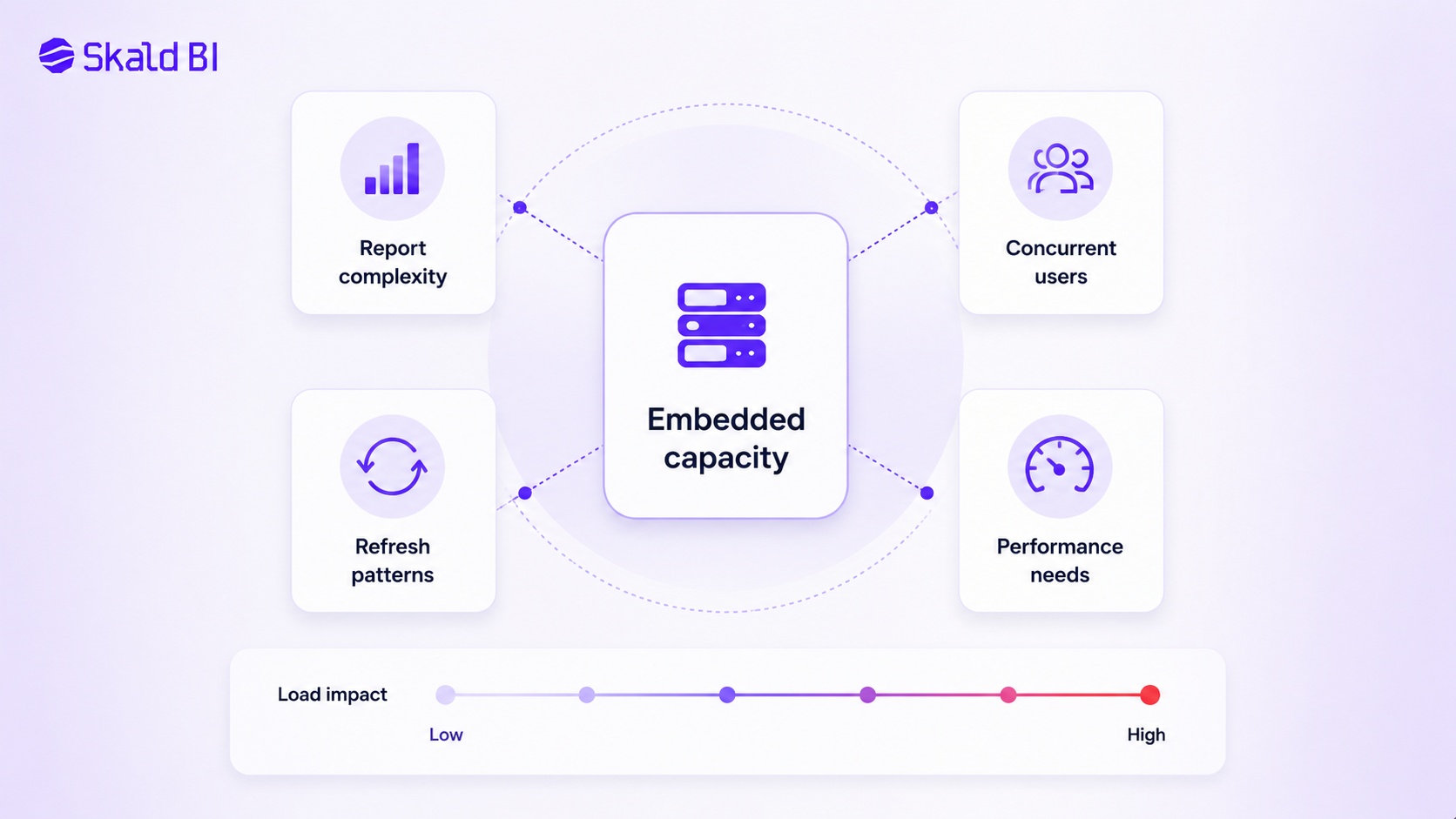
Capacity is the center of the Power BI Embedded cost model.
If capacity is too small, users may experience slower report loading or reduced responsiveness. If capacity is oversized, you pay for resources you do not need. Microsoft notes that exact report performance depends on factors such as model complexity, data volume and report complexity, and that scaling APIs can help organizations scale up or down to meet demand.
There is no universal user count per SKU that applies to every company. A small number of users opening heavy reports can create more load than a larger number of users viewing lighter reports occasionally.
This is why capacity planning should start with usage patterns, not only audience size. Relevant questions include:
- How many users will access reports at the same time?
- How complex are the reports and semantic models?
- How often is data refreshed?
- Are users mostly viewing static KPIs or exploring filters, drilldowns and detailed pages?
- Is the experience business-critical for customers or internal only?
These questions are commercial, not just technical. Poor performance can damage trust in the reporting experience. Overspending on capacity can make the business case weak.
Power BI Embedded vs standard Power BI sharing
Before choosing Power BI Embedded, it is worth comparing it with standard Power BI sharing.
Power BI already supports several ways to share and collaborate, including sharing reports and dashboards, publishing apps, using workspaces and collaborating through Microsoft 365 tools. Microsoft also supports sharing with external guest users through Microsoft Entra B2B.
For internal teams, this may be sufficient. For controlled external sharing, Entra B2B can also be relevant. Microsoft states that external guest users can be invited and governed centrally through Microsoft Entra B2B collaboration.
But standard sharing can create friction when the audience is large, external, non-technical or customer-facing. Users may need to deal with guest access, Microsoft accounts, tenant boundaries, permissions and a Power BI experience that may not match your brand or customer journey.
Power BI Embedded solves some of this by putting reports inside a custom application. But that only makes sense if you are prepared to own the application layer.
For many organizations, the real need is not full embedded analytics development. The real need is a secure, branded and easier way to distribute existing Power BI reports.
Where Power BI Embedded cost can become difficult
Power BI Embedded pricing becomes harder to evaluate when the organization focuses only on the capacity SKU.
The visible cost is capacity. The less visible cost is everything required to make the embedded experience work in practice: authentication, user management, tenant logic, report lifecycle, support, monitoring, governance and ongoing development.
This is especially relevant when the organization already has good Power BI reports. In that situation, the problem is often not report creation. The problem is distribution.
Common signs that the real issue is report distribution rather than embedded analytics development include:
- Reports already exist in Power BI and are maintained by the BI or finance team.
- The main audience is customers, partners or external stakeholders.
- Users mostly need controlled view access, not a fully custom analytics product.
- Branding, access rights and customer experience matter.
- Internal teams want less manual administration around report sharing.
In this scenario, a custom embedded application may be heavier than necessary. It can still be the right answer, but it should not be the default answer.
Security, RLS and access control
Any discussion about Power BI Embedded licensing or cost should include security.
Power BI supports row-level security, which restricts data access at the row level. Microsoft explains that RLS can be used so different users work with the same items but see different data. Microsoft also describes object-level security as a way to hide tables or columns from report viewers.
For embedded scenarios, security design needs to be precise. If reports are shown to customers or partners, the access model must be clear. The same applies to semantic model permissions, user identity, tenant separation and testing.
RLS is useful, but it is not a complete governance strategy on its own. Microsoft’s RLS guidance also notes that RLS filters table rows and cannot be used to restrict access to model objects such as tables, columns or measures.
This matters commercially. A reporting portal used by customers must not only be convenient. It must be trusted.
When a portal layer may be better than custom embedding
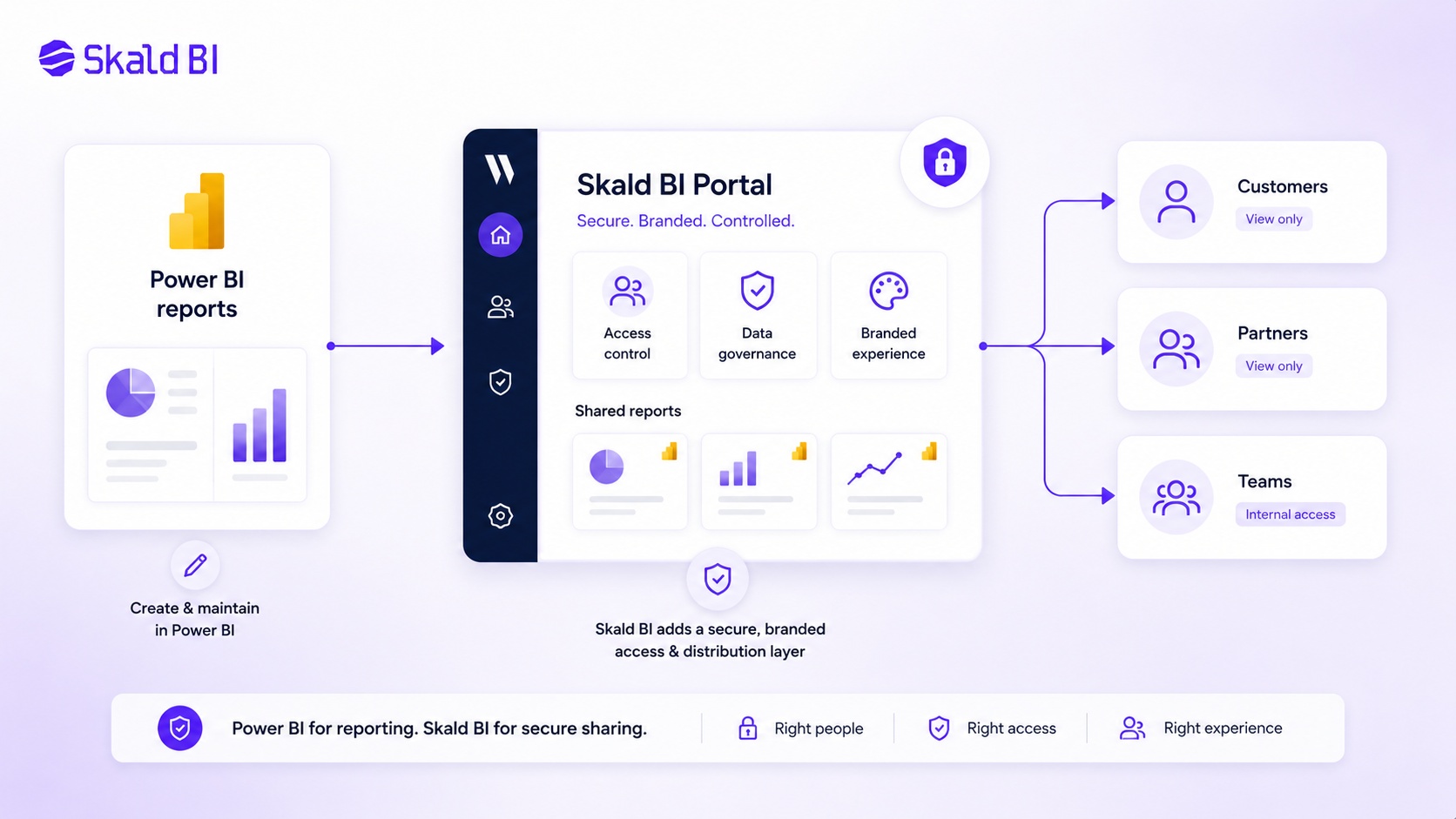
There is a practical middle ground between standard Power BI sharing and building a full custom embedded analytics application.
If your organization already uses Power BI and mainly wants to share existing reports with customers, partners or larger internal groups, a secure portal layer can be a better fit. This is where Skald BI is positioned.
Power BI helps teams build reports. Skald BI helps teams share them.
Skald BI does not replace Power BI. It adds a secure and branded portal layer around existing Power BI reports, with focus on access, rights, branding, cost control and simpler distribution.
That distinction is important. You keep your Power BI reporting workflow. Your teams can continue building and maintaining reports in Power BI. The portal layer helps package and distribute those reports to the right users in a more controlled experience.
This can be especially relevant when the business question is not “How do we build embedded analytics into our product?” but rather “How do we share Power BI reports externally without creating license, access and branding problems?”
How to evaluate Power BI Embedded cost properly
A useful Power BI Embedded cost evaluation should include more than a monthly capacity estimate.
Start with the audience. Internal employees, external customers and partners create different requirements. Then define the experience. A deeply integrated SaaS analytics module is different from a secure report portal. Then assess governance. External access, RLS, workspace structure and permissions need to be designed before scaling.
The cost model should include capacity, creator licenses, development effort, support, governance work and expected growth in usage.
For decision-makers, the central comparison is not simply Power BI Embedded versus Power BI Pro. The real comparison is between three operating models:
- Standard Power BI sharing, where users consume reports through Microsoft’s native Power BI experience.
- Custom embedded analytics, where reports are embedded into an application and the organization owns more of the technical experience.
- A secure portal layer, where existing Power BI reports are distributed through a branded, governed experience without positioning the portal as a replacement for Power BI.
Each model can be right. The wrong move is choosing the most technical model before confirming the actual business requirement.
Power BI Embedded pricing questions to answer before deciding
Before committing to Power BI Embedded, answer these questions:
Do we need a custom analytics application, or do we mainly need better report distribution?
Will users be internal employees, external customers, partners or a mix?
Do users need to edit, explore and build reports, or mainly view controlled reporting content?
How important are branding, access control and user experience?
Who will own the embedded application, authentication, support and governance over time?
What happens to capacity cost if report usage doubles?
How will we test RLS, semantic model access and customer-specific visibility before launch?
These questions often reveal whether Power BI Embedded is the right architecture or whether the organization is trying to solve a sharing problem with an application development project.
Final view: Power BI Embedded pricing is a strategic decision
Power BI Embedded pricing should not be judged only by the published SKU cost. It should be judged by the total cost and operating model required to deliver a reliable reporting experience.
For SaaS companies embedding analytics deeply into their own product, Power BI Embedded can be the right architecture. For organizations that already have Power BI reports and want to share them securely with customers, partners or broader internal audiences, a portal layer may be the more practical route.
The key is to avoid overbuilding. If the main problem is access, branding, governance and distribution, you may not need to create a full embedded analytics application from scratch.
Ready to share Power BI beyond your workspace?
Book a demo with Skald BI and see how your existing Power BI reports can be shared through a secure, branded portal for customers, partners and internal teams.
Table of contents
- What Power BI Embedded is designed for
- How Power BI Embedded pricing works
- Power BI Embedded license considerations
- Power BI Embedded capacity pricing and performance
- Power BI Embedded vs standard Power BI sharing
- Where Power BI Embedded cost can become difficult
- Security, RLS and access control
- When a portal layer may be better than custom embedding
- How to evaluate Power BI Embedded cost properly
- Power BI Embedded pricing questions to answer before deciding
- Final view: Power BI Embedded pricing is a strategic decision

About the author
Ola Wahlström
Ola Wahlström is a Partner and Senior Consultant at Wahsel, focused on using data, analytics and visualisation to drive the CFO agenda and create measurable business impact. He has held senior executive roles including Interim CFO at Nelly Group, COO at Stampen Media and Group CFO at MQ Holding, and works with forecasting, pricing, margin control, management reporting and commercial performance improvement.
Related articles

Power BI License: Costs, Sharing Rules, and Smarter Report Distribution
Understand Power BI license costs, sharing rules, external access, and how a secure portal can simplify report distribution.
Read more
Power BI White Label Usecases: 8 Practical Examples for Customer and Partner Reporting
Explore 8 practical Power BI white label usecases and learn when a branded reporting portal makes sense for customers and partners.
Read more