
Power BI Embedded: What It Is and When to Use It
⏲ Read time: 9 minutes

Power BI Embedded is Microsoft’s approach for embedding Power BI reports, dashboards and visuals into applications. It is often considered by SaaS companies, digital product teams and BI teams that want users to access analytics inside a custom application instead of working directly in the Power BI service.
Many teams search for power bi embedded because they are trying to solve a broader problem: how to share Power BI reports with people outside a normal internal workspace.
That distinction matters. Power BI Embedded is one possible answer, but not the only one. In some cases, standard Power BI sharing is enough. In others, a secure branded portal around existing Power BI reports is a more practical fit. The right model depends on who needs access, how the experience should work, what level of governance is required and how much technical ownership the organization wants to take on.
Power BI helps teams create reports. The challenge often begins after the reports are built. Reports need to be shared with customers, partners, suppliers, regions, franchisees, departments or other stakeholder groups. At that point, the problem becomes less about report creation and more about access, permissions, branding, cost control and distribution.
What is Power BI Embedded?
Power BI Embedded allows organizations to integrate Power BI content into their own applications. The reports are still created and managed in Power BI, but users consume them inside another digital environment.
A SaaS company might embed customer dashboards inside its product. A platform provider might show analytics inside a partner portal. An internal product team might build a custom application where reporting is one part of a larger workflow.
This is different from simply publishing a report to a Power BI workspace and sharing it. With embedded analytics, the application becomes the user interface. The organization is responsible for the surrounding experience, including authentication, navigation, user logic, access control and support.
Power BI Embedded should therefore not be seen as a simple sharing method. It is a developer-led model for bringing Power BI content into a custom software environment.
How Power BI Embedded Works at a High Level
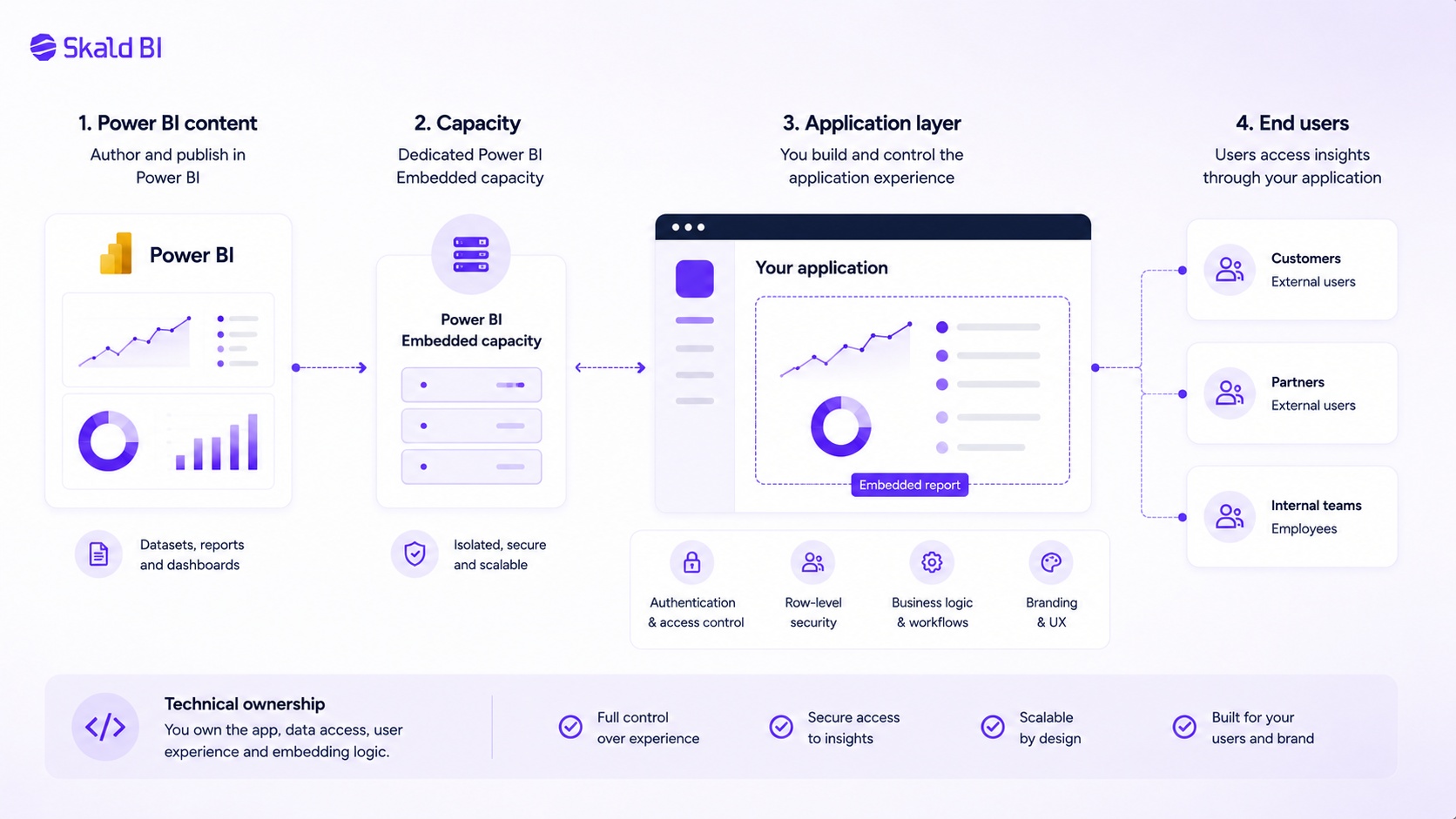
At a high level, Power BI Embedded involves three parts: Power BI content, an embedding application and capacity. Reports and semantic models are built in Power BI. The application controls how users access and view the content. Capacity supports the embedded experience.
Microsoft describes different embedded analytics scenarios, including embedding for your organization and embedding for your customers. The difference matters because authentication, licensing and user management can vary depending on whether users are internal or external.
In practice, teams need to think through several areas:
Where reports and semantic models are created and maintained
How users are authenticated
How report access is controlled
What capacity is required for usage and performance
How governance is managed over time
The report itself may look familiar. The complexity is usually in the delivery model around it.
When Power BI Embedded Makes Sense
Power BI Embedded is most relevant when analytics should be part of a broader application experience. It makes sense when users should not need to enter the Power BI service, when reporting should appear inside a product interface or when the organization wants deep control over the analytics experience.
This is often a strong fit for SaaS companies. If the product already has users, roles, customer accounts and workflows, embedded analytics can make reporting feel like a natural part of the product.
It can also make sense for organizations with strong development capacity. Embedding is not only a BI decision. It affects architecture, security, application design, capacity planning, lifecycle management and support. If the organization can own those areas, Power BI Embedded can be a powerful route.
But not every external reporting need is an embedded analytics project. Many organizations simply want to share existing Power BI reports with customers or partners in a secure, structured and branded way. That need may point toward a portal layer instead of a fully custom embedded application.
Power BI Embedded vs Standard Power BI Sharing
The Power BI service includes built-in ways to share reports and dashboards. For internal use cases, this is often enough. Teams can publish reports to workspaces, use apps, collaborate in Microsoft Teams and manage access within the Microsoft ecosystem.
External sharing is also possible, including scenarios with Microsoft Entra B2B guest users. This can work well when external users are comfortable with Microsoft-based access and when the organization can manage guest access cleanly.
The limitation is not that Power BI cannot be shared externally. The limitation is that standard sharing may not always create the experience the business wants.
External users may face unfamiliar login flows. The experience may feel more like Microsoft Power BI than the company’s own service. Managing many external users, customer groups or partner audiences can also become operationally heavy if the distribution model is not designed carefully.
Power BI Embedded gives more control, but usually requires more technical ownership. Between standard sharing and full embedding sits a common business need: using the reports already built in Power BI, but distributing them through a more controlled and branded experience.
This is where a Power BI portal can be relevant.
Power BI Embedded vs a Branded Power BI Portal
A branded Power BI portal does not replace Power BI. Reports can still be created, modeled and maintained in Power BI. The portal sits around those reports and gives users a clearer place to access them.
This distinction is important. Many organizations do not need a new BI tool. They already have Power BI. They have reports, datasets and people who know how to work in Power BI Desktop and the Power BI service. Their issue is distribution.
A portal layer is often relevant when reports need to reach customers, partners or larger internal audiences. Instead of sending users into a workspace-centric Power BI experience, the company can present reports through a secure branded environment.
For Skald BI, this is the core role. Power BI helps teams create reports. Skald BI helps teams share them. Skald BI adds a secure and branded portal layer around existing Power BI reports, with focus on access, rights, branding and controlled distribution.
The goal is not to replace Power BI. The goal is to make the last mile of Power BI delivery easier to manage.
Why Access and Permissions Matter
Access is one of the main reasons organizations start researching power bi embedded. Once reports move beyond a small internal team, permission management becomes more important.
A customer should only see what that customer is allowed to see. A partner may need access to a specific set of reports. A regional manager may need a different view from a central leadership team. In some cases, one report structure is reused across many audiences, but the data must be filtered based on user context.
Power BI includes row-level security, which can help restrict data access at the row level. This is important, but it is not a complete governance model by itself. Organizations also need to manage who gets access to which reports, how users are onboarded, how access is removed and who owns the process.
The larger the audience, the more this becomes an operating model question. A technically correct report is not enough if access management becomes unclear or manual.
Branding Is Practical, Not Cosmetic
Internal users may accept a Power BI-native experience because they understand the reporting environment. Customers and partners often have different expectations. They may not know what a Power BI workspace is. They may not understand why they are entering a Microsoft environment. They may simply expect a clear portal where they can log in, find their reports and trust that the information is meant for them.
This is where branding becomes practical. A branded reporting experience can reduce confusion and make analytics feel like part of the organization’s own service. It can also help commercial teams present reporting as part of the customer value, rather than as an internal report that has been externally exposed.
For B2B companies, this matters. Reporting is often part of what the customer receives. A logistics company may share delivery performance. A consulting company may share KPI dashboards. A software company may share usage insights. A service organization may share operational reporting with partners or franchisees.
In these cases, the reporting interface becomes part of the customer experience.
Licensing, Capacity and Operational Cost
Power BI distribution decisions are often influenced by licensing and capacity. Power BI Embedded uses capacity, and Microsoft documents several capacity-related options for embedded analytics. Standard Power BI sharing has its own licensing considerations, depending on user type, capacity and sharing model.
The important point is not that one model is always cheaper. That would be too simplistic. The right model depends on the number of users, how often they access reports, whether they are internal or external, how identity is managed and what kind of experience the business wants to provide.
The real cost is also not only licensing. It includes support, user administration, access control, custom development, governance and maintenance. A model that looks efficient technically can become expensive if the process does not scale operationally.
Governance Is the Part Teams Often Underestimate
Governance becomes more important as Power BI content reaches more users. A good distribution model should make it clear who owns the report, who approves access, how users are managed and how outdated reports are retired.
This is not only an IT issue. It affects trust. If customers receive the wrong access, if old reports remain available or if nobody owns the distribution process, confidence in the data can decline.
That is why Power BI Embedded, standard sharing and portal-based distribution should all be evaluated through a governance lens. The best model is not the most advanced one. It is the one the organization can operate safely and consistently.
How to Choose the Right Model
Choose standard Power BI sharing when the audience is mainly internal, the Microsoft experience is acceptable and permissions can be managed cleanly.
Consider Power BI Embedded when analytics should live inside a custom application and the organization has the technical capacity to own the surrounding product experience. This is especially relevant for SaaS companies and digital platforms where reporting is part of the product itself.
Consider a branded Power BI portal when reports are already built in Power BI and the main challenge is secure, scalable and professional distribution to customers, partners or broader internal groups.
The mistake is to treat every external sharing challenge as an embedded analytics project. Sometimes embedding is right. Sometimes it adds unnecessary complexity. The better question is: what experience should the user have, and what operating model can the organization sustain?
Where Skald BI Fits
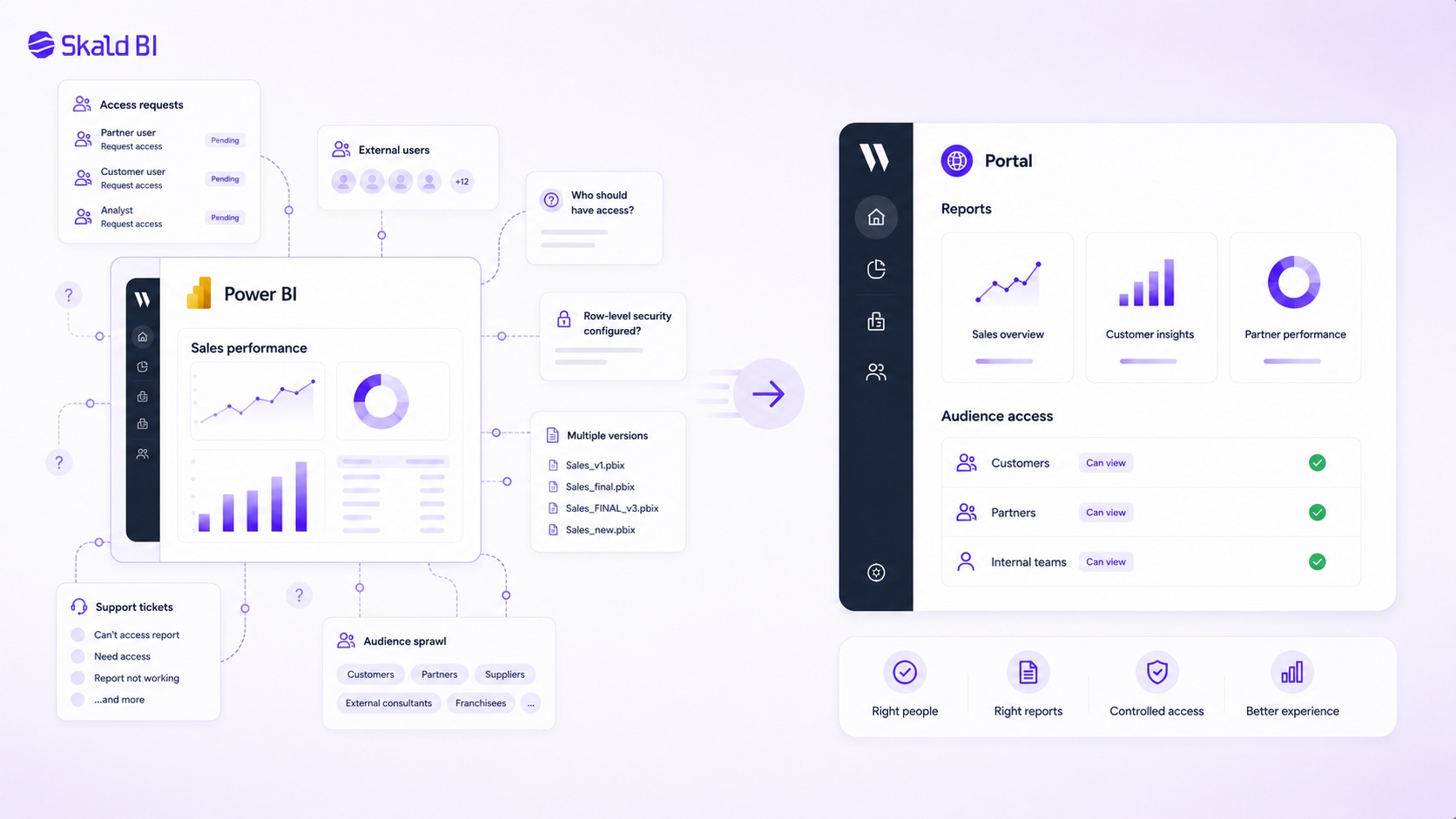
Skald BI fits between Power BI report creation and report consumption. It is designed for organizations that already use Power BI and want to share existing reports through a secure branded portal.
Report builders can continue working in Power BI. Data teams can continue using the Microsoft BI stack they already know. Skald BI focuses on the distribution layer around the reports: access, rights, branding, user experience and controlled delivery.
This is relevant when Power BI reports become part of the service an organization provides to others. Customers may need operational dashboards. Partners may need performance reporting. Internal teams may need easier access without navigating complex workspace structures.
Power BI creates the report. Skald BI helps make that report easier to share with the right audience.
Final Thoughts on Power BI Embedded
Power BI Embedded is a strong option when organizations need to integrate Power BI content into custom applications. It gives teams a way to bring analytics into digital products without building every reporting capability themselves.
But power bi embedded is not the only answer to Power BI distribution. If the real need is to share existing Power BI reports securely with customers, partners or larger internal audiences, a branded portal layer may be more aligned with the business problem.
The decision should start with the user experience, not the technology label. Who needs access? What should they see? How should they log in? Who manages rights? How much technical ownership is realistic? What level of branding and governance does the business require?
For many teams, Power BI is already doing the job it should do: helping them build useful reports. The next challenge is making those reports available to the right people in a secure, clear and scalable way.
Ready to share Power BI beyond your workspace?
Book a demo with Skald BI and see how your existing Power BI reports can be shared through a secure branded portal for customers, partners and internal teams.
Table of contents
- What is Power BI Embedded?
- How Power BI Embedded Works at a High Level
- When Power BI Embedded Makes Sense
- Power BI Embedded vs Standard Power BI Sharing
- Power BI Embedded vs a Branded Power BI Portal
- Why Access and Permissions Matter
- Branding Is Practical, Not Cosmetic
- Licensing, Capacity and Operational Cost
- Governance Is the Part Teams Often Underestimate
- How to Choose the Right Model
- Where Skald BI Fits
- Final Thoughts on Power BI Embedded

About the author
Mathias Melander
As Head of Product & Analytics at Skald BI, Mathias Melander leads the platform’s product strategy, technical architecture and analytics development. His focus is helping companies distribute Power BI reports securely through scalable, customer-facing BI portals.
Related articles

White Label Power BI Portal: Sharing Reports Securely Beyond the Workspace
Learn what a Power BI portal is, when it is useful, and how to share Power BI reports securely with customers, partners and teams.
Read more
Power BI White Label Usecases: 8 Practical Examples for Customer and Partner Reporting
Explore 8 practical Power BI white label usecases and learn when a branded reporting portal makes sense for customers and partners.
Read more
What is Power BI? A practical guide for teams that need better reporting and better sharing
Learn what Power BI is, how it works and why sharing reports with customers, partners or teams often requires a better portal layer.
Read more