
Row Level Security Power BI: A Practical Guide for Secure Report Access
⏲ Read time: 10 minutes

Row level security in Power BI is one of the most important controls for teams that need different users to see different slices of the same report. Instead of creating separate reports for every region, customer, department or partner, you can define rules that filter data at the row level.
Used well, RLS helps keep reporting scalable. A sales manager can see one region. A customer can see only their own account. A partner can access the data relevant to their relationship. The same report structure can serve many audiences without exposing the wrong rows.
But row level security Power BI setup is not only a technical modelling task. It affects how reports are published, how users are assigned, how external access is managed and how governance works when Power BI content moves beyond a small internal workspace.
This guide explains how Power BI row level security works, the difference between static and dynamic RLS, how email-based rules are commonly used, and what to consider when sharing reports with customers, partners or larger internal audiences.
What is row level security in Power BI?
Row level security in Power BI restricts access to rows in a semantic model. The report can remain the same, but the visible data changes depending on the user and the security rules applied to that user.
A simple example is a sales report with data for Sweden, Norway, Denmark and Finland. Without RLS, every report viewer may see all countries. With RLS, Swedish users can be limited to Swedish rows, Norwegian users to Norwegian rows, and Nordic management to all rows.
The security logic is defined through roles and filters. These filters evaluate whether each row should be visible. If the filter returns true for a row, the user can see it. If it does not, the row is removed from that user’s view.
This is different from hiding a visual or applying a page filter. RLS is applied at the model level. That makes it more suitable for access control, especially when the same semantic model supports several reports or audiences.
How row level security works in Power BI
A typical Power BI row level security setup has four parts. First, you define roles and rules in Power BI Desktop or, depending on the model scenario, in the Power BI service. Second, you publish the semantic model and report. Third, you assign users or groups to the relevant roles in the Power BI service. Fourth, you test the result before giving users access.
The important point is that RLS is not complete just because roles have been created in Power BI Desktop. After publishing, role membership must be managed in the service. This is where many implementation issues appear. The model may be correct, but users are not mapped correctly, groups are not maintained, or workspace permissions bypass the intended access pattern.
Microsoft also makes an important distinction around workspace roles. RLS is intended to restrict data access for users with Viewer permissions. It does not apply in the same way to Admins, Members or Contributors in the workspace. For practical governance, this means report consumers should normally be treated differently from report builders and workspace administrators.
Static row level security in Power BI
Static RLS uses fixed rules. For example, a role called Sweden might filter the country column to Sweden. A role called Enterprise Customers might filter a segment column to Enterprise.
This approach is easy to understand and can work well when the number of segments is small and stable. It is often a good starting point for internal use cases where business areas, markets or departments are clearly defined.
The weakness is maintenance. If you have many customers, partners, regions or account teams, static roles can become difficult to manage. Every new access pattern may require another role, another assignment, or another operational step. Over time, the report estate can become technically correct but administratively fragile.
Static RLS is therefore best for clear, limited and stable access groups. It is less suitable when access needs to follow individual users, customer accounts or frequently changing relationships.
Dynamic row level security Power BI explained
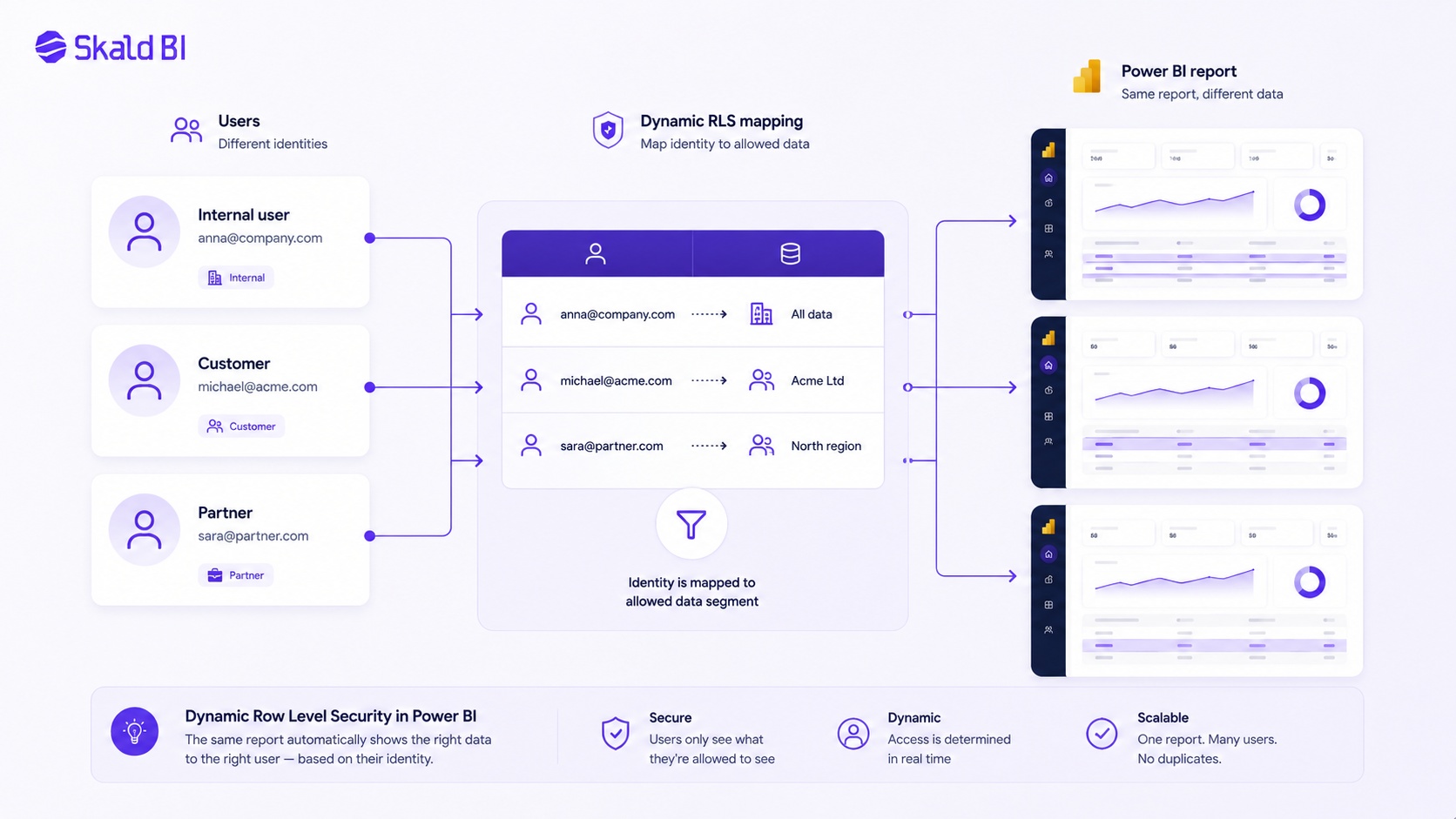
Dynamic row level security Power BI setups use the identity of the signed-in user to filter data. Instead of creating one role for every customer or region, you create a rule that checks who the user is and then filters rows through a mapping table.
A common pattern is to maintain a user access table. This table connects users to the customers, regions, departments or entities they are allowed to see. The RLS rule then uses the logged-in user identity to filter the model.
This is more scalable than static RLS when the same report must support many users with different access rights. It also fits better with customer-facing reporting, partner portals and multi-tenant reporting models, provided the underlying model is designed correctly.
The trade-off is that dynamic RLS requires more discipline. The mapping table must be accurate. Relationships must be tested. Unexpected user values should not accidentally return data. In more complex models, performance and relationship design also matter.
Power BI row level security based on email
Many teams search for power bi row level security based on email because the user’s email address is often the easiest identity to map against business data. In Power BI, DAX functions such as USERPRINCIPALNAME() can be used in RLS expressions. In the Power BI service, the returned value is the user’s User Principal Name, which often looks like an email address.
A simplified model could include a table where each user principal name is mapped to one or more customer IDs. The RLS rule checks the current user, filters the mapping table, and then filters the related customer data.
This design can work well, but it should not be treated casually. Email-based RLS depends on clean identity data, stable user mapping and correct model relationships. It also needs a default-safe design. If a user is not mapped, the safest result is usually that they see no rows, not that they see too much.
For B2B and external users, identity handling can become more nuanced. Guest users, Microsoft Entra B2B setup and group membership behaviour should be tested carefully. Do not assume that internal identity patterns will behave exactly the same for every external access scenario.
RLS and external Power BI sharing
RLS becomes more business-critical when reports move outside the core BI team. Internal reporting is already sensitive, but external sharing raises the stakes. A customer should not see another customer’s data. A partner should not infer commercial information from another partner. A regional team should not access information outside its mandate.
Power BI supports several ways to share and distribute content, including direct sharing, apps, workspace access, Microsoft Teams, SharePoint, external guest access through Microsoft Entra B2B and embedded analytics scenarios. Each option has different governance implications.
This is where teams often confuse two different problems. Power BI helps teams create, model and publish reports. But when those reports need to be distributed to customers, partners or broader audiences, the question becomes wider than RLS alone. You also need to think about user experience, branding, permissions, onboarding, support, workspace structure and long-term access control.
RLS can protect rows in the model. It does not by itself create a polished customer-facing reporting experience. It does not remove the need for governance around who gets access, how they sign in, what they see first, and how report distribution is managed over time.
Common RLS mistakes to avoid
Most RLS failures are not caused by a lack of technical knowledge. They usually come from unclear ownership, weak testing or treating security as a final step rather than part of the model design.
The most common mistakes are:
-
Creating roles in Power BI Desktop but not assigning users or groups correctly in the Power BI service
-
Giving report consumers workspace permissions that are broader than needed
-
Using static roles when the access model is actually dynamic
-
Building email-based RLS without a reliable user-to-entity mapping table
-
Testing only expected users, not unmapped users or edge cases
These mistakes are avoidable. The practical rule is simple: design the access model before the report is widely distributed. RLS should be part of the architecture, not a patch added after stakeholders ask for external sharing.
Testing should include normal users, privileged users, external users where relevant, and users with no mapping. A good RLS setup should fail closed. If the model is uncertain about a user, it should not show more data than intended.
How RLS fits into Power BI governance
Row level security is one layer in a broader governance model. It controls which rows a user can see, but it does not answer every governance question.
A mature Power BI distribution model also needs clarity on who owns the semantic model, who can publish changes, who can manage workspace access, who approves external users, how groups are maintained, and how report access is reviewed over time.
For small internal teams, this may be manageable inside Power BI workspaces. For larger organizations, and especially for customer-facing BI, the operational layer becomes more important. The business needs a repeatable way to package reports, assign access, present content clearly and maintain control as the audience grows.
This is why RLS should be seen as a foundation, not the whole solution. It helps enforce data boundaries. The surrounding distribution model determines whether those boundaries remain manageable in daily operations.
When RLS is enough and when it is not
For many internal reporting scenarios, Power BI RLS is sufficient. If users are already inside the organization, access groups are stable and reporting is consumed through normal Power BI channels, a well-designed RLS model may be all that is needed.
RLS alone may be less sufficient when reports need to be shared with customers, partners, franchisees, suppliers, investors or other external stakeholders. In those cases, the organization often needs more than row filters. It needs a controlled delivery experience around the reports.
Typical signs that RLS alone is not solving the full problem include:
-
Reports are technically correct but difficult for external users to access
-
Customers or partners need a branded reporting environment
-
The BI team spends too much time managing one-off sharing requests
-
Workspace structure becomes hard to explain or govern
-
Licensing, permissions and user onboarding create friction
At that point, the problem is no longer only about row level security in Power BI. It is about secure report distribution.
Where Skald BI fits
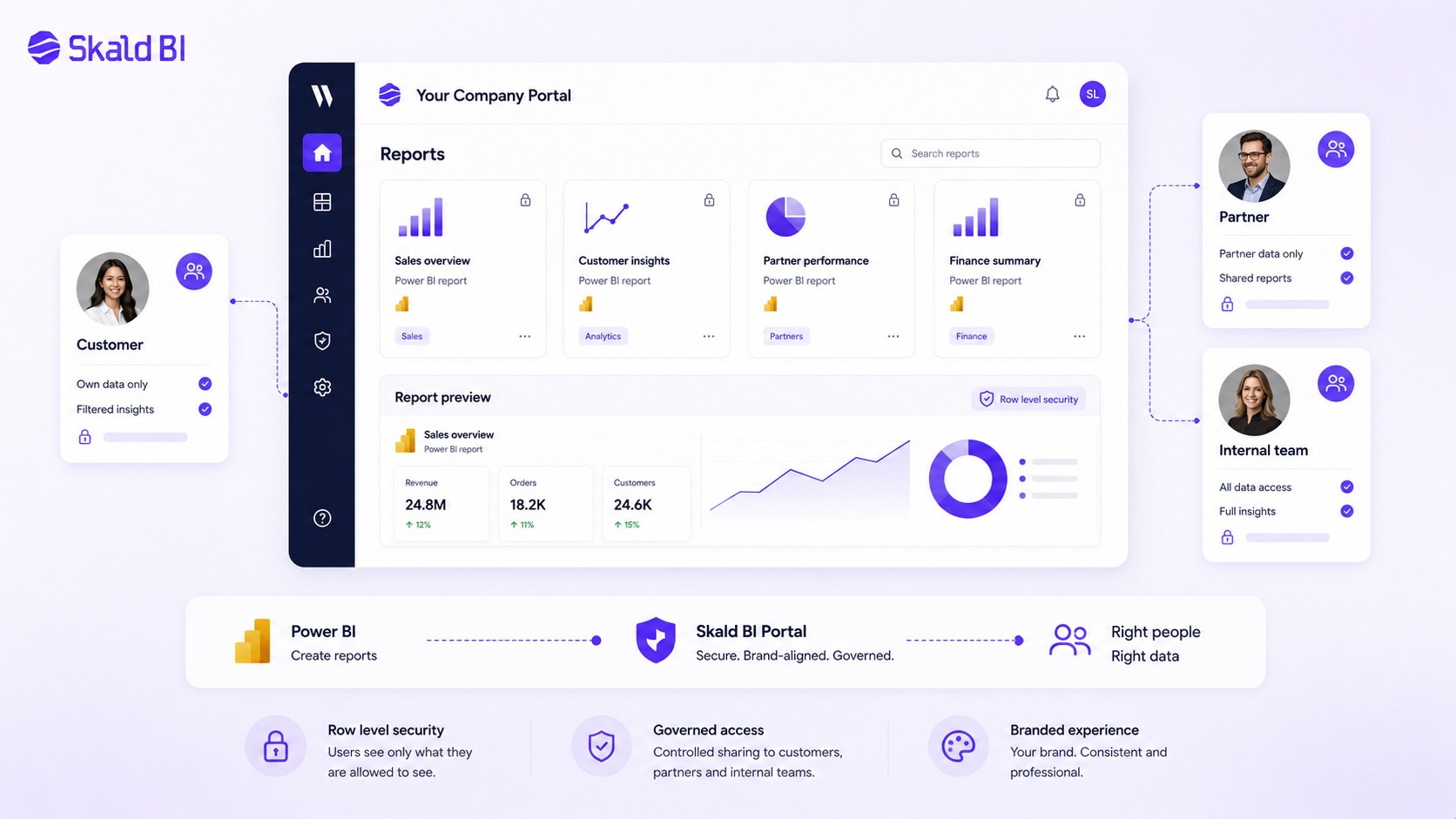
Skald BI is built for organizations that already use Power BI and want to share existing Power BI reports through a secure, branded portal. It does not replace Power BI. Your team can continue building reports in Power BI, using the modelling, visualization and security patterns that already fit your BI architecture.
The role of Skald BI is different. Power BI helps teams create reports. Skald BI helps teams share them with the right users in a more controlled and customer-facing way.
For organizations using RLS, this distinction matters. Row level security can remain part of the Power BI model. Around that, Skald BI can provide a portal layer for distributing reports to customers, partners or internal teams in a branded environment. The value is not that the portal replaces model-level security. The value is that secure reporting also needs a clear access and distribution experience.
This is especially relevant when Power BI content becomes part of a service, customer portal, partner offering or operational reporting flow. In those contexts, the report is not just an internal dashboard. It is part of the user experience.
Best-practice approach for row level security Power BI projects
A practical RLS project should start with the access model, not the DAX expression. Before defining roles, clarify who the audience is, what each audience should see, and how access will be maintained.
For static RLS, keep roles few and understandable. For dynamic RLS, invest in the mapping table and relationship design. For email-based RLS, validate identity values in the Power BI service, not only in Desktop. For external users, test the complete access flow with real user scenarios.
The most robust setups are usually boring in a good way. They are easy to explain, easy to test and easy to maintain. The model does not rely on hidden manual work. The ownership is clear. The distribution path is intentional.
If reports are being shared beyond the workspace, also decide how users should experience the reports. Should they enter through Power BI directly, through an embedded application, or through a branded BI portal? That decision affects support, governance and customer perception as much as it affects technology.
Final thoughts
Row level security in Power BI is a strong capability when used with the right model design and governance. It allows one report or semantic model to serve different users while keeping data boundaries in place.
But RLS is not a complete distribution strategy. It answers who can see which rows. It does not fully answer how customers, partners or larger internal audiences should access reports, how the experience should be branded, or how reporting should scale operationally.
For teams that only need internal controlled access, Power BI RLS may be enough. For teams sharing Power BI reports beyond the workspace, RLS should be combined with a clear distribution model.
Ready to share Power BI beyond your workspace?
Book a demo with Skald BI and see how your existing Power BI reports can be shared through a secure, branded portal built around access, control and scalable report distribution.
Table of contents
- What is row level security in Power BI?
- How row level security works in Power BI
- Static row level security in Power BI
- Dynamic row level security Power BI explained
- Power BI row level security based on email
- RLS and external Power BI sharing
- Common RLS mistakes to avoid
- How RLS fits into Power BI governance
- When RLS is enough and when it is not
- Where Skald BI fits
- Best-practice approach for row level security Power BI projects
- Final thoughts

About the author
Mathias Melander
As Head of Product & Analytics at Skald BI, Mathias Melander leads the platform’s product strategy, technical architecture and analytics development. His focus is helping companies distribute Power BI reports securely through scalable, customer-facing BI portals.
Related articles

White Label Power BI Portal: Sharing Reports Securely Beyond the Workspace
Learn what a Power BI portal is, when it is useful, and how to share Power BI reports securely with customers, partners and teams.
Read more
How to Use Power BI: A Practical Guide for Teams That Need to Share Reports
Learn how to use Power BI to build, publish and share reports, with practical guidance on workspaces, access, licensing and secure distribution.
Read more
What is Power BI? A practical guide for teams that need better reporting and better sharing
Learn what Power BI is, how it works and why sharing reports with customers, partners or teams often requires a better portal layer.
Read more