
How to share Power BI report with free users
⏲ Read time: 9 minutes

Many Power BI teams eventually face the same question: how do we share a Power BI report with free users?
The short answer is that it depends on where the report is hosted, who needs to access it, and which Power BI capacity or licensing model your organisation uses. In standard Power BI sharing, users generally need the right Power BI license to view shared content. Free users have limited sharing and collaboration rights unless the content is hosted in a workspace backed by the right capacity.
That distinction matters. Sharing a report with one colleague inside your organisation is not the same as distributing dashboards to hundreds of customers, partners, suppliers or frontline users. The technical action may look simple. The governance, access and licensing implications are often not.
Power BI is excellent for building reports. The real challenge for many organisations starts when those reports need to be shared securely, repeatedly and in a controlled way outside the core analytics team.
Can you share a Power BI report with free users?
Yes, but only in specific scenarios.
According to Microsoft, users with a free Power BI license can use the Power BI service for their own content, but they cannot use Power BI sharing or collaboration features in the same way as Pro or Premium Per User users. Microsoft also states that Pro and Premium Per User users can share and collaborate with free users when the content is saved in workspaces hosted in Premium capacity, Fabric F64 or greater capacity.
In practical terms, this means that a free user may be able to view shared Power BI content when the organisation has the right capacity in place. Without that, simply sending a link to a report will not usually solve the problem.
The most common misunderstanding is that “free user” means “free distribution”. It does not. A free Power BI account can be part of a working setup, but only when the surrounding license and capacity model supports the intended sharing scenario.
Do you need a Power BI license to view reports?
In many standard Power BI sharing scenarios, yes. A viewer needs the correct Power BI access and license conditions for the content they are trying to open.
This is where the answer becomes more nuanced. If a report is shared through the Power BI service, Microsoft licensing rules apply. If a report is embedded into an application using Power BI Embedded in an embed-for-your-customers scenario, the end users of that application do not necessarily need to sign in to Power BI or have their own Power BI license. The application and embedding setup carry the responsibility instead.
That difference is important for business teams. A CFO, COO or commercial leader usually does not care whether the answer is called Pro, Premium, Fabric capacity or Embedded. They care whether customers, partners or internal users can access the right report without friction, uncontrolled cost or manual administration.
From a governance point of view, the better question is not only “do you need a Power BI license to view reports?” It is “what is the right distribution model for this audience?”
The main ways to share Power BI reports with free users
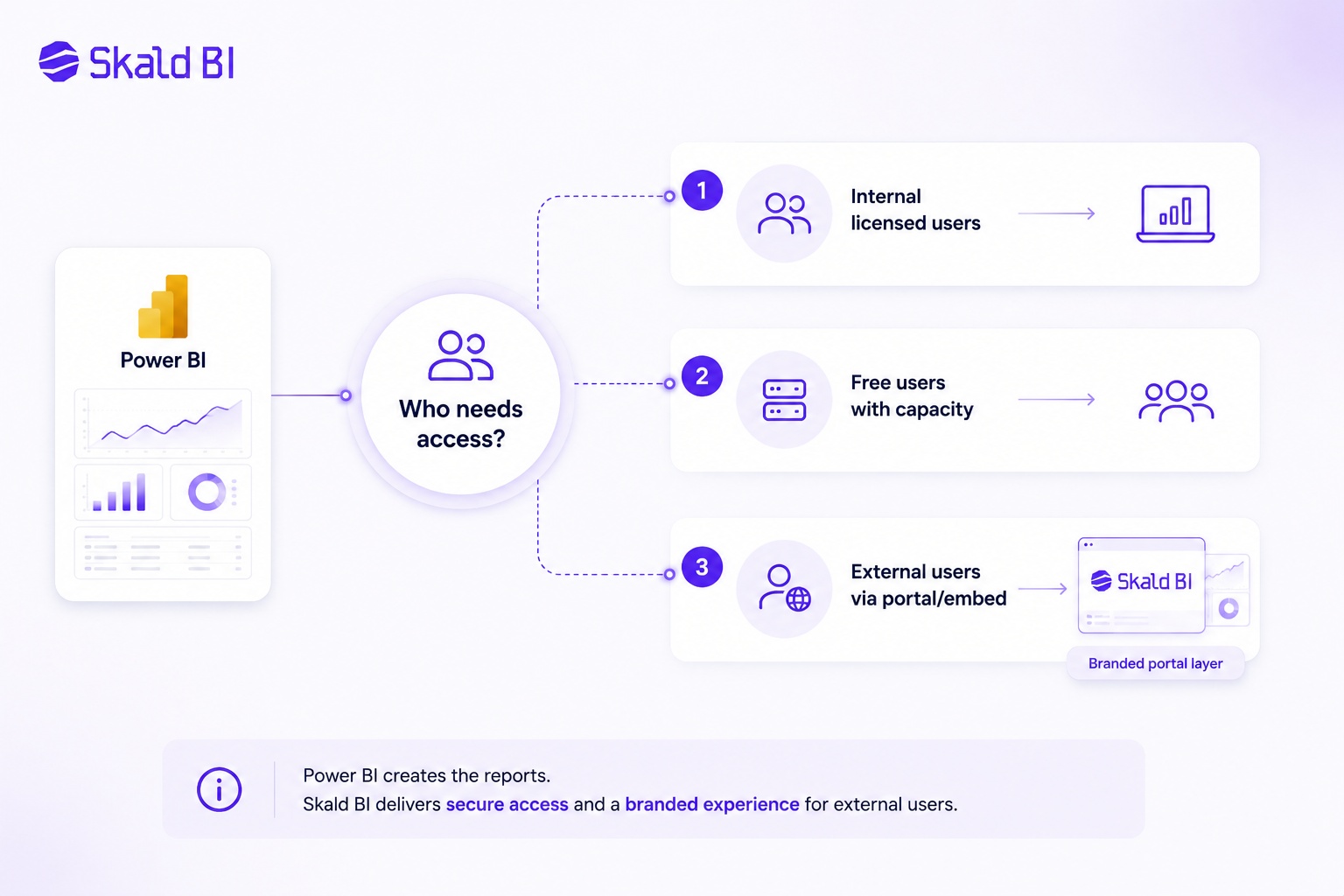
There are several ways organisations approach this. The right option depends on audience size, security needs, branding expectations and how much control you need over the user experience.
Common approaches include:
-
Sharing through Power BI Pro or Premium Per User when all viewers have the required licenses.
-
Hosting content in Premium or Fabric capacity so eligible free users can view shared content.
-
Using Power BI Embedded for customer-facing or application-based analytics scenarios.
-
Creating a controlled portal layer around existing Power BI reports for external or larger audience distribution.
The first two options are often enough for internal analytics teams. They are clean when the audience is known, licensed and comfortable working inside the Power BI service. The problems usually appear when reporting becomes customer-facing, partner-facing or operational at scale.
At that point, the question is no longer just “can we share the report?” It becomes “can we manage access, branding, cost and support in a way that still works six months from now?”
Share Power BI report without Pro: what is actually possible?
The keyword many teams search for is “share Power BI report without Pro”. That usually means one of two things.
The first meaning is internal. A company wants people inside the organisation to view reports without assigning Power BI Pro licenses to every viewer. In that case, Microsoft’s capacity-based options are usually the relevant path to evaluate.
The second meaning is external. A company wants customers, suppliers, franchisees, investors, board members or partners to view Power BI reports without forcing each person into a Power BI license and workspace experience. This is a different problem. It is less about classic collaboration and more about controlled distribution.
For external users, a Power BI Pro license alone is often not the full answer. You also need to think about identity, permissions, tenant settings, user lifecycle, support, data security and how the experience looks to the recipient. A report may be technically shareable but still feel unprofessional or operationally fragile if every external stakeholder receives a raw Power BI link and a set of access instructions.
When external sharing becomes a governance issue
Power BI sharing works well when the user group is limited and administratively manageable. It becomes more complex when the audience expands beyond the internal analytics team.
External sharing creates several practical questions. Who should access which report? How do you remove access when a customer relationship ends? Who owns the workspace? What happens when report links are forwarded? How do you explain access errors to non-technical users? How do you keep the experience aligned with your company brand rather than the internal BI tool?
These questions are not edge cases. They are usually the normal reality when Power BI reporting moves from internal decision support to customer-facing data products.
For example, a company may build strong reports in Power BI for customer profitability, delivery performance, store operations, subscription metrics or supplier scorecards. The report itself may be valuable. But if the sharing model is hard to understand, expensive to scale or weak from a brand perspective, the business value is reduced.
This is where many organisations need a distribution layer, not a replacement for Power BI.
Where Skald BI fits
Skald BI is built for organisations that already use Power BI and want to share existing reports through a secure, branded portal.
It does not replace Power BI. Your team can continue building reports, models and dashboards in Power BI. Skald BI sits around those existing reports as a portal layer focused on access, rights, branding, cost control and simpler distribution.
This is relevant when Power BI reports need to reach users who should not necessarily live inside your Power BI workspace. That may include customers, partners, external stakeholders, regional teams, departments or larger internal audiences.
The core idea is simple: Power BI helps teams create reports. Skald BI helps teams share them in a more controlled and business-friendly way.
For many organisations, this is the missing layer between a well-built dashboard and a scalable reporting experience. The analytics team should not have to rebuild reporting in another tool. But the business may still need a cleaner way to publish, package and distribute access.
Power BI Embedded, portals and report distribution
Power BI Embedded is Microsoft’s route for embedding Power BI content into applications and websites. In customer-facing embedded scenarios, Microsoft describes an “embed for your customers” model where application users do not need to sign in to Power BI or hold a Power BI license themselves.
That makes embedded analytics highly relevant when reports are part of a product, portal or customer experience. But embedded analytics also introduces implementation decisions. You need to consider authentication, authorization, workspace structure, capacity, security and how the front-end experience should work.
A branded portal layer can help make that model understandable for the business. Instead of asking every customer or partner to navigate Power BI, the organisation can provide a controlled entry point where the right reports are available to the right users.
This is especially important when reporting is not just internal analysis, but part of the service you deliver to the market.
What about row-level security and report permissions?
Access control in Power BI is not only about whether someone can open a report. It is also about what data they can see once they are inside it.
Power BI supports row-level security, commonly called RLS, which can filter data rows based on defined roles and rules. Microsoft’s guidance is clear that RLS filters table rows. It is not designed to restrict access to model objects such as tables, columns or measures.
That distinction matters when reports are shared with different customers, partners or business units. You need a deliberate security model, not just a shared link. In many cases, the right setup combines Power BI security design with a clear access layer around the reporting experience.
If your reports contain customer-specific data, margin data, pricing information or operational performance metrics, access should be treated as part of the product design. It should not be handled as an afterthought at the end of report development.
When a free-user sharing model is enough
A capacity-based Power BI sharing setup may be enough when the audience is mostly internal, users are familiar with Microsoft tools, and the organisation has a clear licensing model already in place.
It can also work well when reports are mainly for employees and the user experience of the Power BI service is acceptable. In that case, adding another layer may create unnecessary complexity.
The warning sign is when sharing starts to depend on manual workarounds. If your team is regularly explaining access issues, duplicating reports, exporting PDFs, sending screenshots or maintaining separate customer-specific versions, the distribution model is probably under strain.
The cost is not only licensing. It is also administration, support, governance risk and the loss of trust when users cannot access the data they were promised.
When a secure branded portal is the better route
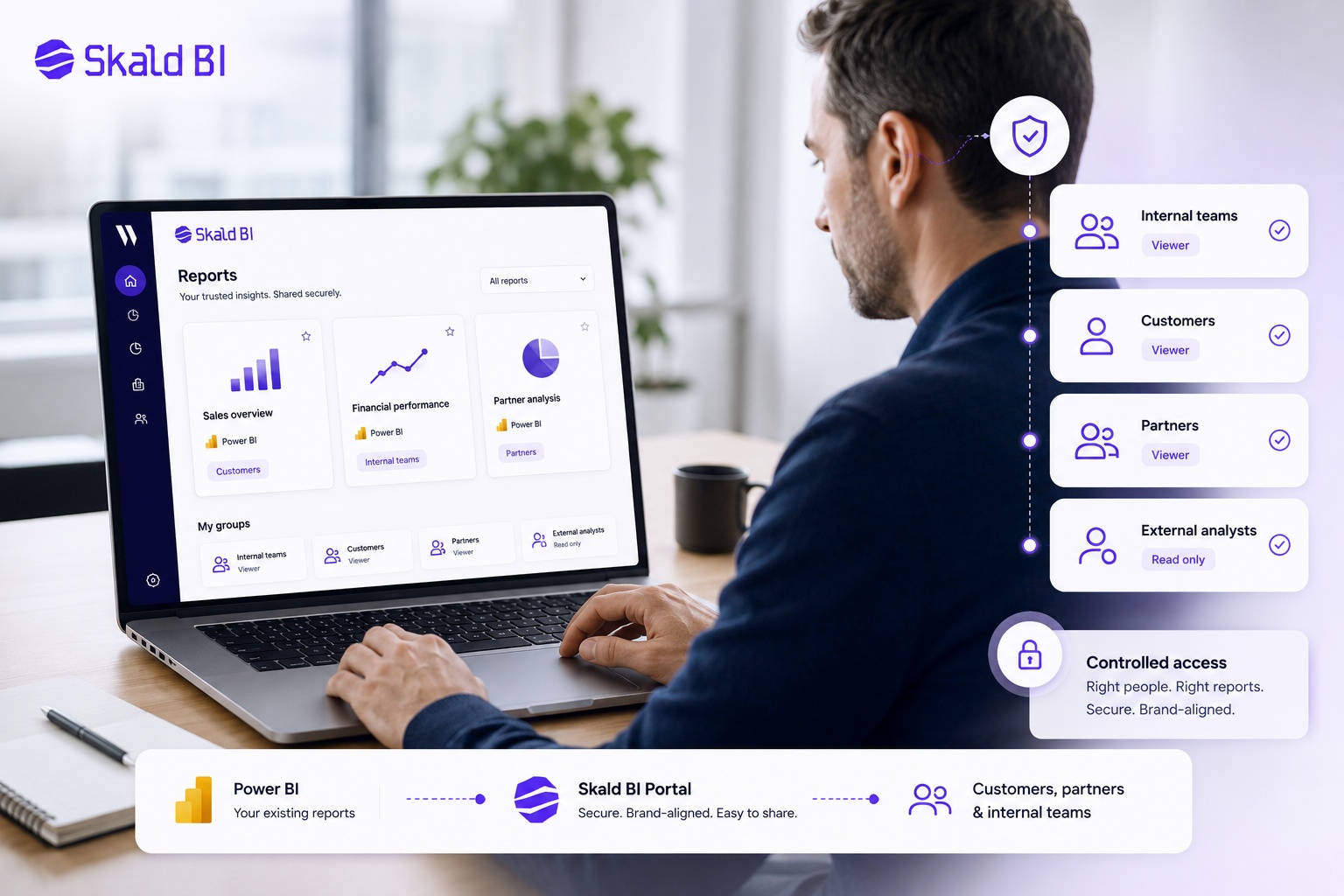
A portal model becomes more relevant when reporting is part of a broader stakeholder experience.
This is often the case when Power BI reports need to be shared with:
-
Customers who expect a branded experience rather than an internal BI workspace.
-
Partners or suppliers who should only see specific reports and data.
-
External stakeholders who need simple access without Power BI training.
-
Larger internal audiences where license management and support become inefficient.
-
Business units that need controlled report distribution without rebuilding analytics.
In these situations, the report is only one part of the problem. The bigger issue is delivery. Users need to find the right report, access it securely, understand that it comes from your organisation, and trust that they are seeing the right data.
That is where Skald BI is positioned. It helps organisations keep Power BI as the reporting engine while improving the way those reports are shared beyond the workspace.
A practical decision framework
Before choosing how to share Power BI reports with free users, step back and define the audience.
If the audience is small, internal and already licensed, standard Power BI sharing may be sufficient. If the audience is broad, external or commercially important, you should evaluate a more structured distribution model.
The key questions are practical:
Do users need to work inside Power BI, or do they simply need access to finished reports? Are they employees, customers or partners? Do they need different data views? Will access change often? Does the reporting experience need to carry your brand? Is the report part of your product or service delivery?
These questions usually reveal the right path faster than starting with license names. Licensing matters, but the business requirement should come first.
For a CFO or operating leader, this is also a cost-control question. Paying for licenses can be appropriate. Building an embedded or portal-based model can also be appropriate. The wrong answer is the one that scales cost or administration faster than the value of the reporting.
Final answer: how to share Power BI report with free users
You can share a Power BI report with free users when your Power BI setup supports it, typically through the right Premium or Fabric capacity model. In standard sharing scenarios without the right capacity, free users will be limited. For external or customer-facing use cases, Power BI Embedded and portal-based distribution models may be more suitable, especially when users should not need their own Power BI license or work inside your Power BI environment.
The most important point is that report sharing is not only a license question. It is an access, governance, branding and distribution question.
If you only need to share a few internal reports, Power BI’s native sharing model may be enough. If you need to distribute existing Power BI reports to customers, partners or larger audiences in a controlled and branded way, a portal layer becomes much more relevant.
Ready to share Power BI beyond your workspace?
Book a demo with Skald BI and see how your existing Power BI reports can be shared through a secure, branded portal built for customers, partners and internal teams.
Table of contents
- Can you share a Power BI report with free users?
- Do you need a Power BI license to view reports?
- The main ways to share Power BI reports with free users
- Share Power BI report without Pro: what is actually possible?
- When external sharing becomes a governance issue
- Where Skald BI fits
- Power BI Embedded, portals and report distribution
- What about row-level security and report permissions?
- When a free-user sharing model is enough
- When a secure branded portal is the better route
- A practical decision framework
- Final answer: how to share Power BI report with free users

About the author
Ola Wahlström
Ola Wahlström is a Partner and Senior Consultant at Wahsel, focused on using data, analytics and visualisation to drive the CFO agenda and create measurable business impact. He has held senior executive roles including Interim CFO at Nelly Group, COO at Stampen Media and Group CFO at MQ Holding, and works with forecasting, pricing, margin control, management reporting and commercial performance improvement.
Related articles

Power BI License: Costs, Sharing Rules, and Smarter Report Distribution
Understand Power BI license costs, sharing rules, external access, and how a secure portal can simplify report distribution.
Read more
Power BI sharing: how to share reports securely with the right users
Learn how Power BI sharing works across reports, dashboards, workspaces, external users, licenses, RLS and secure branded portals.
Read more
White Label Power BI Portal: Sharing Reports Securely Beyond the Workspace
Learn what a Power BI portal is, when it is useful, and how to share Power BI reports securely with customers, partners and teams.
Read more