
Power BI Embedded Alternatives: How to Choose the Right Way to Share Power BI Reports
⏲ Read time: 11 minutes

Power BI is a strong platform for building reports. The harder question is often what happens after the report is built.
Many organizations reach the same point. They already have useful dashboards, semantic models and reports in Power BI. Internal teams use them. Business leaders trust them. But the next requirement is more complex: sharing reports with customers, partners, suppliers, franchisees, regional teams or other stakeholders outside the core Power BI workspace.
That is where many teams start searching for power bi embedded alternatives.
Power BI Embedded is a relevant option, especially when an organization wants to embed analytics directly into an application. But it is not the only route. Depending on the audience, governance model, licensing structure, branding requirements and technical capacity, a different approach can be more practical.
This article explains the main alternatives to Power BI Embedded, when each one fits, and how to think about the choice if your real problem is not report creation, but secure report distribution.
What Power BI Embedded Is Designed For
Power BI Embedded is Microsoft’s solution for embedding Power BI content into applications. It is commonly used when software vendors or product teams want to bring reports, dashboards or visuals into a customer-facing application, often without asking end users to work directly inside the Power BI service.
In Microsoft’s embedded analytics model, there are different implementation patterns. One common scenario is “embed for your customers”, where users access analytics inside an application and do not necessarily need their own Power BI license. This type of setup typically requires technical implementation, application ownership, identity design, embed tokens and capacity planning.
That distinction matters. Power BI Embedded is not simply a nicer way to send a Power BI report link. It is an embedded analytics architecture. For some companies, that is exactly right. For others, it introduces more development and governance complexity than the use case requires.
If your company is building a software product where analytics is part of the product experience, Power BI Embedded can make sense. If your company mainly wants to share existing Power BI reports through a secure, controlled and branded experience, the decision is less obvious.
Why Companies Look for Power BI Embedded Alternatives
Most searches for power bi embedded alternatives are not driven by dissatisfaction with Power BI itself. They are usually driven by distribution friction.
The report is ready. The data model is in place. The business wants more users to access the insights. But the organization then has to answer practical questions about licenses, guest access, workspaces, security roles, user management, branding and support.
The challenge often looks like this:
-
Customers need access to selected reports, but not the full Power BI workspace.
-
Partners need a branded experience that feels like part of the company’s own service.
-
Internal teams need simpler access than navigating Power BI workspaces and apps.
-
Finance or IT wants clearer control over license cost and user provisioning.
-
Data owners need governance, permissions and row-level access to remain controlled.
These are not report-building problems. They are distribution, access and governance problems.
That is the key point. Power BI helps teams create reports. The next layer must help teams share them with the right users, in the right context, with the right controls.
The Main Power BI Embedded Alternatives
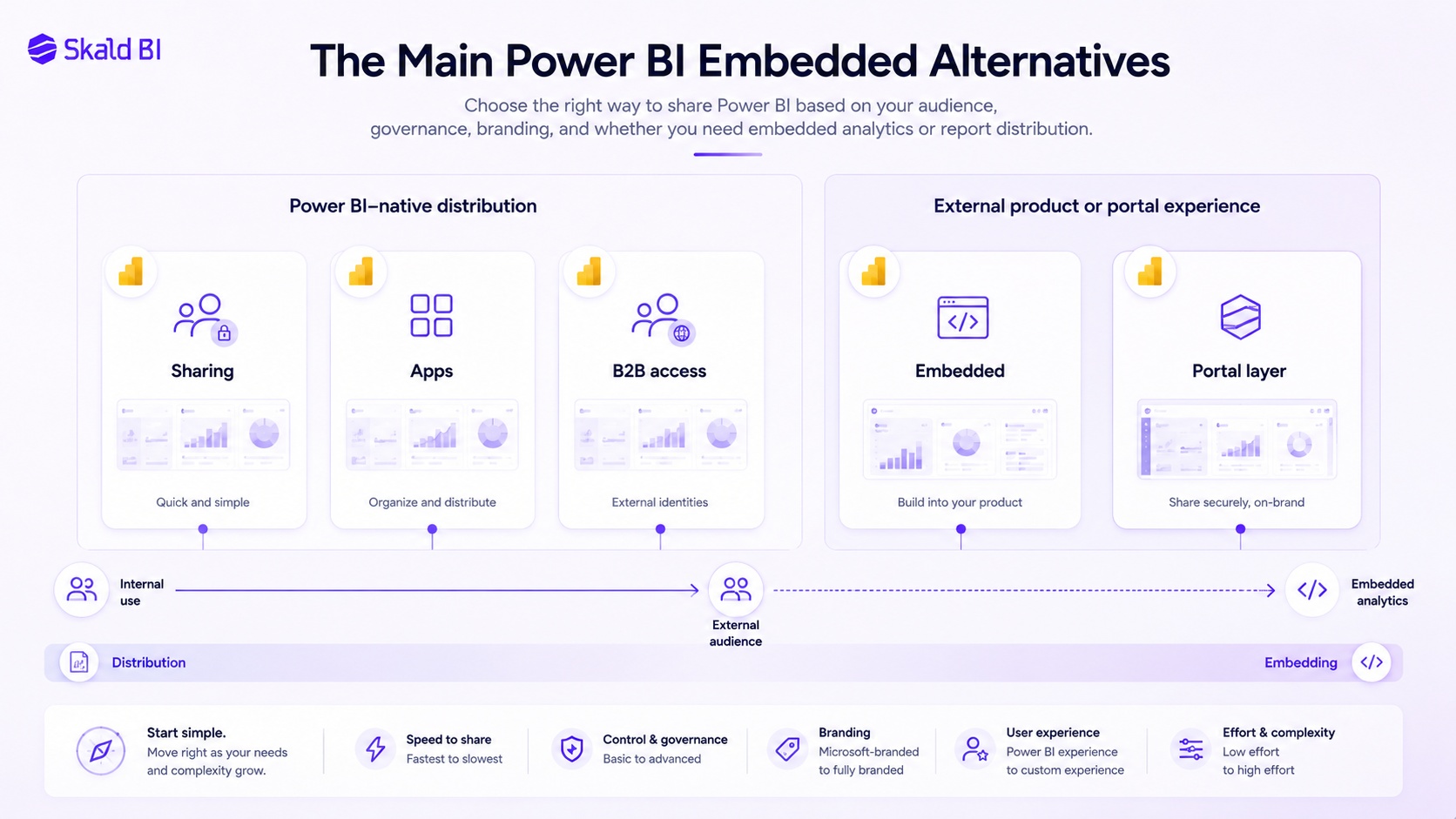
There is no single best alternative. The right answer depends on whether you need collaboration, external sharing, customer-facing analytics, a portal experience or a fully embedded product feature.
A useful way to compare the options is to separate them by intent.
Power BI Service Sharing
The simplest alternative is to use Power BI’s native sharing capabilities. Users can share reports and dashboards with specific people, and Microsoft supports internal and external sharing scenarios, including guest users through Microsoft Entra B2B.
This can work well when the audience is relatively small, known and comfortable with Microsoft access flows. It is often the fastest path for internal collaboration or controlled sharing with named stakeholders.
The limitation is experience. Native Power BI sharing still feels like Power BI. That may be acceptable for internal users, but less ideal when reports are part of a customer journey, partner service or external reporting package. It can also become harder to manage when the audience grows, when branding matters, or when report access must be presented in a more structured business portal.
Power BI Apps
Power BI apps are a strong option for packaging and distributing Power BI content to internal audiences. They allow organizations to publish collections of reports and dashboards from a workspace to business users in a more organized format.
For internal reporting, this is often underused. It gives more structure than ad hoc sharing and can reduce confusion for business users who should consume reports rather than manage workspace content.
But Power BI apps are still Power BI-native experiences. They are not designed to become a fully branded customer portal. They also do not remove the need to think carefully about licenses, permissions, workspace roles and governance.
Microsoft Entra B2B External Sharing
For external stakeholders, Microsoft Entra B2B can be used to give guest users access to Power BI content. This is a valid enterprise approach when the organization wants to govern external access through Microsoft identity and tenant controls.
This approach fits companies that already have mature Microsoft identity governance and where external users can accept a guest-user model. It is often appropriate for structured collaboration with customers, suppliers or partners who are expected to use Microsoft authentication flows.
The trade-off is user experience and operational overhead. External users may need to navigate guest access, tenant switching or unfamiliar Microsoft flows. For some audiences this is acceptable. For others, especially customers expecting a polished reporting experience, it may feel too internal or technical.
Custom Portal with Power BI Embedded
Another option is to build a custom portal and use Power BI Embedded inside it. This can create a tailored experience where Power BI content appears inside a company’s own application or customer portal.
This route gives control, but it also creates responsibility. The organization must design and maintain the application layer, authentication, authorization, embed logic, capacity management, user administration and support model. It must also plan for performance, scaling and lifecycle management.
This can be the right choice for software companies, data product teams or organizations where analytics is a core part of a digital product. It is less attractive when the main requirement is to distribute existing Power BI reports quickly, safely and professionally without building a new software product around them.
Secure Branded Portal Layer
A different alternative is to use a portal layer around existing Power BI reports. This is where Skald BI fits.
The logic is simple. Keep Power BI as the reporting and analytics platform. Let analysts and business teams continue building reports in Power BI. Add a secure, branded distribution layer for the people who need to consume those reports.
This type of model is relevant when reports need to be shared with customers, partners, external stakeholders or larger internal audiences, but the organization does not want every user journey to happen inside the Power BI service.
The important distinction is that a portal layer does not replace Power BI. It extends the distribution experience around it.
Power BI Embedded vs Premium: What Is the Real Difference?
The keyword power bi embedded vs premium often appears in the same buying process because both concepts relate to capacity, licensing and scale. But they are not the same decision.
Power BI Embedded is typically associated with embedding Power BI content into applications, particularly customer-facing applications. Power BI Premium and Fabric capacity are broader capacity models used for enterprise analytics, performance, sharing and access scenarios within the Microsoft ecosystem.
The practical question is not only “Which license is cheaper?” A better question is: what kind of experience are we trying to deliver?
If the goal is analytics inside a product, Power BI Embedded may be a natural option. If the goal is enterprise-scale Power BI usage, Premium or Fabric capacity may be part of the answer. If the goal is controlled report distribution to customers and partners, the organization also needs to think about the access layer, branding, user lifecycle and governance model.
Pricing comparisons can be misleading without usage assumptions. Power BI Embedded pricing depends on capacity and consumption. Premium and Fabric capacity decisions depend on broader organizational usage, user types and workload requirements. A small external reporting use case and a large customer-facing analytics product can require very different architectures.
Power BI Embedded Pricing: Why Cost Is Not Just Capacity
Power BI Embedded pricing is often viewed as a capacity cost question. That is only part of the picture.
Capacity matters because embedded analytics needs compute resources. Larger workloads, more users, heavier reports and more complex models can require more capacity. Microsoft also provides ways to scale capacity and, in some Azure Embedded scenarios, pause capacity when it is not needed.
But the total cost of Power BI Embedded usually includes more than the Azure or Microsoft line item. Organizations should also include development, maintenance, identity management, monitoring, support, governance and future changes to report structure or user access.
A lower direct license or capacity cost does not automatically mean a lower total cost. A setup that requires ongoing developer involvement for every access or portal change can become expensive operationally. A setup that creates confusion for customers can become expensive commercially.
The right cost analysis should include three layers: Microsoft licensing and capacity, implementation and maintenance effort, and the business cost of user friction.
Where Row-Level Security and Governance Fit
Any serious Power BI sharing model must address security. That includes who can access which reports, which data each user can see, and how permissions are maintained over time.
Power BI supports row-level security, commonly called RLS, which can filter data for specific users or roles. This is important when one report or semantic model serves multiple audiences. For example, different customers, regions or business units may need to see only their own data.
But RLS is not the whole governance model. It controls data visibility within the model. It does not by itself define the entire user experience, external access process, brand environment, onboarding flow or reporting portal structure.
Governance needs to cover several layers:
-
Data access: which rows, models and reports a user can access.
-
Identity: how users authenticate and how external users are managed.
-
Distribution: where reports are published and how users find them.
-
Ownership: who maintains content, permissions and support.
-
Compliance: how access is reviewed and removed when no longer needed.
This is why Power BI distribution often becomes cross-functional. BI, IT, security, customer success and commercial owners all have legitimate concerns. A good solution must respect all of them.
When Power BI Embedded Is the Right Choice
Power BI Embedded is a strong option when analytics needs to become part of an application experience.
It is especially relevant when a company is building a customer-facing software product, wants to embed interactive reports directly into that product, has development capacity available, and needs detailed control over the embedded experience.
It can also be relevant when the organization wants to avoid sending users into the Power BI service and instead manage the analytics experience within its own application. In that case, the technical ownership is a feature, not a burden.
The risk is using Power BI Embedded for the wrong problem. If the core need is simply to share existing reports with customers or partners through a secure and branded interface, building a full embedded analytics application may be more than the organization needs.
When a Portal Layer Is the Better Alternative
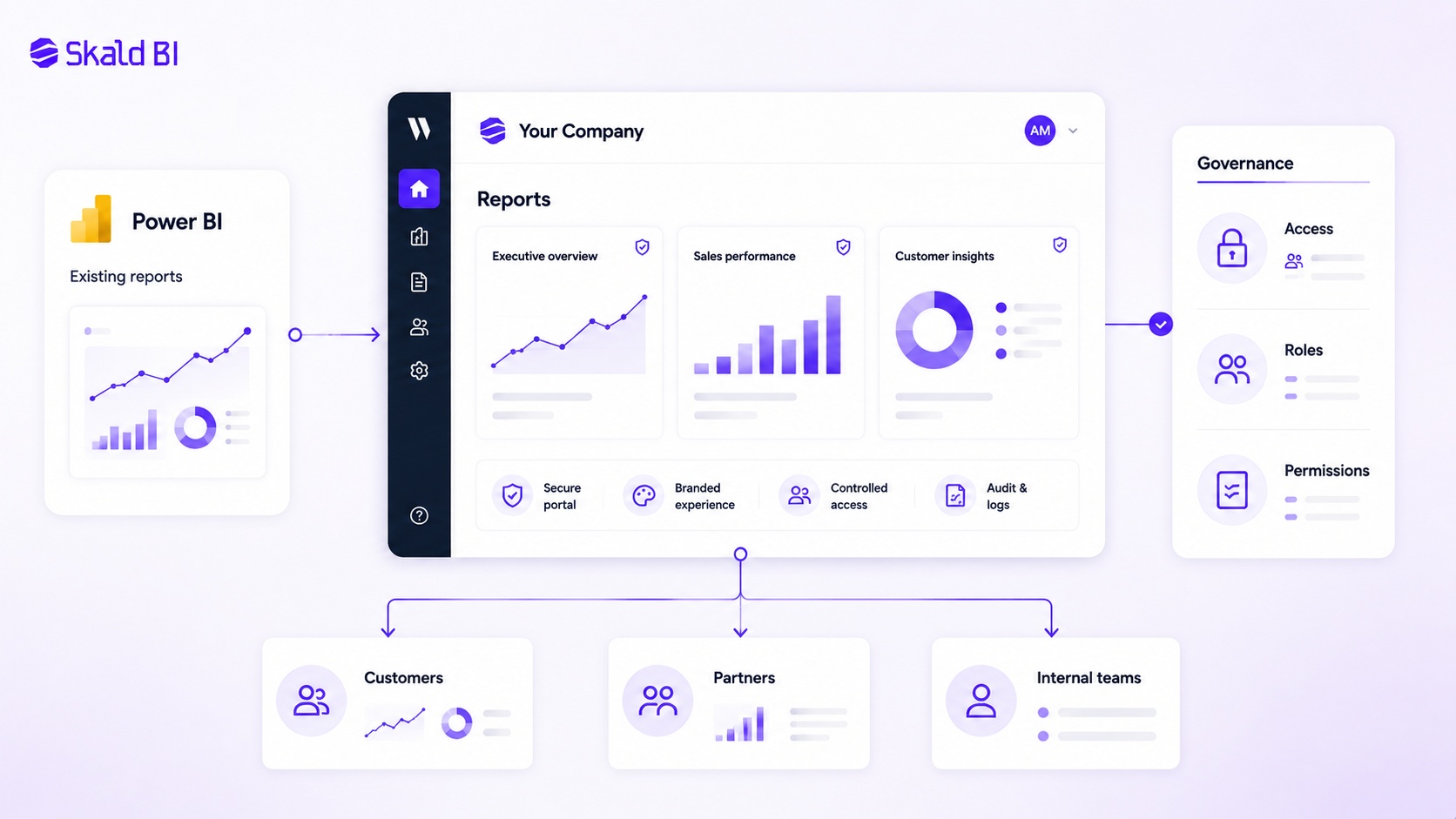
A secure portal layer is often a better fit when the organization already has Power BI reports and wants to distribute them more professionally.
This is common in consulting, retail, logistics, finance, franchise, SaaS, customer success and partner reporting scenarios. The reports already exist. The business value is not in rebuilding analytics. It is in making the reports easier to access, safer to govern and more appropriate for external or semi-external audiences.
In these cases, the portal becomes the business-facing access point. Users do not need to understand workspaces, internal report structures or Power BI administration. They need to sign in, find the right report and trust that they are seeing the right information.
This is the space Skald BI is built for. Power BI remains the place where reports are created and maintained. Skald BI adds a secure, branded portal layer around existing Power BI reports, with focus on access, rights, branding, cost control and simpler distribution.
That positioning matters. Skald BI is not an alternative to Power BI as an analytics platform. It is an alternative to overbuilding embedded analytics or forcing every report-sharing use case through native Power BI access flows.
How to Choose Between the Options
A practical decision should start with the audience, not the technology.
If the audience is internal analysts or managers, Power BI workspaces, apps and native sharing may be enough. If the audience is external partners who already work closely with your Microsoft environment, Entra B2B sharing may be appropriate. If analytics is part of a software product, Power BI Embedded deserves serious consideration.
But if the audience is customers, partners or broad internal groups who need a simple branded place to access existing Power BI reports, a portal layer can be the more focused answer.
The decision becomes clearer when you ask five questions:
-
Are we building a product experience, or distributing existing reports?
-
Do users need to work inside Power BI, or only consume selected reports?
-
Will the audience accept Microsoft guest access and Power BI navigation?
-
How important are branding, customer experience and access simplicity?
-
Who will maintain permissions, users, support and governance over time?
These questions prevent a common mistake: choosing an architecture because it is technically powerful, not because it fits the operating model.
A Senior View: Do Not Confuse Embedding with Distribution
The most important distinction is between embedding and distribution.
Embedding is about placing analytics inside another application. Distribution is about getting the right reports to the right people in a controlled and usable way. They overlap, but they are not the same problem.
Many organizations search for power bi embedded alternatives because they think embedding is the only professional way to share Power BI outside the core BI team. It is not. Sometimes embedding is right. Sometimes native Power BI sharing is right. Sometimes a secure branded portal is the cleaner answer.
A mature Power BI environment should not only optimize for report creation. It should also optimize for report consumption. The best report has limited value if the right user cannot access it easily, safely and in the right context.
Final Recommendation
Power BI Embedded is a strong Microsoft solution for embedded analytics. It should be considered when analytics needs to live inside an application and the organization is ready to own the technical architecture.
But many organizations do not need to rebuild their reporting experience or create a full embedded analytics product. They need a better way to share the Power BI reports they already have.
For those cases, the best Power BI Embedded alternative may be a secure branded portal layer around Power BI.
That is the role of Skald BI. Power BI helps your team build reports. Skald BI helps your team share them with customers, partners and internal audiences through a controlled, branded and scalable portal experience.
Ready to share Power BI beyond your workspace?
Book a demo with Skald BI and see how your existing Power BI reports can be shared through a secure branded portal.
Table of contents
- What Power BI Embedded Is Designed For
- Why Companies Look for Power BI Embedded Alternatives
- The Main Power BI Embedded Alternatives
- Power BI Service Sharing
- Power BI Apps
- Microsoft Entra B2B External Sharing
- Custom Portal with Power BI Embedded
- Secure Branded Portal Layer
- Power BI Embedded vs Premium: What Is the Real Difference?
- Power BI Embedded Pricing: Why Cost Is Not Just Capacity
- Where Row-Level Security and Governance Fit
- When Power BI Embedded Is the Right Choice
- When a Portal Layer Is the Better Alternative
- How to Choose Between the Options
- A Senior View: Do Not Confuse Embedding with Distribution
- Final Recommendation

About the author
David Glassel
David Glassel is a Senior Partner and Consultant at Wahsel, helping companies use strategy, AI, analytics and technology to drive the CEO agenda and create measurable business impact. He has held Head of Business Development roles at Saint-Gobain Distribution Sweden and Stadium, as well as technology leadership roles at H&M Group, including Head of Business Tech EMEA and Head of Store Solutions.
LinkedIn
Related articles

White Label Power BI Portal: Sharing Reports Securely Beyond the Workspace
Learn what a Power BI portal is, when it is useful, and how to share Power BI reports securely with customers, partners and teams.
Read more
Power BI sharing: how to share reports securely with the right users
Learn how Power BI sharing works across reports, dashboards, workspaces, external users, licenses, RLS and secure branded portals.
Read more
Power BI Workspace Permissions: Access Levels, Report Access and Secure Sharing
Learn how Power BI workspace permissions work, how access levels differ from report access, and when a portal layer helps with secure sharing.
Read more