
Power BI License Types and Cost: A Practical Guide for Sharing Reports
⏲ Read time: 11 minutes

Power BI is often simple to start with and harder to scale. A finance team, analytics team or commercial function can build useful reports quickly in Power BI Desktop, publish them to the Power BI service and start sharing insights internally. The licensing question usually comes later, when more users need access, when reports move beyond one workspace, or when customers and partners need to view reporting outside the organization.
This guide explains Power BI license types and cost in practical terms. It is written for teams that already use Power BI and need to understand what they are paying for, what each license is designed to do and how licensing affects report sharing.
The main point is straightforward. Power BI helps teams create reports. The licensing model determines who can publish, share, collaborate and consume those reports. When reports need to be shared with external users, larger internal audiences or customer groups, the issue is rarely only the license price. It becomes a question of access, governance, branding, user experience and cost control.
What Are the Main Power BI License Types?
Microsoft currently describes Power BI licensing around individual user licenses and capacity licenses. The main per-user license types are Fabric Free, Power BI Pro and Power BI Premium Per User. In addition, organizations can use capacity-based licensing through Microsoft Fabric capacity or Power BI Premium capacity, depending on their setup and commercial agreement.
Power BI Desktop is free to download and use for report authoring. It is useful for analysts who build models, connect data sources and design reports locally. But Power BI Desktop alone does not solve managed sharing through the Power BI service. Once reports need to be published, collaborated on or shared with other users, licensing becomes relevant.
Power BI Pro is the baseline paid license for most teams that publish and share reports. Power BI Premium Per User, often called PPU, includes Pro capabilities and adds access to certain Premium features on a per-user basis. Capacity licensing shifts part of the model from individual users to a shared pool of compute capacity, which can be useful when reports need to be distributed to a larger audience.
Power BI License Types and Cost in Simple Terms
The current public Microsoft pricing page lists Power BI Pro at USD 14 per user per month and Power BI Premium Per User at USD 24 per user per month, paid yearly. Pricing can vary by country, agreement, currency, tax treatment and procurement channel, so the exact cost should always be verified in Microsoft’s pricing page or admin center before purchase.
The practical cost logic is not only the monthly license fee. It is the number of people who need to create, publish, collaborate, view and manage reports. A small management team may be well served by Pro licenses. A larger organization with hundreds or thousands of viewers may need to evaluate whether capacity licensing is more efficient for broad consumption.
A simplified way to think about the options is:
-
Fabric Free is mainly for individual use and viewing content in specific capacity-backed scenarios.
-
Power BI Pro is for users who need to publish, share and collaborate in the Power BI service.
-
Power BI Premium Per User is for users who need Pro capabilities plus selected Premium features.
-
Fabric or Premium capacity is for organizations that want capacity-backed workloads and broader report consumption patterns.
-
Power BI Embedded is relevant when analytics are embedded into an application or customer-facing product experience.
This is where many teams make mistakes. They compare license prices without first mapping user roles. The better starting point is to separate creators, publishers, administrators, frequent viewers, occasional viewers, external users and customers. Those groups often need different access models.
Power BI Free: Useful for Authoring, Limited for Sharing
Power BI Desktop is a strong free authoring tool. Analysts can create data models, build reports and explore data locally without buying a paid Power BI license. For individual analysis, learning and prototyping, this is often enough.
The limitation appears when the report becomes operational. A report used in management meetings, customer reviews or partner reporting needs controlled access, refresh logic, publishing and governed distribution. At that point, the value is no longer only in the report. It is in making sure the right people can access the right version in the right context.
Free licensing can therefore be useful at the edge of the Power BI workflow, but it is not a complete model for governed report distribution.
Power BI Pro: The Standard License for Sharing and Collaboration
Power BI Pro is the most common license for organizations that want to publish and share reports in the Power BI service. It is typically the license used by report creators, analysts and business users who collaborate in workspaces or distribute content to other licensed users.
For many companies, Pro is the right starting point. It is predictable, relatively easy to understand and fits teams where most report consumers are internal users who already work inside Microsoft 365 and Power BI.
The challenge comes when the audience becomes wider. If every viewer needs an individual paid license, the cost model can become difficult to manage. This is especially true when many viewers only access a report occasionally, such as monthly sales reporting, customer steering meetings, partner updates or executive dashboards.
Power BI Premium Per User: More Capability, Still Per User
Power BI Premium Per User includes all Pro capabilities and adds access to certain Premium features on a per-user basis. It can make sense for smaller groups that need advanced Power BI capabilities without buying dedicated capacity.
The important point is that PPU is still a per-user model. If a report is placed in a PPU workspace, users who access that content generally need PPU access as well. That can work well for specialized analytics teams, but it may be less attractive for broad report distribution.
PPU is therefore best evaluated by use case. If the need is advanced Power BI functionality for a defined group of internal power users, it may be relevant. If the need is controlled report distribution to many viewers, customers or partners, the licensing conversation should include capacity and portal options as well.
Fabric and Premium Capacity: When Viewer Scale Changes the Equation
Capacity licensing changes the financial and operational logic. Instead of paying only per user, an organization pays for a dedicated or shared capacity that supports workloads and report consumption. Microsoft’s current model increasingly connects this to Microsoft Fabric capacity.
The benefit is not simply that capacity can reduce per-user licensing in certain scenarios. The bigger point is that capacity creates a different architecture for scale. It can support broader distribution patterns, larger user populations and specific Premium capabilities depending on SKU and configuration.
For organizations with many report viewers, the business case should compare total cost, not just license price. That includes creators, publishers, admins, viewers, external users, support burden, governance work and the time spent managing access manually.
How to Share Power BI Reports with External Users
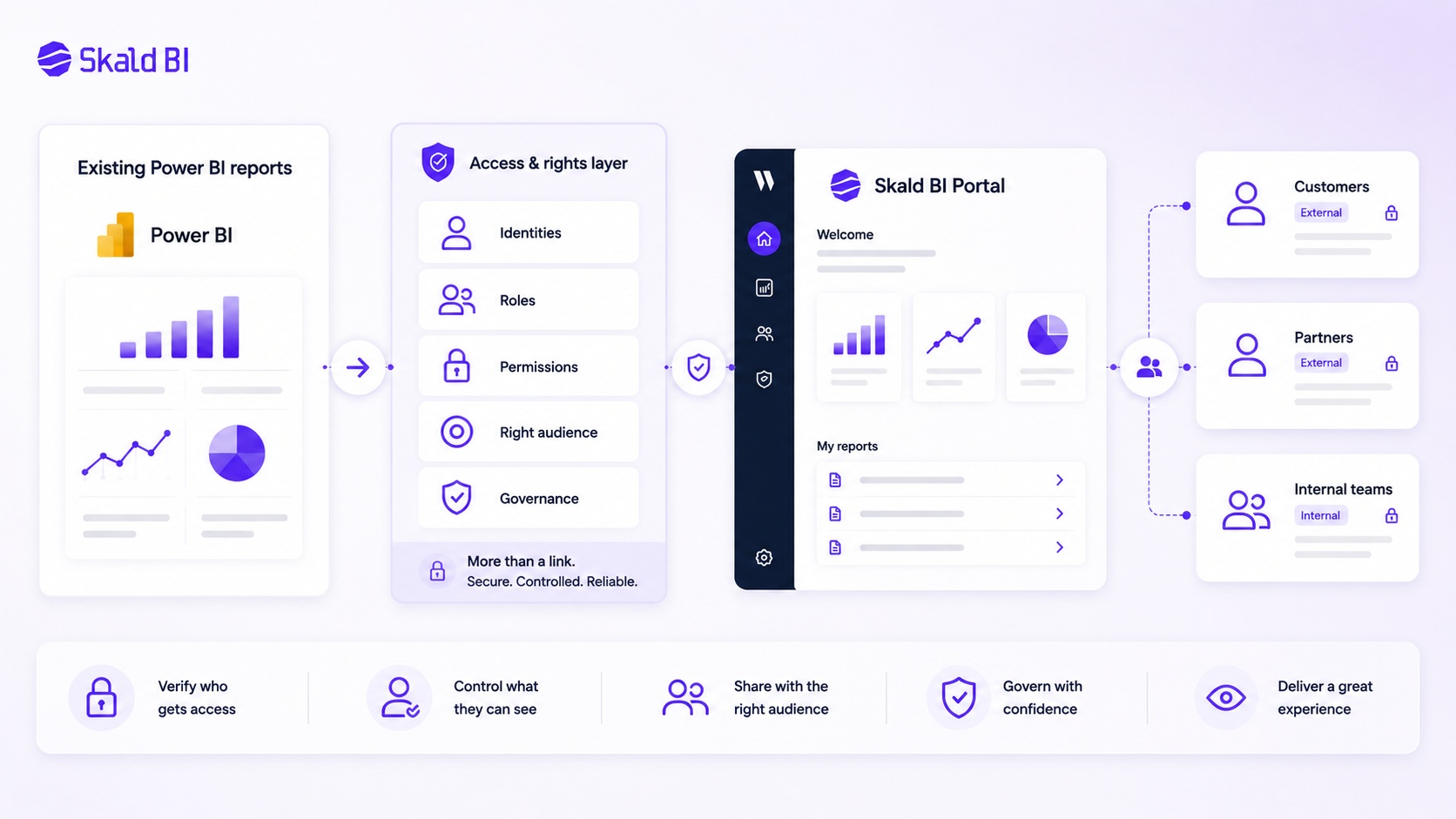
External sharing is one of the main reasons teams search for Power BI license types and cost. Internal sharing is usually manageable. External sharing introduces identity, permission, customer experience and governance questions.
Microsoft supports external sharing through Microsoft Entra B2B guest users. In practical terms, this means external users can be invited and governed as guests, with access controlled through Microsoft identity and Power BI permissions. The user who shares content needs the right Power BI license, and the external user also needs the right license unless the content is hosted in a qualifying capacity scenario.
This matters because “how to share Power BI report with external users” is not only a technical question. It is a commercial and operational question. If you share reports with ten external stakeholders, manual guest access may be acceptable. If you share reports with hundreds of customers, partners or store managers across markets, the model needs more structure.
Sharing Power BI Reports with External Users: Common Friction Points
The first friction point is licensing. External users may need Pro or PPU licenses, either from their own organization or assigned by yours, unless the content is hosted in a qualifying capacity setup. That creates uncertainty for finance and IT teams because the cost depends on user type, volume and access pattern.
The second friction point is identity. External sharing through guest access can be secure and governed, but it requires administration. Guest users need to be invited, managed and removed when access should end. For customer-facing reporting, this can become heavy if the audience changes often.
The third friction point is experience. A customer or partner may not care about your internal workspace structure. They want a clean place to access the reports that matter to them. A Power BI workspace is built for collaboration and report management. It is not always the ideal front-end experience for external report consumption.
The fourth friction point is branding. Many organizations want external reporting to feel like part of their own service delivery. A raw Power BI sharing flow may be functionally correct, but not always aligned with the way the company wants to present insights to customers or partners.
How to Share Power BI Report Outside Organization Without Losing Control
When teams ask how to share Power BI report outside organization, they often focus on the link. That is understandable, but the link is not the main issue. The main issue is control.
Before sharing reports externally, the organization should define:
-
Who is allowed to see each report.
-
Whether access is individual, customer-based, partner-based or role-based.
-
How users are added, changed and removed.
-
Whether row-level security is needed to filter data by user or customer.
-
What experience external users should have when they access reports.
Row-level security can help restrict which rows of data a user can see in a semantic model. It is valuable when different users should access the same report structure but only see their own data. However, RLS is not a substitute for a complete distribution model. It should be part of a broader governance setup covering identity, workspace structure, permissions, monitoring and report lifecycle.
Where Skald BI Fits in the Power BI Sharing Model
Skald BI is relevant when an organization already has useful Power BI reports and needs a better way to distribute them. It does not replace Power BI. The reporting team can continue building reports in Power BI, using the tools and workflows they already know.
Skald BI adds a secure, branded portal layer around existing Power BI reports. That distinction is important. Power BI remains the reporting and analytics layer. Skald BI helps with the sharing layer around it, especially when reports need to reach customers, partners, external stakeholders or larger internal audiences.
In many organizations, the problem is not that Power BI reports are weak. The problem is that distribution becomes fragmented. Reports are published in workspaces, links are shared, permissions are adjusted manually, external users are invited one by one and the customer experience becomes inconsistent. Skald BI addresses that practical gap by focusing on access, rights, branding, cost control and easier distribution.
When a Portal Layer Becomes More Relevant Than Another License Discussion
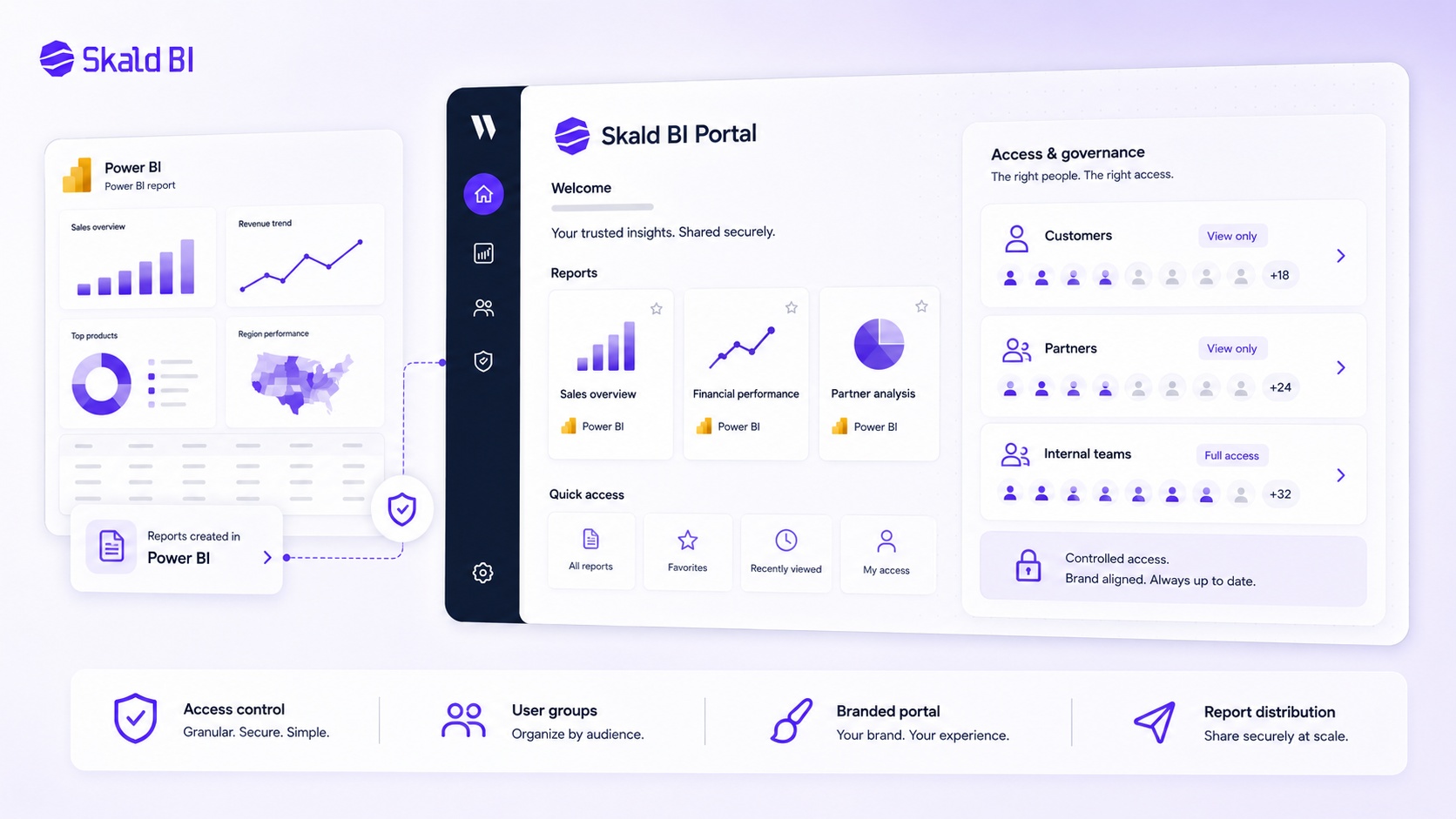
There is a point where the licensing question becomes too narrow. Buying more licenses may solve access for a small group, but it may not solve the structural issue of report distribution.
A portal layer becomes relevant when the organization needs reporting to feel like a controlled service, not a collection of shared links. This is common in B2B SaaS, consulting, retail, logistics, financial services and multi-site operations where different audiences need recurring access to reports.
For example, a company may want to share customer-specific performance reports with each client. Another may want partners to access operational dashboards. A third may want internal managers across countries or business units to access the same reporting environment without navigating Power BI workspaces.
In these cases, the question is not “Power BI or Skald BI?” The question is “Power BI for report creation, plus what layer for controlled distribution?”
Cost Control Is About More Than License Price
Power BI license cost is visible. Distribution cost is often hidden.
Hidden cost appears when finance, IT and analytics teams spend time managing users, answering access questions, fixing broken sharing flows, duplicating reports, explaining where reports live or creating manual workarounds for external users. None of this is always visible in the Microsoft license line, but it affects the total cost of reporting.
A more mature cost view includes three layers. First, the Microsoft licensing cost for creators, publishers, viewers and capacity. Second, the administrative cost of managing access and governance. Third, the business cost when customers, partners or internal users cannot easily access the reports that were already built.
This is why the right Power BI setup is rarely just the cheapest license mix. It is the setup that gives the right users reliable access at an acceptable total cost and with enough control for the organization.
A Practical Decision Framework
A good licensing and distribution decision starts with usage, not technology preference. The organization should first map who uses reports, how often they use them, what they need to see and whether they are internal or external.
For a small internal team, Power BI Pro may be enough. For advanced internal analytics, PPU may be the right step. For broad consumption, capacity may be worth evaluating. For customer, partner or large audience distribution, a secure and branded portal layer can become the missing part of the architecture.
The strongest setups usually separate responsibilities clearly. Power BI is used to build, model and publish reports. Governance defines who should access what. A portal layer helps make report access easier, more controlled and more aligned with the user experience the organization wants to provide.
Final Thoughts on Power BI License Types and Cost
Power BI license types and cost should not be evaluated as a static price table. The better question is what the organization is trying to do with reporting.
If the goal is individual analysis, Power BI Desktop may be enough. If the goal is internal collaboration, Pro or PPU may be the right model. If the goal is broad report consumption, capacity should be considered. If the goal is to share existing Power BI reports with customers, partners or larger internal groups in a secure and branded way, the sharing layer becomes central.
Skald BI is built for that last problem. It helps organizations that already use Power BI share existing reports through a secure, branded portal, without replacing Power BI or forcing teams to rebuild their reporting stack.
Ready to share Power BI beyond your workspace? Book a demo with Skald BI and see how your existing Power BI reports can be shared through a secure branded portal for customers, partners and internal teams.
Table of contents
- What Are the Main Power BI License Types?
- Power BI License Types and Cost in Simple Terms
- Power BI Free: Useful for Authoring, Limited for Sharing
- Power BI Pro: The Standard License for Sharing and Collaboration
- Power BI Premium Per User: More Capability, Still Per User
- Fabric and Premium Capacity: When Viewer Scale Changes the Equation
- How to Share Power BI Reports with External Users
- Sharing Power BI Reports with External Users: Common Friction Points
- How to Share Power BI Report Outside Organization Without Losing Control
- Where Skald BI Fits in the Power BI Sharing Model
- When a Portal Layer Becomes More Relevant Than Another License Discussion
- Cost Control Is About More Than License Price
- A Practical Decision Framework
- Final Thoughts on Power BI License Types and Cost

About the author
Ola Wahlström
Ola Wahlström is a Partner and Senior Consultant at Wahsel, focused on using data, analytics and visualisation to drive the CFO agenda and create measurable business impact. He has held senior executive roles including Interim CFO at Nelly Group, COO at Stampen Media and Group CFO at MQ Holding, and works with forecasting, pricing, margin control, management reporting and commercial performance improvement.
Related articles

Power BI License: Costs, Sharing Rules, and Smarter Report Distribution
Understand Power BI license costs, sharing rules, external access, and how a secure portal can simplify report distribution.
Read more
Power BI Embedded Alternatives: How to Choose the Right Way to Share Power BI Reports
Compare Power BI Embedded alternatives for sharing reports with customers, partners and internal teams through secure, governed access.
Read more
Power BI Embedded Pricing: What It Really Means for Sharing Reports
Understand Power BI Embedded pricing, capacity, licensing, and when a portal layer may be a better way to share Power BI reports.
Read more