
Power BI Portal: How to Share Reports Securely Beyond the Workspace
⏲ Read time: 14 minutes

A power bi portal is a secure web experience where users can access Power BI reports through a controlled, organized and often branded interface. It does not replace Microsoft Power BI. It sits around existing Power BI reports and helps organizations manage access, user experience, report distribution and governance when reports need to reach customers, partners or larger internal audiences.
For many teams, the reporting work already happens in Power BI Desktop, Power BI Service and Microsoft Fabric. The harder question is what happens after the report is ready. Who should see it? Under which brand? With what level of access? Through which login flow? And how do you avoid turning report distribution into manual administration?
That is where the idea of a Power BI portal becomes relevant.
Key takeaways
A power bi portal is mainly about distribution, not report creation:
-
Microsoft Power BI is the core platform for building reports, semantic models and analytics assets.
-
Power BI Service, Power BI Apps, Microsoft Entra B2B and Power BI Embedded all solve different parts of the sharing problem.
-
Power BI Report Server has its own on-premises web portal, but it is not the same thing as a customer-facing cloud portal.
-
A branded portal becomes relevant when Power BI reports need to be shared with customers, partners, franchisees, suppliers or larger internal groups.
-
Skald BI is designed for organizations that want to keep building reports in Power BI, but share them through a secure, branded portal layer.
The practical point is simple. Power BI helps teams create reports. A Power BI portal helps teams deliver those reports to the right users in a more controlled and scalable way.
What is a Power BI portal?
A Power BI portal is a web-based access layer for Power BI reports. In practical terms, it gives users a place to log in, find relevant reports and view analytics content without needing to navigate the full Power BI workspace structure.
The term can mean different things depending on context. Some people use it to describe the standard Power BI Service experience. Others mean the power bi report server web portal used with Power BI Report Server. Some mean a custom application built with Power BI Embedded. Increasingly, B2B teams use the term to describe a customer portal or partner portal where Power BI reports are shared in a branded environment.
A clear definition is useful:
A power bi portal is a controlled web interface for accessing Power BI reports, usually focused on report distribution, user access, branding and governance rather than report development.
That distinction matters. Report builders still use Power BI Desktop, Power BI Service, semantic models, workspaces and Microsoft Fabric capabilities where relevant. The portal is not where the analytics logic usually starts. It is where the finished reporting experience becomes easier to access for the intended audience.
Why organizations start looking for a Power BI portal
Most Power BI environments begin internally. A team builds dashboards for management, finance, sales, operations or customer success. Distribution happens through workspaces, shared links, Power BI Apps, Teams or internal reporting routines.
That works well when the audience is internal, licensed, known and comfortable inside the Microsoft ecosystem.
The problem changes when the audience expands. A SaaS company may want to give each customer access to usage analytics. A consulting firm may want to publish recurring KPI reports to clients. A distributor may want to share sell-through dashboards with suppliers. A group company may want regional managers, franchisees or external partners to see only the reports and data relevant to them.
At that point, the Power BI report itself may be good enough. The distribution model may not be.
The common symptoms are recognizable. Report access is handled manually. External users need guidance to find reports. Branding feels inconsistent. Licensing discussions become harder. Admin teams lose visibility over who has access to what. The report exists, but the delivery experience is not designed for the business relationship around it.
Power BI Service, Power BI Report Server web portal and custom portals compared
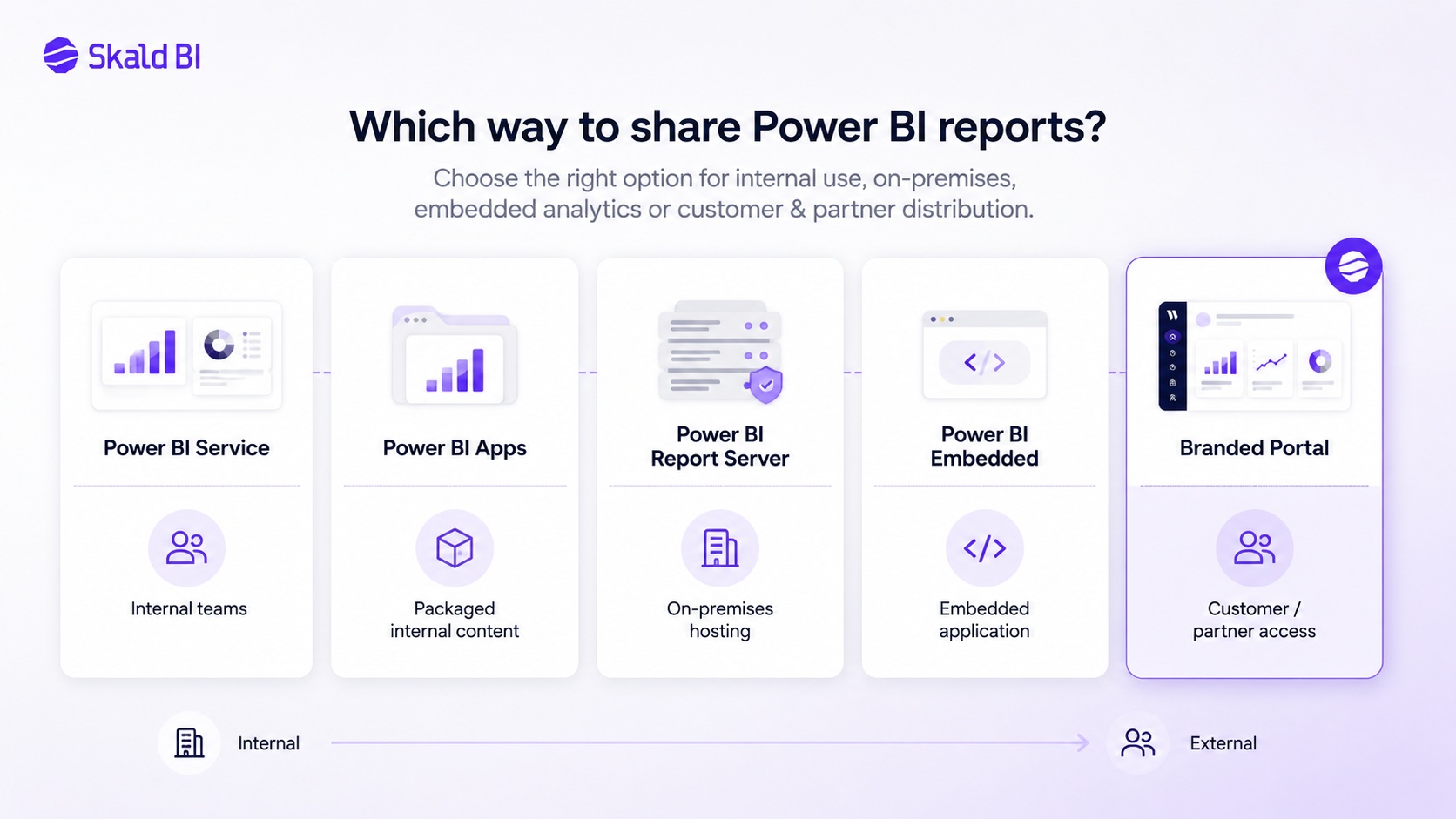
There is no single correct answer for every organization. The right option depends on audience, security model, licensing, branding, internal IT constraints and the expected scale of distribution.
| Option | Best suited for | Strengths | Limitations |
|---|---|---|---|
| Power BI Service web portal | Internal teams using Microsoft Power BI and Microsoft Fabric | Native Microsoft experience, workspace access, apps, sharing and collaboration | Less tailored for branded customer or partner experiences |
| Power BI Apps | Internal or controlled audience distribution | Good way to package approved Power BI content for users | Still largely within the Power BI user experience |
| Microsoft Entra B2B sharing | External users who can be invited as guests | Uses Microsoft identity governance and guest access | Can create friction for customer-facing reporting if users expect a branded portal |
| Power BI Report Server web portal | On-premises report hosting | Useful where reports must be hosted on premises | Different deployment model from cloud-first Power BI Service scenarios |
| Power BI Embedded | Custom applications and embedded analytics | Strong option for embedding reports into applications | Requires technical implementation, capacity planning and governance |
| Branded Power BI portal such as Skald BI | Customer, partner and broader stakeholder report distribution | Focused on access, branding, user experience and scalable distribution | Not intended to replace Power BI report development |
The key mistake is treating these as identical alternatives. They are not. Power BI Service is the native cloud environment. The power bi report server web portal belongs to an on-premises server model. Power BI Embedded is a developer-oriented route for embedding analytics into applications. A branded portal is a distribution layer around existing reports, often chosen when the audience experience matters as much as the report itself.
How the Power BI Service web portal fits in
The power bi service web portal is the browser-based Power BI experience where users can access workspaces, reports, dashboards, apps and other Power BI content. It is central to how many organizations collaborate on analytics.
For internal teams, this is often the right starting point. Workspaces help teams organize content. Roles help control who can view, edit or manage assets. Power BI Apps can package finished content for broader consumption. For many internal analytics use cases, this is enough.
The limitation appears when the user experience needs to be separated from the internal Power BI environment. A customer does not necessarily need to understand your workspace structure. A partner should not need to navigate your internal analytics setup. An executive audience may simply need a clean login, a branded report library and access to the right reports.
This is why a power bi web portal can mean different things. Technically, Power BI Service is already a web portal. Commercially, many companies need a more specific portal experience for external or semi-external report consumption.
What about the Power BI Report Server web portal?
The power bi report server web portal is part of Power BI Report Server. It is an on-premises report server used to host and manage Power BI reports, paginated reports, KPIs and related content.
This is relevant for organizations with specific on-premises requirements, legacy reporting architectures or constraints that make cloud-only distribution unsuitable. Users can browse folders, search reports and view content through a browser.
However, this should not be confused with a customer-facing Power BI portal for cloud distribution. Power BI Report Server is a server product with its own deployment and administration model. If your organization already works primarily in Power BI Service and Microsoft Fabric, and your challenge is how to share existing cloud reports with customers or partners, then a branded portal layer is usually a different conversation.
The question is not only “where can the report be hosted?” The better question is “how should the intended audience access, understand and use the report?”
Security and access control in a Power BI portal
Security is usually the first serious requirement once reports move beyond a small internal group. A portal strategy should not weaken the Power BI governance model. It should make access easier to manage and easier to understand.
In a Power BI context, security often involves several layers:
-
Identity and login, often connected to Microsoft Entra ID or Single Sign-On depending on the environment.
-
Report and workspace permissions inside Microsoft Power BI.
-
Data-level restrictions such as Row-Level Security where different users should see different rows of data.
-
Portal-level access rules that determine which users, customers or partner groups can see which reports.
-
Operational governance, including onboarding, offboarding and periodic access reviews.
These layers serve different purposes. Row-Level Security can restrict data within a report model. Workspace roles control what users can do inside Power BI. Microsoft Entra B2B can support external guest access. A portal layer can help present the right reports to the right audience in a more controlled and business-friendly way.
The risk is assuming that one layer solves everything. It rarely does. A good portal design should clarify which layer handles identity, which layer handles report access, which layer handles data filtering and which layer handles the user-facing experience.
Cost considerations for a Power BI portal
Cost is rarely just the software price. It includes licensing, capacity, development time, administration, support and the cost of user friction.
For internal use, Power BI Pro, Premium Per User or capacity-based models may be part of the discussion depending on how content is created, shared and consumed. For embedded analytics, Power BI Embedded and Microsoft Fabric capacity planning can become relevant. For external users, organizations also need to understand how guest access, licensing and capacity choices affect the total model.
A simple scenario shows the issue. Suppose a company wants to share monthly KPI reports with 200 customer users across 40 customer accounts. The report development work may already be complete in Power BI. The real cost question becomes how those 200 users are invited, authenticated, supported, segmented, removed when they leave and guided to the right reports.
A custom-built portal may give full flexibility, but it introduces product development and maintenance cost. A native Power BI sharing model may be faster, but less branded and potentially harder for external users. A dedicated portal layer can reduce delivery complexity if the organization repeatedly shares Power BI reports with external or distributed audiences.
The right cost model should compare total operating effort, not only license line items.
Implementation: how to think before building or buying
A good implementation starts with audience design, not technology selection. Define who the report consumers are, how often they use the reports, what they already have access to and what experience they expect.
For an internal finance team, the answer may be Power BI Service and well-governed workspaces. For a SaaS company exposing analytics to customers, the answer may be embedded analytics or a branded portal. For a regulated organization with on-premises requirements, Power BI Report Server may still be relevant.
The implementation plan should usually cover five areas. First, map the report inventory. Which Power BI reports are ready for distribution, and which are still internal working documents? Second, define audiences and permission groups. Third, decide whether data separation should happen through separate reports, separate workspaces, Row-Level Security or another model. Fourth, define the login and access flow. Fifth, decide how the portal should look and feel to the end user.
This is also the point where internal ownership matters. Analytics teams often own report quality. IT owns identity and security. Commercial teams own customer experience. If those responsibilities are not explicit, a portal project can become technically correct but commercially weak.
Pros of using a dedicated Power BI portal
A dedicated Power BI portal is strongest when report distribution is repeated, external or brand-sensitive.
| Benefit | Practical meaning |
|---|---|
| Better user experience | Customers, partners or internal teams can access reports through a clearer interface than a workspace structure |
| Stronger brand control | Reports can be presented in a portal experience aligned with the company brand |
| Easier distribution | Report access can be organized around audiences, customers, partners or use cases |
| Governance support | Access logic becomes easier to explain and manage when report delivery is centralized |
| Lower support friction | Users are less dependent on internal instructions about where Power BI content lives |
The main benefit is not that the reports become more advanced. The benefit is that report consumption becomes easier to manage at scale.
Cons and limitations
A portal is not always needed. If the audience is small, internal and already comfortable in Power BI Service, a separate portal may add unnecessary complexity.
A portal also does not remove the need for good Power BI governance. Poor semantic models, unclear ownership, inconsistent Row-Level Security or weak workspace structure will still create problems. The portal improves distribution, but it does not fix every reporting issue underneath.
There is also a strategic choice to make. A fully custom portal gives high control but requires development capacity. Native Power BI sharing is faster but less tailored. A dedicated portal layer sits between those options. It can be a strong fit when the organization wants a professional external reporting experience without turning report distribution into a large internal software project.
When a Power BI portal is a good fit
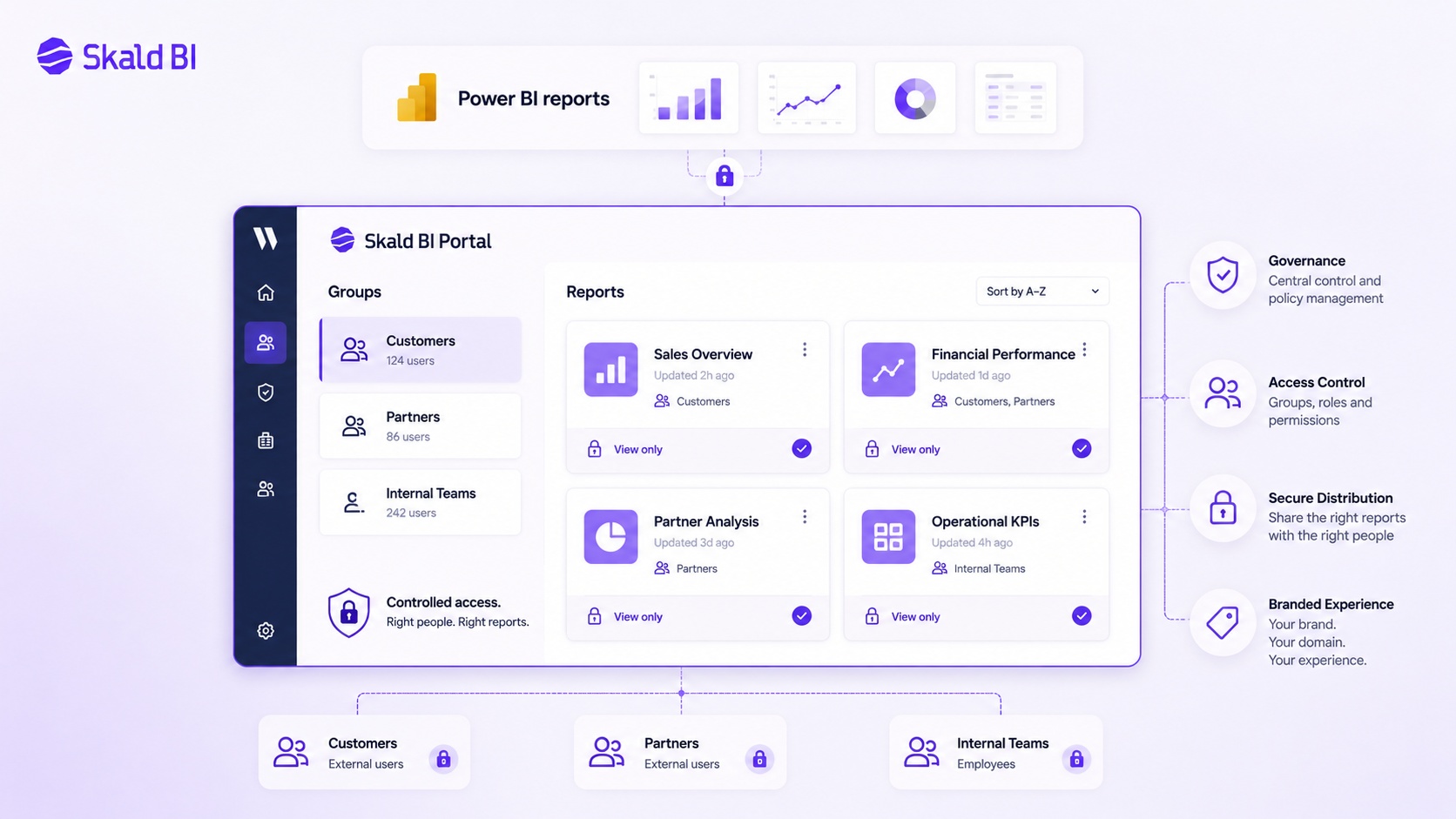
A power bi portal is usually worth considering when the report audience extends beyond a small internal group. Typical cases include customer reporting, partner reporting, supplier dashboards, franchise reporting, investor or board reporting, embedded analytics for SaaS users and internal reporting for large distributed teams.
It is especially relevant when users should not need to understand the internal Power BI setup. A customer wants to see their reports. A partner wants access to the relevant dashboards. A regional manager wants the right KPIs. They do not want to think about workspaces, permissions, report ownership or internal naming conventions.
For Skald BI, this is the core use case. The customer continues to build and maintain reports in Microsoft Power BI. Skald BI helps create the secure, branded portal layer around those reports so they can be shared with the right users in a more controlled way.
When it is not the right fit
A portal may be unnecessary if all report consumers are internal Power BI users, the audience is small and the current Power BI Service experience works well. It may also be premature if report ownership, semantic models or access rules are still unclear.
In those cases, the first step should be Power BI governance. Clean up workspaces. Define ownership. Review report usage. Check permissions. Validate Row-Level Security. Decide which reports are official and which are exploratory.
A portal should make a working reporting environment easier to distribute. It should not be used to hide a reporting environment that is not yet ready.
Alternatives to a dedicated Power BI portal
Before choosing a portal, it is worth comparing the main alternatives.
Power BI Apps are a natural option for distributing approved content to internal audiences. They are part of the Power BI ecosystem and can work well when users already operate inside Microsoft Power BI.
Microsoft Entra B2B guest access is relevant when external users can be invited into the organization’s Microsoft identity environment. This can be appropriate for some partner and client scenarios, especially where IT governance already supports guest users.
Power BI Embedded is relevant when reports need to be embedded into an application or website. This can be powerful for SaaS products and customer-facing analytics, but it requires technical implementation, capacity planning and ownership of the application experience.
Power BI Report Server is relevant for on-premises report hosting. It is not the same choice as building a branded cloud customer portal around existing Power BI Service reports.
A custom-built portal is also possible. This can be right for organizations with strong internal engineering capacity, specific product requirements and a willingness to maintain the portal over time.
Skald BI is relevant when the need is more focused: keep Power BI as the reporting platform, but share reports through a secure, branded portal for customers, partners or larger user groups.
Concrete example: customer reporting for a B2B SaaS company
Consider a B2B SaaS company with 80 customers. The product team has already built Power BI reports showing adoption, usage, account health and operational KPIs. Internally, the reports work well. Customer success managers use them in quarterly business reviews.
The next step is to give customers direct access.
Without a portal, the company needs to decide whether to invite customer users into Power BI, embed reports into an existing application or manually export and send reports. Each path has trade-offs. Guest access may be administratively heavy. Embedding may require development. Manual distribution does not scale and can create governance risks.
With a branded Power BI portal, the company can think differently. The Power BI reports remain the source of the analytics experience. The portal becomes the customer-facing delivery layer. Each customer sees the right reports in a controlled environment. The company can present reporting as part of the customer experience rather than as a back-office artifact.
The same pattern applies to partner reporting, supplier dashboards, franchise networks and external stakeholder reporting.
FAQ
What is a Power BI portal?
A Power BI portal is a web interface where users can access Power BI reports through a controlled experience. Depending on context, it may refer to Power BI Service, Power BI Report Server web portal, a custom embedded analytics application or a branded portal layer for customers and partners.
Is Power BI Service a web portal?
Yes, Power BI Service is a browser-based web experience for accessing and managing Power BI content. However, many organizations use the term power bi web portal to mean a more tailored portal for external users, customer reporting or branded report distribution.
What is the difference between Power BI Report Server web portal and Power BI Service?
Power BI Report Server web portal is part of the on-premises Power BI Report Server product. Power BI Service is Microsoft’s cloud-based Power BI environment. They support different deployment models and should not be treated as the same solution.
Can Power BI reports be shared with external users?
Yes, Power BI supports external sharing scenarios, including Microsoft Entra B2B guest access and embedded analytics patterns. The right model depends on identity, licensing, governance, user experience and whether the audience should access reports inside or outside the standard Power BI experience.
Do users need Power BI licenses to view reports in a portal?
It depends on the sharing and embedding model. Microsoft licensing and capacity rules vary by scenario, so this should be validated against the current Microsoft documentation and the organization’s Power BI setup before implementation.
Does a Power BI portal replace Power BI Embedded?
Not necessarily. Power BI Embedded is a Microsoft capability for embedding Power BI content into applications. A portal may use embedding as part of the architecture, or it may solve the distribution problem in another way. The right choice depends on technical requirements and ownership model.
When should a company use Skald BI?
Skald BI is relevant when a company already uses Power BI and wants to share existing reports through a secure, branded portal with customers, partners or larger internal audiences. It is not a replacement for Power BI report creation. It is a distribution layer around the reports.
Final thoughts
A power bi portal is not primarily a reporting tool. It is a report distribution model.
For internal analytics teams, Power BI Service, workspaces and apps may be enough. For on-premises needs, Power BI Report Server has its own web portal. For application teams, Power BI Embedded can be the right technical path. But when the challenge is to share existing Power BI reports with customers, partners or broader audiences in a secure and branded way, a dedicated portal layer becomes a practical option.
Skald BI is built around that specific need. Keep creating reports in Microsoft Power BI. Use Skald BI to share them through a secure, branded portal with the right users.
Ready to share Power BI beyond your workspace? Book a demo with Skald BI and see how your existing Power BI reports can be shared through a secure branded portal.
Table of contents
- Key takeaways
- What is a Power BI portal?
- Why organizations start looking for a Power BI portal
- Power BI Service, Power BI Report Server web portal and custom portals compared
- How the Power BI Service web portal fits in
- What about the Power BI Report Server web portal?
- Security and access control in a Power BI portal
- Cost considerations for a Power BI portal
- Implementation: how to think before building or buying
- Pros of using a dedicated Power BI portal
- Cons and limitations
- When a Power BI portal is a good fit
- When it is not the right fit
- Alternatives to a dedicated Power BI portal
- Concrete example: customer reporting for a B2B SaaS company
- FAQ
- What is a Power BI portal?
- Is Power BI Service a web portal?
- What is the difference between Power BI Report Server web portal and Power BI Service?
- Can Power BI reports be shared with external users?
- Do users need Power BI licenses to view reports in a portal?
- Does a Power BI portal replace Power BI Embedded?
- When should a company use Skald BI?
- Final thoughts

About the author
Mathias Melander
As Head of Product & Analytics at Skald BI, Mathias Melander leads the platform’s product strategy, technical architecture and analytics development. His focus is helping companies distribute Power BI reports securely through scalable, customer-facing BI portals.
Related articles

What is Power BI? A practical guide for teams that need better reporting and better sharing
Learn what Power BI is, how it works and why sharing reports with customers, partners or teams often requires a better portal layer.
Read more
Power BI sharing: how to share reports securely with the right users
Learn how Power BI sharing works across reports, dashboards, workspaces, external users, licenses, RLS and secure branded portals.
Read more
How to share Power BI report with free users
Learn when you can share Power BI reports with free users, what licenses are needed, and when a branded portal may be a better option.
Read more