
Power BI Publish to Web Without Pro License: What Is Actually Possible?
⏲ Read time: 14 minutes

Yes, it can be possible to use Power BI Publish to web without a Power BI Pro license if you publish from My Workspace and your Power BI administrator has enabled the tenant setting. But this is not a secure sharing method. Publish to web makes the report publicly accessible on the internet without authentication.
That distinction matters. The question is not only “can I publish?” The more important question is whether Publish to web is appropriate for the data, audience and governance model you need.
For most business reporting, especially when customers, partners or internal teams need controlled access, Publish to web is usually the wrong answer. It is useful for public, non-sensitive information. It is not designed for private reporting, customer portals, controlled external access or reports that require Row-Level Security.
Key takeaways
-
Power BI Publish to web is a public publishing feature, not a secure access model.
-
A free Power BI user may publish from My Workspace if the tenant setting allows it, but publishing from app workspaces requires Power BI Pro or Premium Per User.
-
Viewers of Publish to web reports do not need Power BI accounts, but anyone with internet access may be able to view the report.
-
Publish to web is not available for reports secured with Row-Level Security.
-
For customer, partner or large internal distribution, consider Power BI sharing, Power BI Apps, Microsoft Fabric capacity, Power BI Embedded or a secure customer portal such as Skald BI.
What “power bi publish to web without pro license” actually means
The phrase “power bi publish to web without pro license” usually mixes three separate ideas.
The first is publishing a report from Power BI Desktop to the Power BI service. The second is using the Publish to web feature to create a public embed code. The third is sharing a report with other people in a controlled way.
These are not the same thing.
Power BI Desktop lets report creators build reports locally. Power BI Service is where reports are published, managed and shared. Publish to web is a specific option inside the Power BI service that creates a public embed link or iframe for a report. It is intended for public websites, blog posts, public communication and similar scenarios where the data can safely be exposed to anyone.
A clear definition:
Power BI Publish to web is a Power BI Service feature that creates a public web embed code for a report or visual. It does not require viewers to sign in, but it also does not provide private user authentication or controlled access.
That is why the feature can look attractive when the real problem is licensing. A team wants to avoid buying Power BI Pro licenses for every viewer, so they search for power bi publish to web free license or how to enable publish to web in Power BI. But if the report contains customer data, financial data, operational metrics, commercial performance or anything not meant for public access, Publish to web should not be treated as a license workaround.
Can you use Power BI Publish to web with a free license?
Microsoft’s current documentation separates My Workspace from app workspaces. To publish to web from My Workspace, you need a Microsoft Power BI license. To publish to web from workspaces, you need Power BI Pro or Premium Per User.
In practical terms, a free Power BI user may be able to create content in My Workspace and use Publish to web if the organization’s admin settings allow it. But that does not mean the feature is suitable for business distribution. The resulting report is public.
For a small example, imagine a marketing team wants to publish a public dashboard showing anonymised survey results from 2,000 respondents. No customer names, no internal cost data, no pricing, no geographic granularity that could identify accounts. Publish to web may be reasonable if the organization accepts the risk.
Now compare that with a CFO dashboard showing sales, margin and inventory by customer. Even if the team can technically publish it without buying viewer licenses, that would be the wrong control model. The problem is not only license cost. The problem is exposure.
How to enable Publish to web in Power BI
Publish to web must be allowed by the Power BI administrator through the tenant settings in the Microsoft Fabric admin portal. If the setting is disabled, report creators will not be able to create embed codes.
At a high level, the process is this:
| Step | What happens | Who usually owns it |
|---|---|---|
| 1 | Admin reviews whether Publish to web should be allowed | Power BI admin, IT, security |
| 2 | Admin enables or restricts the tenant setting | Power BI admin |
| 3 | Report creator opens the report in Power BI Service | Report owner |
| 4 | Report creator selects File, Embed report, Publish to web | Report owner |
| 5 | Report creator reviews the public sharing warning | Report owner |
| 6 | Embed code is created and placed on a website, portal page or content page | Report owner, web team |
The key governance point is step one. Many organizations should not enable Publish to web broadly. If it is enabled, it should typically be limited to specific security groups and paired with clear rules for what types of reports may be published.
The practical question is not just “how to enable publish to web in Power BI.” It is “who should be allowed to publish business data publicly, and under what approval process?”
When Publish to web fits
Publish to web fits when the intended audience is truly public and the underlying data can safely be public.
Typical examples include public annual statistics, open-data dashboards, public campaign results, high-level non-sensitive research summaries or public service information. The common denominator is simple: if the report appeared in Google search or was forwarded to a competitor, customer or journalist, the organization would still be comfortable.
It can also fit when a company wants a lightweight way to place interactive Power BI content on a public website without requiring sign-in. That is a legitimate use case. Microsoft built the feature for public embedding.
The boundary is sensitive data. If the report requires user-specific permissions, private access, customer separation, Row-Level Security, contractual restrictions or brand-controlled customer experience, Publish to web is not enough.
When Publish to web does not fit
Publish to web does not fit when the report should only be seen by selected people. It also does not fit when the report contains data that depends on who the viewer is.
This is especially important in B2B contexts. A supplier portal, customer portal or partner dashboard often has data that is safe for one customer but not safe for another. That requires authentication, access rights and often Row-Level Security. Publish to web is not designed for that.
It also creates a brand and trust issue. Sending a public Power BI link or embedding a public report may be acceptable for public content. But for a customer-facing reporting experience, many companies want a branded, controlled environment where the user understands where they are, what they can access and why they are allowed to see it.
Power BI helps teams create reports. Distribution to a broader external audience is a different design problem.
Pros of Power BI Publish to web
Publish to web has clear advantages when used for the right type of content.
| Pro | Why it matters |
|---|---|
| No viewer sign-in | Useful for public reports where friction should be low |
| Easy embedding | A report can be placed in a web page or content page using an embed code |
| No viewer Power BI license required | Helpful for public communication and broad reach |
| Interactive experience | Users can interact with the report rather than downloading static screenshots |
| Simple removal | Embed codes can be managed and removed when no longer needed |
These advantages explain why teams search for power bi publish to web free license. The feature solves a real distribution problem. But the simplicity comes from removing authentication. That is exactly why it must be used carefully.
Cons and limitations of Publish to web
The main limitation is security. Publish to web makes the report available publicly without authentication. Microsoft is explicit that anyone on the internet can view a report published this way, including detail-level data that may sit behind the visual summary.
It also does not support reports that rely on Row-Level Security to secure data. This removes it from many serious B2B reporting scenarios.
There are also governance concerns. If many users can create public embed codes, the organization needs a process to review what is being published. A report that looks harmless can still expose underlying fields, filters, metadata or segment-level values that should not be public.
The risk is highest when teams use Publish to web as a licensing shortcut. That usually signals that the underlying need is not public publishing. The real need is controlled distribution without creating too much licensing or admin friction.
Cost considerations
The cost question behind this keyword is usually simple: “Do we need to buy Power BI Pro licenses for everyone who views the report?”
The answer depends on the sharing model.
Publish to web avoids viewer licensing because viewers are not authenticated Power BI users. But it also avoids access control. That makes it unsuitable for private business reporting.
Power BI Pro is a per-user model. It works well when a known set of internal users need to create, share and consume reports inside the Power BI service. It becomes harder when the audience is large, external, intermittent or commercially diverse.
Premium or Fabric capacity can change the economics for internal distribution because free users may consume shared content when the content is in eligible capacity and permissions are configured correctly. But capacity has its own commercial logic and should be evaluated against user volume, usage patterns and governance needs.
Power BI Embedded is often relevant when the goal is to embed Power BI reports inside an application for customers. In Microsoft’s app-owns-data model, end users do not need to sign in to Power BI or hold Power BI licenses. However, this is a development and architecture path. It typically requires application work, Microsoft Entra configuration, service principals, embed tokens, capacity planning and security design.
A customer portal layer such as Skald BI is relevant when the organization already has Power BI reports and wants to distribute them through a secure, branded environment without turning Power BI itself into the customer-facing experience.
Security and governance
For senior finance, operations and commercial teams, reporting distribution should be treated as a governance decision, not only a technical decision.
The important questions are concrete. Who should see the report? Should customers see different data? Should access be removed automatically when a relationship ends? Should users authenticate through Single Sign-On? Should the portal reflect the company’s brand? Should reports be grouped by customer, partner, market or business unit?
Power BI supports several security concepts that matter here, including Microsoft Entra ID, workspace permissions, sharing links, Power BI Apps, Row-Level Security and, in embedded scenarios, service principals and embed tokens. But these are building blocks. They still need to be assembled into a controlled distribution model.
For many organizations, the weakest point is not report building. It is the operational process around report access.
A common example is a company sharing performance reports with 50 customers. Each customer should only see its own data. Sales wants a clean customer-facing experience. Finance wants margin logic protected. IT wants access controlled centrally. Management wants the cost to stay predictable.
Publish to web does not solve that. A secure portal model is usually a better fit.
Implementation options compared
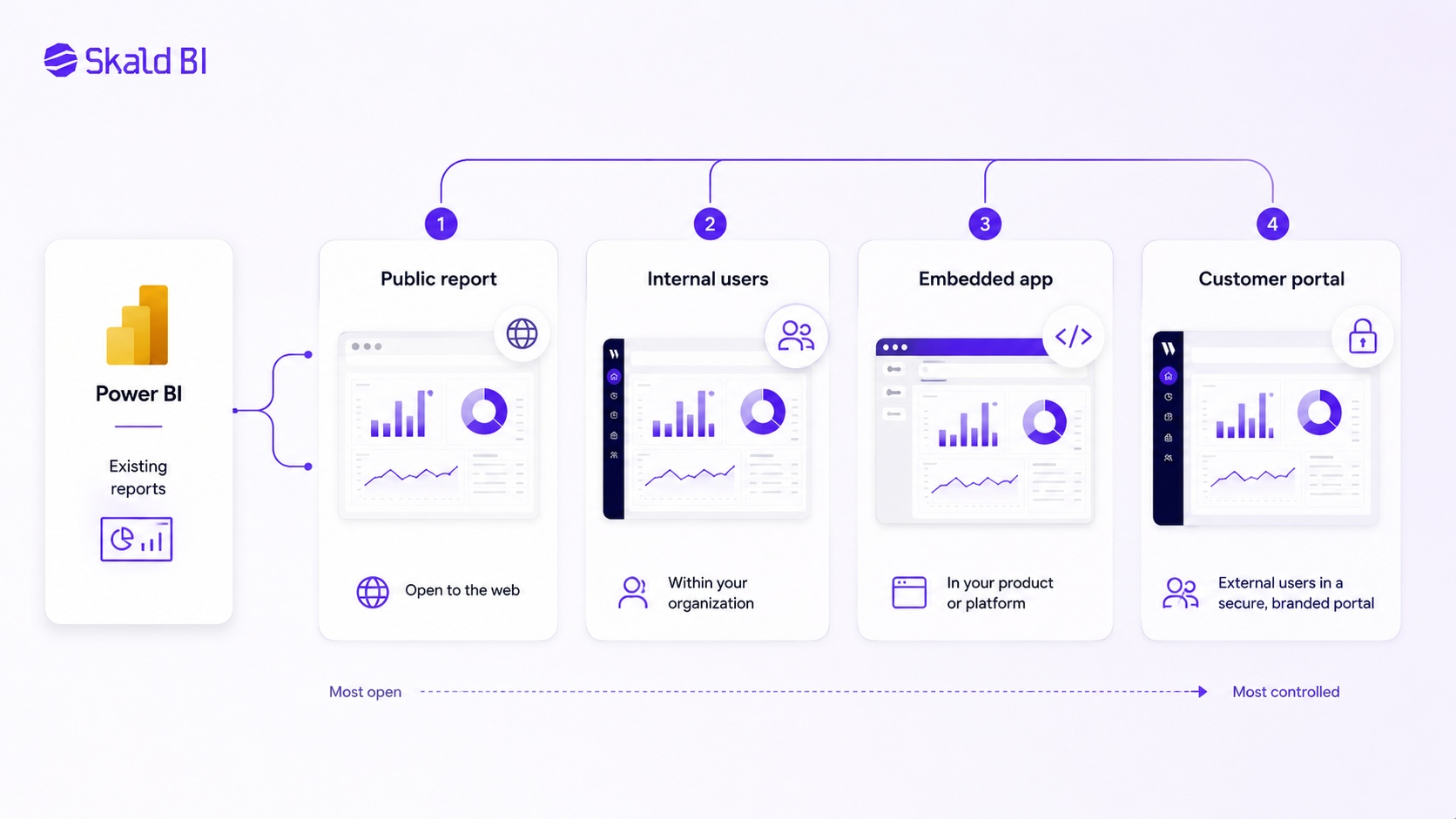
There is no single best method for every Power BI distribution scenario. The right choice depends on audience, sensitivity, scale, licensing and desired experience.
| Option | Best for | Viewer licensing | Security model | Main limitation |
|---|---|---|---|---|
| Publish to web | Public, non-sensitive reports | No viewer license | Public internet access, no authentication | Not suitable for private or sensitive data |
| Standard Power BI sharing | Known internal users or selected external guests | Often requires Pro or eligible capacity depending on setup | Power BI permissions and Microsoft Entra B2B guests | Can become heavy for external or large audiences |
| Power BI Apps | Internal distribution to audiences | Depends on license and capacity setup | App audiences, workspace permissions | Primarily Power BI-native experience |
| Microsoft Fabric or Premium capacity | Broader internal consumption and scale | Free users may consume eligible shared content in capacity | Power BI and capacity governance | Capacity economics and setup must be justified |
| Power BI Embedded | Customer-facing analytics inside an application | End users do not need Power BI licenses in app-owns-data scenarios | Application authentication, Entra app, service principal, embed tokens, RLS design | Requires development and architecture work |
| Skald BI customer portal | Sharing existing Power BI reports securely and brandably with customers, partners or teams | Depends on the chosen architecture and setup | Portal-layer access, rights and branded distribution around existing reports | Not intended to replace Power BI report creation |
The important point is that Skald BI should not be compared to Power BI Desktop or Power BI Service as a report-building tool. Customers continue building reports in Power BI. Skald BI adds a sharing layer around existing reports when distribution, access and experience become the real problem.
Alternatives to Publish to web
The most relevant alternatives are Microsoft-native sharing, Power BI Apps, Power BI Embedded and a portal layer.
For a small internal team, standard Power BI sharing may be enough. If ten managers need access to a sales dashboard and they already work inside Microsoft 365, Power BI sharing with the right licenses and permissions is often straightforward.
For a larger internal audience, Power BI Apps can make distribution cleaner. Apps let report owners package content and manage audiences more deliberately than one-off sharing links.
For a customer-facing software product, Power BI Embedded is often the technical route. It is designed for embedding reports, dashboards or tiles inside an application. This is powerful, but it is not a simple publishing toggle. It requires technical ownership.
For B2B companies that already have useful Power BI reports but need a better external experience, a customer portal can be more practical. The portal becomes the place customers, partners or internal groups go to access reporting. Power BI remains the report engine. The portal handles the distribution experience around it.
Where Skald BI fits
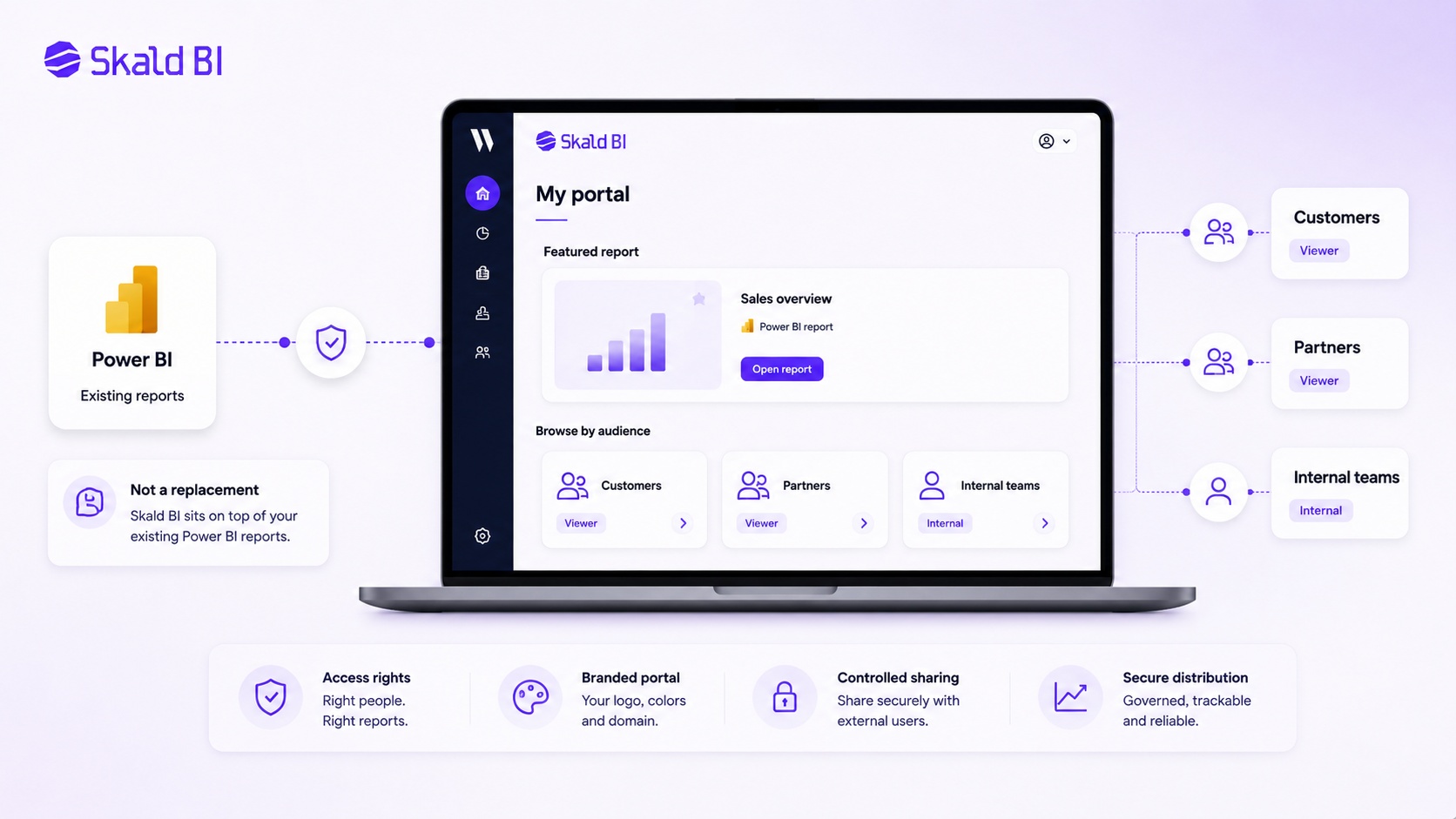
Skald BI is relevant when Power BI reports are already valuable, but the way they are shared is becoming too manual, too risky or too fragmented.
The pattern is common. A company starts with Power BI for internal reporting. Then customers ask for reporting access. Partners need selected KPIs. Internal teams want dashboards without being trained in Power BI. Someone starts exporting PDFs, sending screenshots, sharing links or discussing whether Publish to web can avoid more licenses.
That is the moment to separate report creation from report distribution.
Power BI helps teams build reports. Skald BI helps teams share them through a secure, branded portal layer. The aim is not to replace Power BI. The aim is to make existing Power BI reports easier to distribute to the right audience with a more controlled access and brand experience.
This is especially relevant for organizations that need to share reporting beyond the core Power BI workspace, including customers, partners, external stakeholders, departments, franchisees, suppliers or operational teams.
Practical scenarios
A public ESG dashboard is a reasonable Publish to web candidate if the data has been reviewed and approved for public access. The audience is open. No authentication is needed. The company accepts that the report may be indexed, copied or forwarded.
A customer profitability dashboard is not a Publish to web candidate. It may contain customer-level margin, revenue, cost, discount or volume information. Even if only one page is shown, the underlying model may still include data that should not be exposed publicly.
A partner reporting portal is also not a Publish to web case. Partners usually need selective access, a clear brand experience and the ability to remove or change access over time.
A SaaS product with embedded analytics may fit Power BI Embedded if the company has the technical team and architecture to manage app-owns-data embedding properly.
A service company with 30 customer-specific Power BI reports may fit a portal layer if the main problem is not report building, but controlled distribution and customer experience.
FAQ
Can I use Power BI Publish to web without a Pro license
It may be possible from My Workspace with a Microsoft Power BI license if your administrator has enabled the tenant setting. Publishing to web from workspaces requires Power BI Pro or Premium Per User. The larger issue is that Publish to web is public and unauthenticated.
Is Power BI Publish to web safe for customer reports?
Usually no. Publish to web is designed for public content. If the report contains customer data, commercial data, internal KPIs or any information that should be restricted to named users, use a secure sharing or portal model instead.
Do viewers need a Power BI license for Publish to web?
No. Viewers of Publish to web reports do not need to be Power BI users. That is because the report is public, not because it has a private license-free access model.
What is the difference between Publish to web and Power BI Embedded?
Publish to web creates a public embed code. Power BI Embedded is an application embedding model for delivering Power BI content inside an app or web experience. In app-owns-data scenarios, end users do not need Power BI licenses, but the solution requires proper application architecture, authentication and capacity planning.
Can I use Row-Level Security with Publish to web?
No. Publish to web is not available for reports that rely on Row-Level Security to secure data. If different users or customers need to see different rows of data, use another distribution model.
How do I enable Publish to web in Power BI?
A Power BI or Microsoft Fabric administrator must enable the Publish to web tenant setting. Many organizations restrict this setting because it allows users to publish reports publicly.
What is the best alternative to Publish to web for external customers?
For simple named external users, Power BI sharing with Microsoft Entra B2B guests may work. For application embedding, Power BI Embedded may be appropriate. For organizations that already have Power BI reports and need a secure, branded customer portal, Skald BI is designed for that distribution layer.
Does Skald BI replace Power BI?
No. Skald BI does not replace Power BI. Your team continues to build reports in Power BI. Skald BI adds a secure, branded portal layer around existing reports so they can be shared with the right customers, partners or teams.
Final view
If your report is public, non-sensitive and approved for open distribution, Power BI Publish to web can be a practical option.
If your report needs access control, customer-specific data, Row-Level Security, Single Sign-On, brand control or a better user experience than a public embed link, Publish to web is not the right foundation.
Ready to share Power BI beyond your workspace? Book a demo with Skald BI and see how your existing Power BI reports can be shared through a secure, branded portal built for customers, partners and internal teams.
Table of contents
- Key takeaways
- What “power bi publish to web without pro license” actually means
- Can you use Power BI Publish to web with a free license?
- How to enable Publish to web in Power BI
- When Publish to web fits
- When Publish to web does not fit
- Pros of Power BI Publish to web
- Cons and limitations of Publish to web
- Cost considerations
- Security and governance
- Implementation options compared
- Alternatives to Publish to web
- Where Skald BI fits
- Practical scenarios
- FAQ
- Can I use Power BI Publish to web without a Pro license
- Is Power BI Publish to web safe for customer reports?
- Do viewers need a Power BI license for Publish to web?
- What is the difference between Publish to web and Power BI Embedded?
- Can I use Row-Level Security with Publish to web?
- How do I enable Publish to web in Power BI?
- What is the best alternative to Publish to web for external customers?
- Does Skald BI replace Power BI?
- Final view

About the author
Ola Wahlström
Ola Wahlström is a Partner and Senior Consultant at Wahsel, focused on using data, analytics and visualisation to drive the CFO agenda and create measurable business impact. He has held senior executive roles including Interim CFO at Nelly Group, COO at Stampen Media and Group CFO at MQ Holding, and works with forecasting, pricing, margin control, management reporting and commercial performance improvement.
Related articles

Power BI License: Costs, Sharing Rules, and Smarter Report Distribution
Understand Power BI license costs, sharing rules, external access, and how a secure portal can simplify report distribution.
Read more
How to share Power BI report with free users
Learn when you can share Power BI reports with free users, what licenses are needed, and when a branded portal may be a better option.
Read more
Power BI License Types and Cost: A Practical Guide for Sharing Reports
Understand Power BI license types and cost, including Pro, PPU, Fabric capacity and external report sharing options.
Read more