
Power BI License: Costs, Sharing Rules, and Smarter Report Distribution
⏲ Read time: 14 minutes

A Power BI license is not just a user cost. It shapes how reports are created, published, shared, governed, and consumed across an organization.
For a small internal team, licensing can feel simple. Analysts build reports in Power BI Desktop, publish them to the Power BI service, and share dashboards with colleagues. But as reporting grows, the licensing model becomes more important. Reports may need to reach customers, partners, suppliers, franchisees, board members, operational teams, or other users who do not work inside Power BI every day.
That is when the real question changes.
It is no longer only “Which Power BI license do we need?” It becomes “What is the most practical and cost efficient way to share Power BI reports with the right users?”
This guide explains the main Power BI license concepts, how they affect report sharing, where costs can increase, and when a secure branded portal such as Skald BI can help organizations distribute existing Power BI reports more effectively.
What Is a Power BI License?
A Power BI license defines what a user can do in the Power BI service. It affects whether a person can create content, publish reports, collaborate in workspaces, share dashboards, or consume reports made by others.
The most common licensing concepts are Power BI Free, Power BI Pro, Power BI Premium Per User, and capacity based models. These models are not only about features. They also affect who can access shared content and under what conditions.
This is where many organizations underestimate the issue. They focus on the person building the report, but the larger cost often appears on the consumption side. If a report needs to be shared with hundreds or thousands of users, the licensing and access model can become a business decision, not only a BI decision.
Power BI Desktop vs Power BI Service
Power BI Desktop and Power BI Service solve different problems.
Power BI Desktop is the application used to build reports, data models, calculations, and visualizations. It is where analysts and BI developers usually create the reporting experience.
Power BI Service is the cloud environment where reports are published, organized, shared, secured, and consumed. It is where licensing, workspace roles, sharing permissions, tenant settings, and capacity decisions become important.
This distinction matters. Many organizations are strong at building Power BI reports but weaker at distributing them. Report creation and report distribution are different disciplines. Power BI is excellent for creating analytics. But when existing reports need to be shared with customers, partners, external stakeholders, or large internal audiences, the distribution model needs more deliberate design.
Power BI helps teams create reports. Skald BI helps teams share them through a secure branded portal.
Main Power BI License Types
Power BI licensing can change over time, so final decisions should always be checked against Microsoft’s current documentation or your Microsoft partner. Still, the core license types are useful to understand.
Power BI Free is mainly relevant for individual use and certain content consumption scenarios where content is hosted in the right type of capacity. It does not offer the same collaboration and sharing capabilities as paid licenses.
Power BI Pro is commonly used by users who create, publish, share, and collaborate on Power BI content. In many standard sharing scenarios, both the person sharing the content and the person viewing it need a suitable Power BI license.
Power BI Premium Per User gives individual users access to additional Premium capabilities on a per user basis. It can be useful when advanced capabilities are needed without moving to a full capacity model, but access still depends on how the content is licensed and where it is hosted.
Capacity based models, including Microsoft Fabric or Power BI capacity options, work differently. They can support broader consumption scenarios depending on configuration, capacity level, and architecture. This can reduce the need for every viewer to have the same individual user license in some cases, but the details matter.
The important point is that licensing should not be evaluated in isolation. It must be evaluated together with audience size, user type, sharing model, governance requirements, and cost predictability.
How Power BI License Affects Report Sharing
Power BI sharing depends on several layers: license type, workspace roles, permissions, tenant settings, identity model, and sometimes capacity.
For a simple internal use case, the setup may be straightforward. A report author publishes a report to a workspace and shares it with colleagues who already use Power BI. But complexity grows quickly when the audience becomes larger or more external.
Different sharing methods solve different needs. Power BI supports workspaces, apps, direct sharing, Microsoft Teams, SharePoint, external guest access, semantic model sharing, and embedded analytics. Each method has different implications for licensing, access control, user experience, and administration.
The licensing question becomes especially important when:
- Reports need to be shared with users who do not normally work in Power BI
- Customers, partners, suppliers, or external stakeholders need access
- The audience is large, changing, or segmented by customer, role, market, or business unit
- The organization wants a branded experience instead of a standard Power BI interface
- Manual access management creates cost, friction, or governance risk
A technically valid Power BI setup can still be difficult for users. If customers need support to find reports, if partners receive unclear links, or if internal teams constantly ask for access, the problem is no longer only licensing. It is distribution.
The Cost Question: Can a Portal Reduce Power BI License Spend?
Power BI license costs become more visible when report audiences grow.
Microsoft’s public pricing lists Power BI Pro at $14 per user/month and Power BI Premium Per User at $24 per user/month, paid yearly. Those prices may differ depending on region, enterprise agreement, contract, currency, and Microsoft’s future pricing changes. But they are useful for understanding the scale of the cost question.
If every report viewer needs an individual Power BI Pro license, the cost can increase quickly. A simplified example:
- 100 report viewers x $14 x 12 months = $16,800 per year
- 500 report viewers x $14 x 12 months = $84,000 per year
- 1,000 report viewers x $14 x 12 months = $168,000 per year
- 2,500 report viewers x $14 x 12 months = $420,000 per year
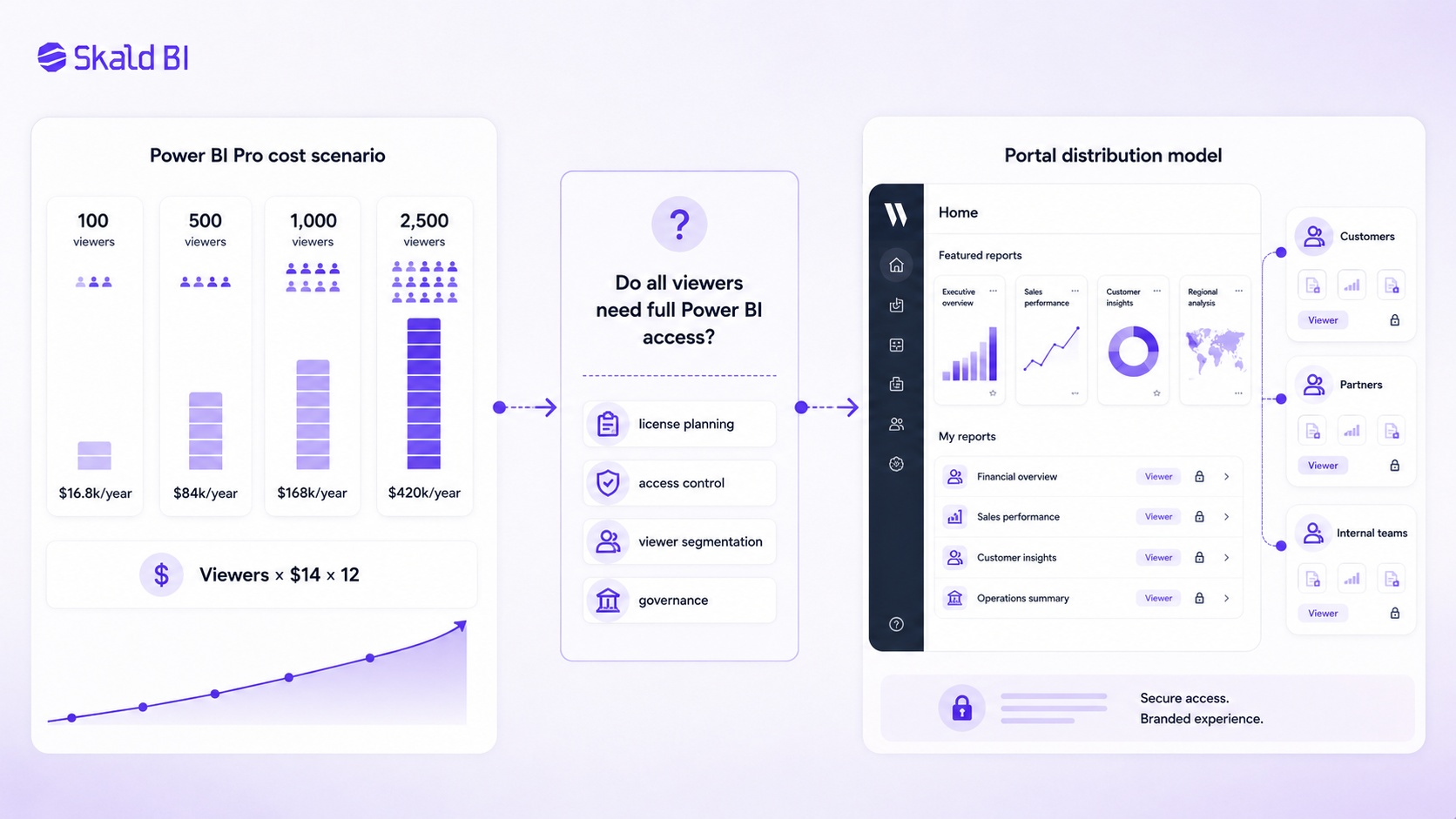
License cost should be evaluated against the real report audience, not only the number of report creators
This is not a guaranteed saving calculation. It is a starting point. The real cost depends on the Microsoft licensing setup, whether capacity is used, whether users already have licenses, how content is embedded or shared, and what type of access each user needs.
The key question is not “Can we avoid Power BI licensing?” That is the wrong framing. The better question is:
Do all viewers need a full Power BI user experience, or do some audiences only need secure access to selected reports?
Many external users, customer teams, frontline employees, partners, or executives do not need to create reports, publish content, collaborate in workspaces, or navigate Power BI. They may only need to view selected reports in a controlled environment. In those cases, a portal based distribution model may help reduce unnecessary per user licensing, simplify access management, and improve the reporting experience.
Skald BI should not be seen as a way to bypass Power BI. It is a way to separate report creation from report distribution. Reports can still be built and maintained in Power BI, while selected audiences access them through a secure branded portal.
Why License Cost Is Only Part of the Saving
License cost is easy to calculate. Operational cost is harder to see.
When Power BI reports are shared with many users, someone needs to manage access, answer login questions, explain where reports are located, remove users who should no longer have access, support external stakeholders, and make sure the right people see the right content.
That work can become expensive even when the license model looks acceptable on paper.
A portal layer can create value in several ways. It can give users one clear destination for reports. It can reduce the need to expose users to the underlying Power BI workspace structure. It can make the reporting experience feel more consistent and professional. It can also help the organization think more clearly about who should access which reports.
For customer and partner reporting, this matters. External users judge the full experience, not only the report itself. If the report is hard to access, difficult to understand, or delivered through a confusing flow, the value of the analytics is reduced.
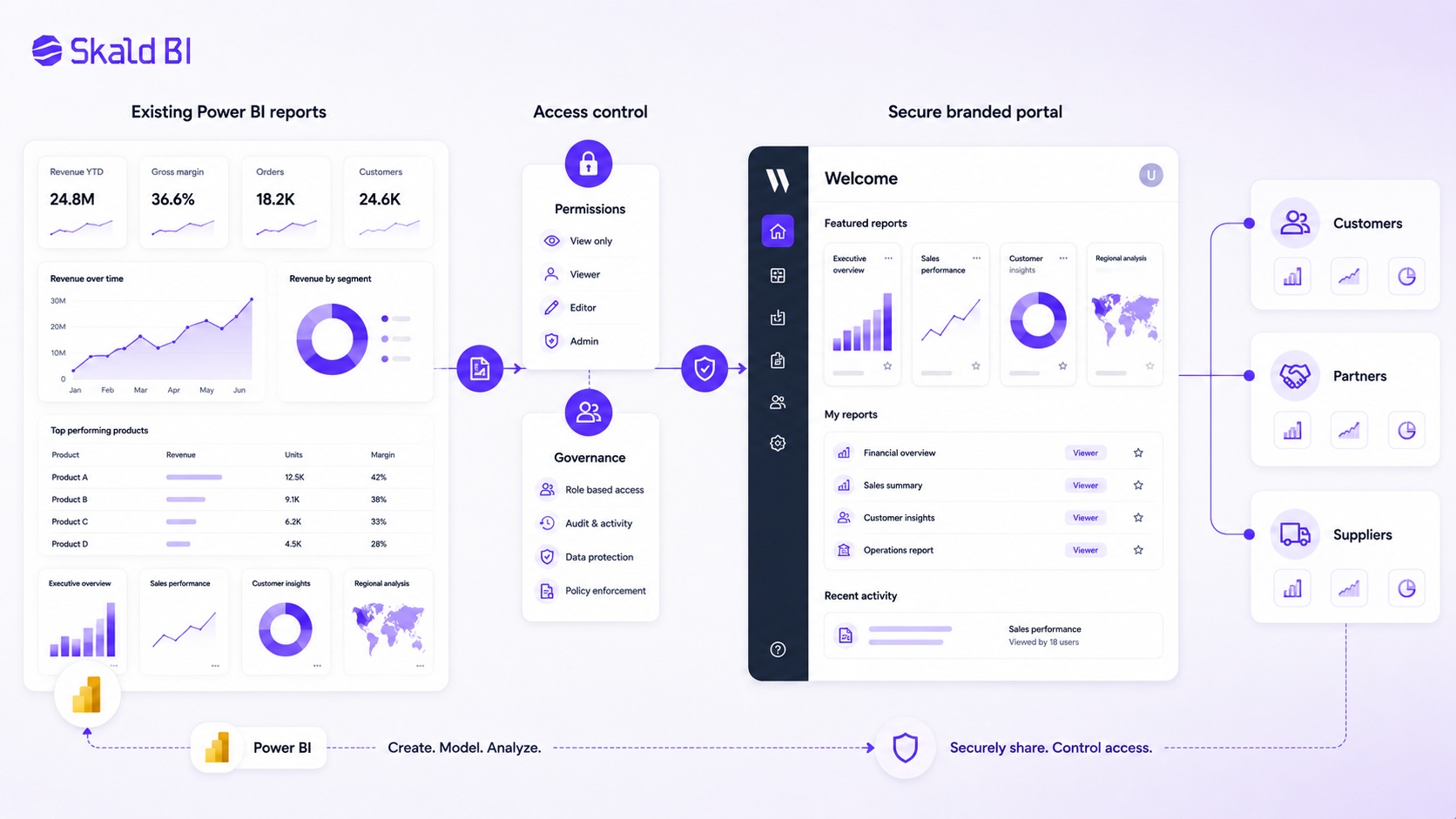
Power BI License and External Sharing
Power BI can support external sharing through Microsoft Entra B2B guest access. This allows organizations to invite external users and govern access through Microsoft’s identity and access framework.
For some use cases, this is the right model. It keeps access connected to Microsoft identity management and can work well when external users are known, limited in number, and comfortable with Microsoft based access flows.
But external sharing also has practical limitations. Customers and partners may not understand where to find reports. Guest access may require support from IT. Different external audiences may need different views, reports, or branded experiences. The setup can feel more like internal collaboration than a polished customer facing reporting environment.
That distinction is important.
Microsoft Entra B2B helps solve guest access. It does not automatically create a branded reporting portal, a simplified user journey, or a customer ready analytics experience. If the business need is to deliver reports professionally to external users, the user experience around Power BI becomes just as important as the license model.
Power BI Embedded and Customer Facing Reporting
Power BI Embedded is Microsoft’s approach for embedding Power BI content into an application or website. It can be a strong option for software companies and organizations that want analytics inside their own product experience.
In an embed for your customers scenario, users may consume embedded analytics without signing in to Power BI directly, depending on the architecture. But this model is more technical. It typically involves application development, identity handling, workspace setup, service principals or master user models, capacity considerations, and ongoing maintenance.
For companies with a mature product and engineering team, embedded analytics can be the right choice. For organizations that already have Power BI reports and mainly need a secure, branded, scalable way to distribute them, building a custom embedded application may be more work than necessary.
This is where Skald BI can be relevant. It sits around existing Power BI reports as a secure branded portal layer. The organization can continue using Power BI for reporting while using Skald BI to improve how reports are shared with the intended audience.
Row Level Security and Licensing Are Not the Same Thing
Row level security, often called RLS, helps restrict which rows of data a user can see in a Power BI model. For example, one customer might only see its own data, while an internal administrator sees all customers.
RLS is important, but it does not replace licensing, authentication, permissions, or portal governance. A user still needs a valid access path to the report. RLS controls data visibility inside the model. It does not, by itself, decide who should enter the reporting environment, which reports they should see, or how the user experience should be structured.
This is a common governance mistake. Organizations assume that because RLS exists, the distribution model is solved. It is not. Mature report distribution usually requires several layers: identity, licensing, workspace governance, report permissions, data security, audience segmentation, and user experience.
A portal can support that broader distribution logic by giving different audiences a clearer and more controlled place to access selected Power BI reports.
When Power BI Licensing Becomes a Business Problem
Power BI licensing becomes a business problem when reporting moves from internal analytics to repeatable distribution.
A finance team sharing a monthly dashboard with management has one need. A SaaS company sharing analytics with 800 customer users has another. A consulting firm delivering recurring Power BI reports to clients has another. A group company sharing operational dashboards across subsidiaries, markets, and partners has another.
In these situations, the report itself is rarely the only issue. The organization also needs to answer practical questions. Who gets access? How is access approved? What happens when a customer changes users? Should external users enter Power BI directly? Should they see a branded portal? How are reports grouped by customer, market, or team? How do we avoid giving too much access?
If these questions are not handled deliberately, the reporting setup often becomes messy. Links are shared manually. Permissions are managed inconsistently. External users ask for help. Internal teams create parallel processes. BI teams become support teams.
This is not a failure of Power BI. It is a sign that the organization has outgrown a simple sharing model.
Where Skald BI Fits
Skald BI is designed for organizations that already use Power BI and need a better way to share existing Power BI reports.
It does not replace Power BI. It does not ask the BI team to stop building reports in Power BI. Instead, it adds a secure branded portal layer around existing reports so they can be distributed to the right users in a more controlled and professional way.
The distinction is simple:
Power BI is where reports are built.
Skald BI is where selected audiences access them.
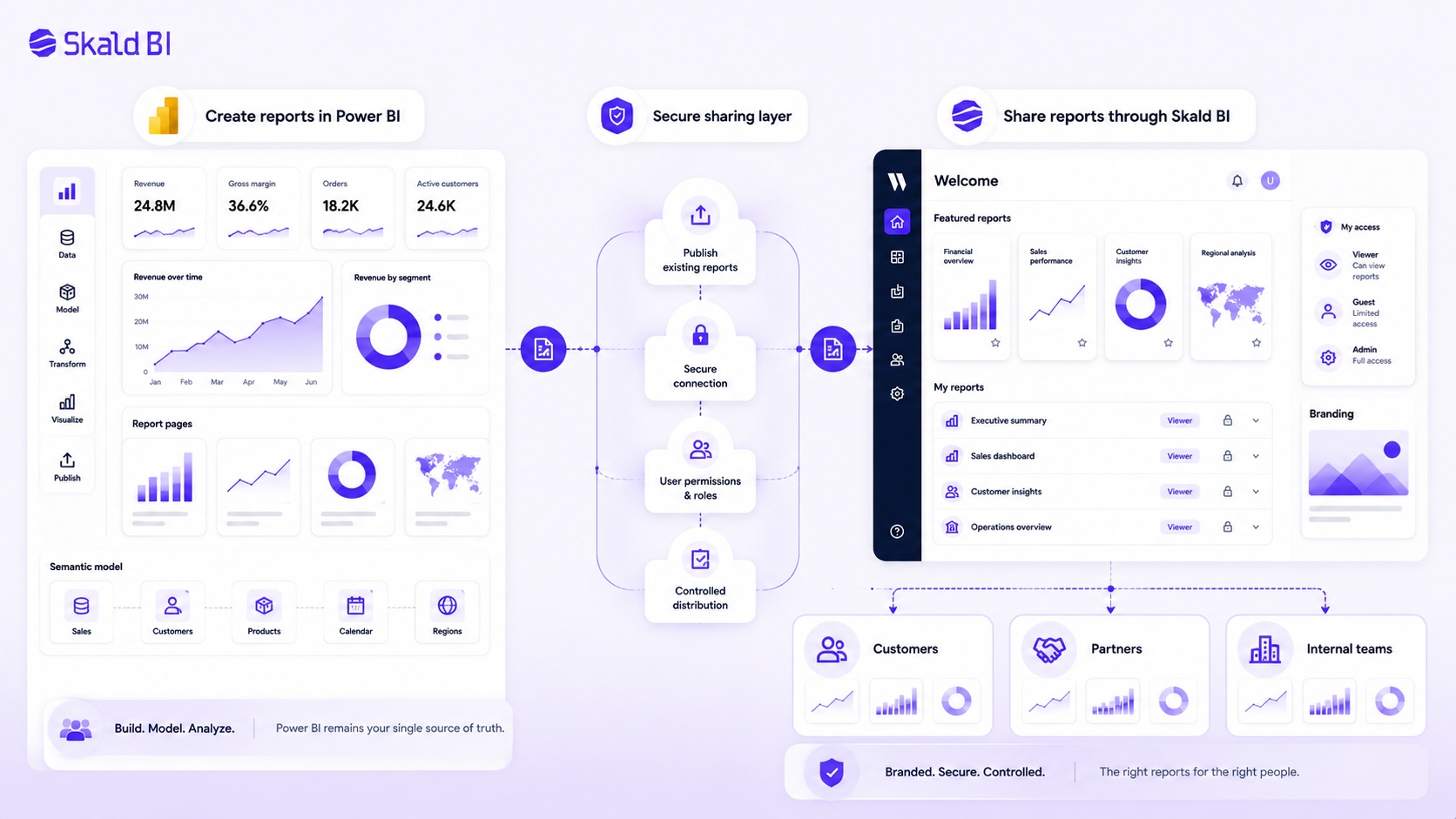
This matters when reports need to reach customers, partners, external stakeholders, or larger internal teams. Those users may not need the full Power BI workspace experience. They may need a simple, secure, branded place to find the reports relevant to them.
Skald BI is especially relevant when the organization wants to:
- Share Power BI reports beyond internal BI users
- Give customers or partners a branded reporting experience
- Reduce unnecessary complexity around report access
- Separate report creation from report consumption
- Improve governance for larger or segmented report audiences
The value is not that Skald BI changes what Power BI is good at. The value is that it helps organizations make Power BI reports easier to distribute, easier to control, and easier for the right users to consume.
A Practical Way to Evaluate Power BI License Savings
The best way to evaluate potential savings is to map users by need, not by department.
Start by separating report creators from report consumers. Creators usually need the ability to build, publish, edit, and collaborate. Consumers may only need to view selected reports. Then separate internal users from external users. External users often have different experience, support, and governance needs.
A simple evaluation model looks like this:
Current annual user license cost = number of licensed viewers x monthly license cost x 12
Then compare that with the total cost of the alternative model, including Microsoft licensing, capacity, portal cost, implementation, administration, and support.
This should not be treated as a purely financial calculation. A cheaper model that creates poor governance is not a good model. A technically elegant model that users cannot navigate is also weak. The right setup should balance cost, access control, user experience, security, and operational effort.
For many organizations, the largest opportunity is not only reducing license spend. It is avoiding the assumption that every viewer needs to be treated like a Power BI user.
Common Mistakes in Power BI License Decisions
The first mistake is assuming that report creation and report sharing have the same requirements. They do not. A team can be mature in building Power BI reports and still have an immature distribution model.
The second mistake is focusing only on license price. License cost matters, but administration, support, user confusion, and governance risk can become just as expensive.
The third mistake is treating customers and partners like internal users. External audiences often need a simpler experience. They should not have to understand Power BI workspaces, tenant settings, guest access, or internal report structures to consume analytics.
The fourth mistake is overbuilding too early. Some organizations jump straight into custom embedded analytics when a portal layer around existing reports would be more practical. Others stay too long with manual sharing even after the audience has become too large.
The fifth mistake is making licensing decisions without a clear access model. Before choosing the license path, define who needs access, what they need to see, how often they use reports, and what kind of experience they expect.
Power BI License and Governance
Governance is the part of Power BI licensing that often receives too little attention.
A license gives a user certain rights. Governance decides how those rights are applied. It defines who can publish, who can share, who approves access, how workspaces are structured, how external users are managed, and how sensitive data is protected.
Good governance also creates a better user experience. People should not need to understand the internal BI architecture to find the reports they need. Customers should not receive confusing links. Partners should not see irrelevant content. Internal users should not have to ask several people for access to the same report.
For external or high volume report distribution, governance and experience are connected. A branded portal can create a clearer front door for report access while Power BI remains the reporting layer behind it. That separation can make the setup easier to explain, easier to scale, and easier to manage.
How to Choose the Right Power BI Sharing Setup
There is no single Power BI license answer that fits every organization. The right setup depends on audience, scale, security, cost model, technical maturity, and how much of the experience needs to be branded or simplified.
If the users are internal and already work actively in Power BI, standard Power BI sharing may be enough. If external users are few and known, Microsoft Entra B2B may be suitable. If reports need to be embedded inside a custom software product, Power BI Embedded may be worth evaluating. If the organization already has Power BI reports and needs a secure branded way to share them with larger or external audiences, Skald BI may be the more focused option.
The key is to avoid forcing all use cases into the same model. Internal BI collaboration, customer reporting, partner reporting, executive dashboards, and embedded product analytics are different distribution problems. They may all use Power BI, but they should not necessarily use the same access experience.
Final Thoughts on Power BI License and Report Distribution
A Power BI license decision should not stop at asking who needs Pro, who needs Premium Per User, or whether capacity is required. Those questions matter, but they are only part of the picture.
The more strategic question is how your organization wants reports to reach the people who need them.
If the audience is small, internal, and comfortable in Power BI, the standard Power BI experience may be enough. If the audience includes customers, partners, external stakeholders, or larger internal groups, the distribution layer becomes just as important as the license model.
Power BI helps teams create reports. Skald BI helps teams share those reports through a secure branded portal.
Ready to share Power BI reports beyond your workspace?
Book a demo with Skald BI and see how your existing Power BI reports can be distributed through a secure branded portal, with clearer access, better control, and a more scalable experience for customers, partners, and internal teams.
Table of contents
- What Is a Power BI License?
- Power BI Desktop vs Power BI Service
- Main Power BI License Types
- How Power BI License Affects Report Sharing
- The Cost Question: Can a Portal Reduce Power BI License Spend?
- Why License Cost Is Only Part of the Saving
- Power BI License and External Sharing
- Power BI Embedded and Customer Facing Reporting
- Row Level Security and Licensing Are Not the Same Thing
- When Power BI Licensing Becomes a Business Problem
- Where Skald BI Fits
- A Practical Way to Evaluate Power BI License Savings
- Common Mistakes in Power BI License Decisions
- Power BI License and Governance
- How to Choose the Right Power BI Sharing Setup
- Final Thoughts on Power BI License and Report Distribution

About the author
Ola Wahlström
Ola Wahlström is a Partner and Senior Consultant at Wahsel, focused on using data, analytics and visualisation to drive the CFO agenda and create measurable business impact. He has held senior executive roles including Interim CFO at Nelly Group, COO at Stampen Media and Group CFO at MQ Holding, and works with forecasting, pricing, margin control, management reporting and commercial performance improvement.
Related articles

What is Power BI? A practical guide for teams that need better reporting and better sharing
Learn what Power BI is, how it works and why sharing reports with customers, partners or teams often requires a better portal layer.
Read more
Power BI Portal: How to Share Reports Securely Beyond the Workspace
Learn what a Power BI portal is, when it is useful, and how to share Power BI reports securely with customers, partners and teams.
Read more
Power BI License: Costs, Sharing Rules, and Smarter Report Distribution
Understand Power BI license costs, sharing rules, external access, and how a secure portal can simplify report distribution.
Read more