
Power BI Portal: How to Share Reports Securely Beyond the Workspace
⏲ Read time: 12 minutes

A Power BI portal is a dedicated way to give users access to Power BI reports through a structured, secure and often branded experience. For many organizations, the need appears when reports are no longer only used by analysts and internal managers. Customers, partners, suppliers, franchisees, board members or large internal audiences also need access to the same insights.
Power BI is strong at building reports, dashboards and semantic models. But once reports need to be shared at scale, the practical questions become different. Who should see which reports? How should access be managed? What should external users experience when they log in? How do you keep distribution controlled without turning the Power BI workspace into a support burden?
That is where the idea of a Power BI portal becomes relevant. It is not about replacing Power BI. It is about creating a better distribution layer around the Power BI reports you already have.
What is a Power BI portal?
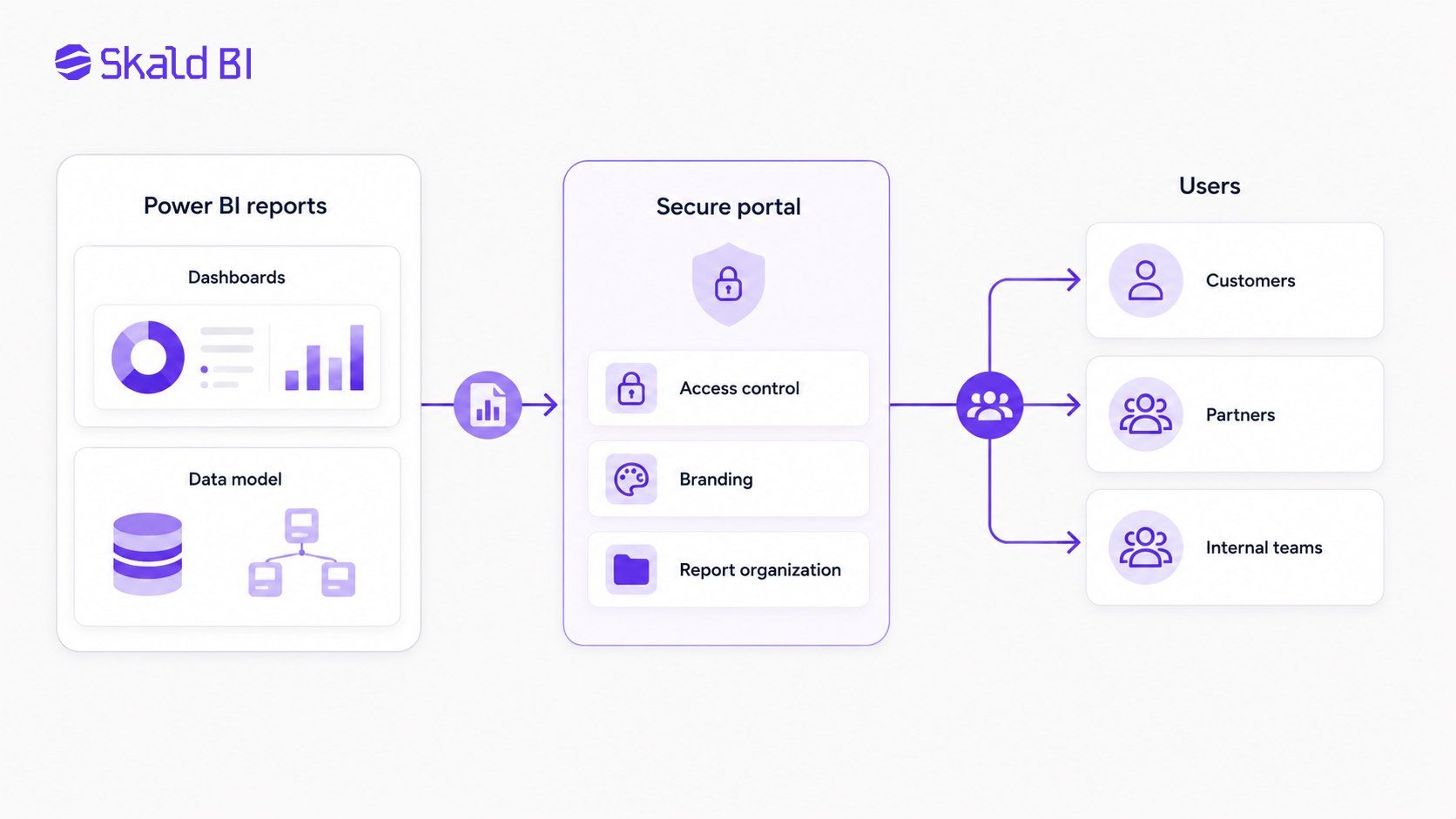
A Power BI portal is a user facing environment where Power BI reports can be made available to selected audiences. The portal can be internal, external or both. It can serve employees, customers, partners or other stakeholders who need controlled access to reporting.
In simple terms, Power BI remains the place where reports are built and maintained. The portal becomes the place where users consume them.
This distinction matters. Many companies already have well built Power BI reports. The issue is not report creation. The issue is distribution. A finance team may want to share performance dashboards with business units. A SaaS company may want to show customer specific reporting. A consulting firm may want to deliver recurring insights to clients. A group management team may want one controlled place for reports across entities.
In all cases, the portal solves a consumption problem. It gives users a clearer entry point than a workspace, a shared link or a collection of report URLs.
Why companies look for a Power BI portal
Organizations usually start looking for a Power BI portal when Power BI usage moves beyond a small group of internal users. At that point, the report itself is only one part of the challenge. Access, structure, branding, support and governance become just as important.
A workspace can work well for collaboration between report creators and internal teams. Power BI apps can also be useful for packaging and distributing content to broader audiences. But external or customer facing reporting often creates additional requirements. The experience may need to feel more like a product, a client portal or a controlled reporting environment.
Common reasons include:
-
Customers or partners need access to selected Power BI reports.
-
Internal teams need a simpler report hub than navigating multiple workspaces.
-
The company wants a branded experience instead of a generic report sharing flow.
-
Access needs to be controlled across many users, roles or organizations.
-
Report distribution needs to scale without creating manual administration.
The underlying issue is rarely that Power BI is not good enough. It is that Power BI was not the only thing the business needed. The business needed a controlled way to publish, present and manage access to existing reports.
Power BI portal versus Power BI workspace
A Power BI workspace is primarily a collaboration and content management area. It helps teams organize reports, dashboards, semantic models and related content. For analysts, BI developers and internal stakeholders, workspaces are central to how Power BI content is created and managed.
A Power BI portal serves a different purpose. It is focused on consumption. The portal should make it easy for the right user to find the right report, access it securely and understand that they are in the correct environment.
This difference becomes important when external users are involved. A customer should not need to understand your internal workspace structure. A partner should not have to navigate technical report collections. A board member or store manager should not need training in your Power BI governance model just to open the right dashboard.
The workspace is for managing BI content. The portal is for delivering that content to users in a cleaner and more controlled way.
Power BI portal versus Power BI Embedded
Power BI Embedded is often part of the discussion when companies search for a Power BI portal. It allows Power BI content such as reports and dashboards to be embedded into an application or website. For software companies and customer facing analytics products, this can be highly relevant.
But Power BI Embedded is not the same thing as a complete portal strategy. Embedded analytics can provide the technical foundation for showing Power BI content inside another environment. The broader portal question includes user journeys, branding, authentication, access rights, report organization, support flows and ongoing governance.
A useful way to think about it is this: embedding is about how a report appears inside an application. A portal is about the full experience around report access and distribution.
For some organizations, a custom embedded solution is the right route. For others, the development effort, maintenance responsibility and governance complexity may be more than they need. They may already have the Power BI reports and only need a secure, branded layer for sharing them.
What a good Power BI portal should solve
A useful Power BI portal should reduce friction for both report owners and report consumers. It should not create a parallel BI system or force teams to rebuild existing reporting. The best case is that Power BI remains the reporting engine, while the portal improves distribution.
At a practical level, a Power BI portal should help with:
-
Access: Users should only see the reports they are allowed to see.
-
Structure: Reports should be organized in a way that makes sense to the audience.
-
Branding: The experience should feel like part of the company or customer offering.
-
Governance: Ownership, permissions and distribution should be easier to manage.
-
Scalability: Adding users, customers or report groups should not depend on manual workarounds.
These points are not cosmetic. They affect adoption. A technically correct report that is hard to access will be underused. A report that is easy to access but poorly governed can create risk. The portal needs to balance both sides.
External sharing and access control in Power BI
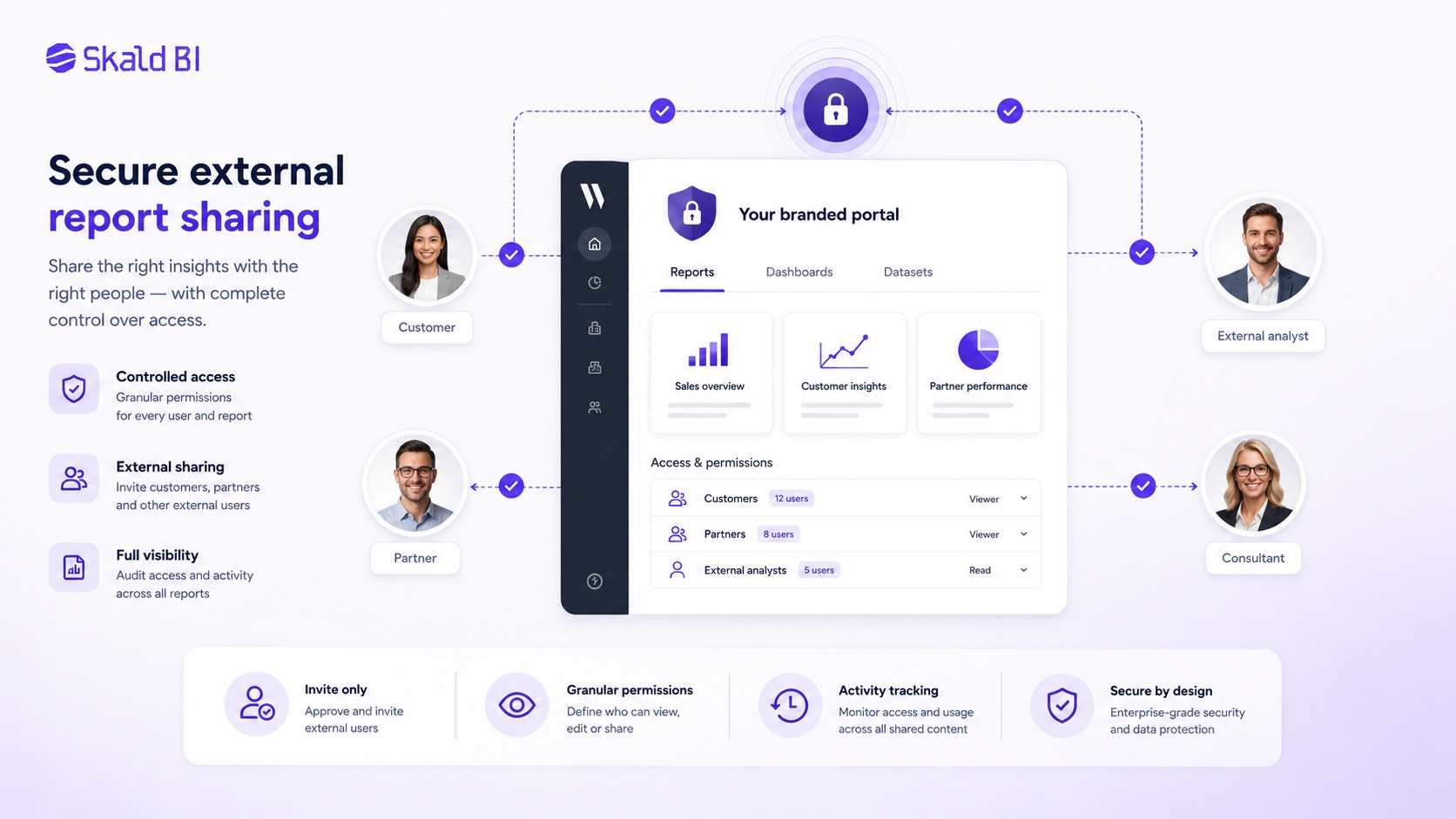
Sharing Power BI content externally requires careful planning. Microsoft provides several ways to collaborate and share Power BI content, including sharing reports and dashboards, distributing apps and embedding content. The right model depends on the audience, licensing, tenant settings, security requirements and how much control the organization needs.
For external users, access can involve Microsoft Entra B2B guest users, embedded analytics, or other controlled approaches depending on the setup. The key point is that external distribution should not be treated as an afterthought. It affects identity, permission management, support, user experience and sometimes cost.
This is where many organizations run into operational friction. A small number of external users can often be handled manually. But when reporting becomes part of a customer offering, partner relationship or recurring service delivery, manual sharing can become fragile. Permissions drift. Links are forwarded. Users change roles. New customers are added. Old users remain. Support questions increase.
A Power BI portal does not remove the need for governance. It gives the organization a clearer place to enforce it.
Where row level security fits
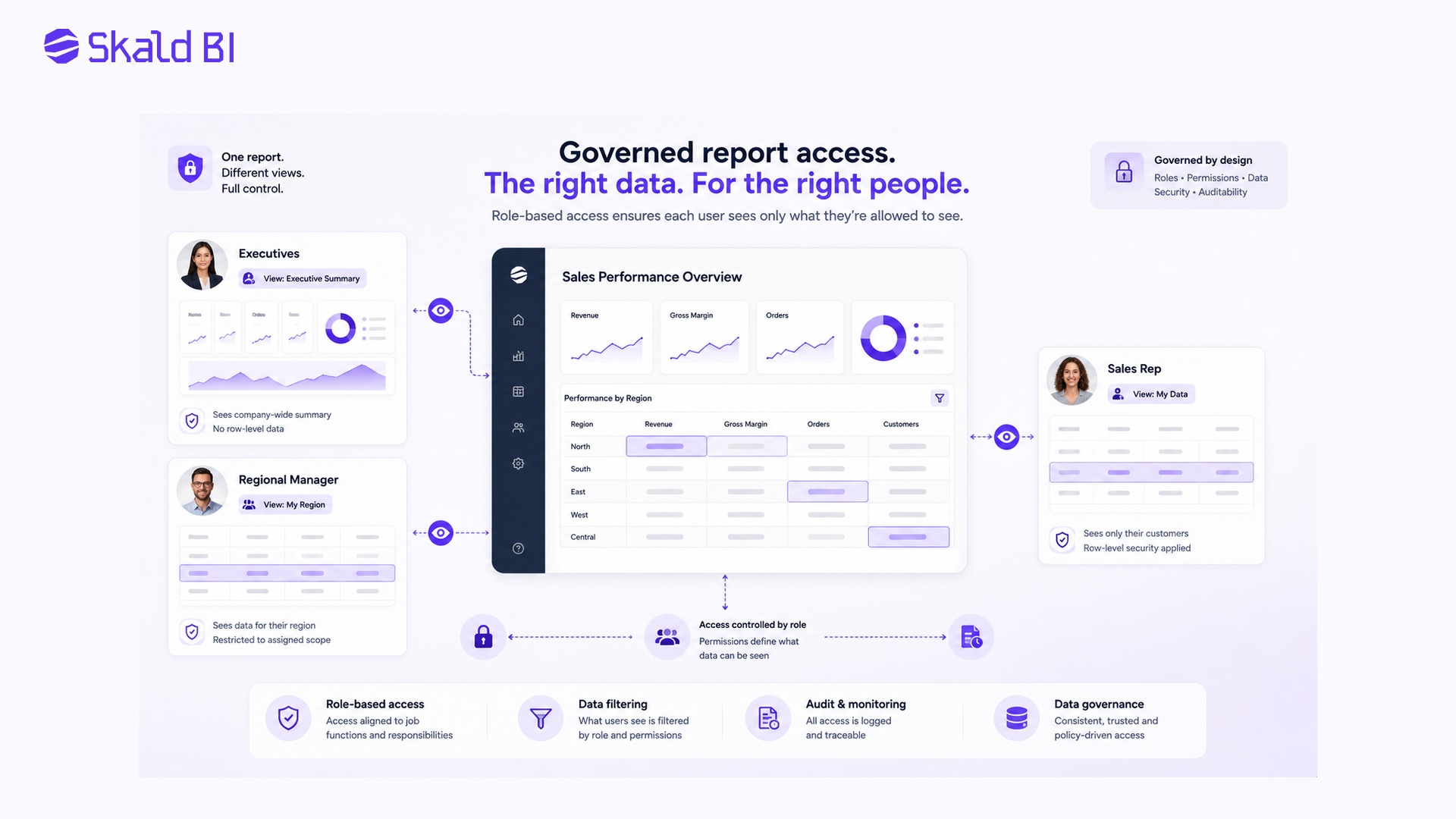
Row level security, often called RLS, is relevant when different users should see different rows of data inside the same report or semantic model. For example, each customer should only see their own data, or each regional manager should only see their region.
RLS can be a powerful part of a Power BI portal setup, but it should not be confused with the portal itself. RLS controls data visibility inside the model. The portal controls the surrounding experience of access, navigation, branding and distribution.
This distinction is important. A portal without proper data security can create risk. RLS without a clear distribution experience can still create user friction. Mature report sharing often needs both: data level security in Power BI and a controlled consumption layer around it.
The exact design should be tested carefully before launch. Permissions, roles and data filtering need to behave as expected for every user group. This is especially important when reports are shared with customers or partners, where a mistake can damage trust.
When a Power BI portal is a better fit than standard sharing
Standard Power BI sharing can be enough when reports are used by a limited internal audience. If a management team, finance department or analytics team shares reports with known users inside the organization, native Power BI features may cover the need.
A portal becomes more relevant when reporting starts to behave like a service. That can happen in several situations.
A SaaS company may want to give each customer access to usage, performance or financial dashboards. A retailer may want suppliers to access sales and inventory reporting. A consulting firm may want to deliver client dashboards in a more professional environment. A group company may want different entities to access selected reports without exposing the broader workspace structure.
In these cases, the report is part of the relationship. The user experience matters. Access control matters. Branding matters. The ability to scale distribution matters.
This is also where Skald BI is positioned.
How Skald BI works with Power BI
Skald BI helps organizations share existing Power BI reports through a secure, branded portal. It does not replace Power BI. Your team can continue building and maintaining reports in Power BI, using the tools and workflows they already know.
The role of Skald BI is to add a sharing layer around those reports. That layer is designed for situations where reports need to be distributed to customers, partners, external stakeholders or larger internal audiences in a more controlled and professional way.
The practical difference is simple. Power BI helps your team create reports. Skald BI helps your team share them.
For organizations that already have valuable Power BI content, this can be a more focused path than rebuilding analytics in a new system or developing a custom portal from scratch. The reports remain in the Power BI ecosystem. The access experience becomes easier to package, brand and manage for the intended audience.
A Power BI portal should support governance, not bypass it
One mistake companies make is treating a portal as a shortcut around governance. That is risky. A portal should make governance more visible and easier to operate, not weaker.
Before sharing reports through any portal, the organization should be clear on who owns each report, which data is sensitive, which users should have access, how roles are assigned, and how access is removed when users leave or customers churn. These questions are not only technical. They are operational.
The portal should fit the organization’s reporting model. If Power BI content is poorly structured, a portal will not automatically fix it. If permissions are unclear, branding will not solve the underlying risk. If data definitions are inconsistent, easier access can spread confusion faster.
A strong Power BI portal strategy starts with a sober view of the reporting estate. Which reports are ready to share? Which should remain internal? Which need RLS, review or redesign before external access is considered?
What to consider before choosing a Power BI portal
The right portal approach depends on the business model, audience and maturity of the Power BI environment. A company sharing five internal reports has a different need from a SaaS company serving hundreds of customers. A consulting firm delivering client dashboards has different requirements than an enterprise distributing reports across departments.
The most important questions are practical. Who are the users? Are they internal or external? Do they already have Power BI access? Do reports need to be customer specific? How important is branding? How often are users added or removed? Who will own support? What governance model already exists?
Licensing and architecture also need to be reviewed carefully. Microsoft’s Power BI sharing and embedded options have different requirements and implications. These should be checked against the organization’s Microsoft environment and current Power BI setup before making a decision.
The best portal is not necessarily the most technically advanced. It is the one that makes report distribution secure, understandable and maintainable.
Common mistakes when building Power BI portals
The first mistake is starting with technology before defining the user journey. A portal should be designed around how people actually consume reports. If the user cannot quickly find the right report, understand what they are seeing and trust that access is correct, the portal will underperform.
The second mistake is assuming that external sharing is only an IT setting. It is also a commercial and operational decision. When customers or partners see reports, the reporting experience becomes part of the company’s service delivery. Poor access flows, unclear branding or inconsistent permissions reflect on the business.
The third mistake is rebuilding reports unnecessarily. If the organization already uses Power BI and has trusted reports, the portal should normally support that investment. The goal should be to improve access and distribution, not create duplicate reporting logic.
The fourth mistake is ignoring long term administration. A portal that works for ten users may not work for five hundred. User management, report grouping, onboarding, offboarding and support need to be considered early.
Power BI portal for customers and partners
Customer and partner reporting is one of the clearest use cases for a Power BI portal. In these situations, the report is not just internal analysis. It is part of the value the organization delivers externally.
A customer portal can give each client a clear place to access their reports. A partner portal can make shared performance data easier to distribute. A supplier portal can help external stakeholders follow sales, inventory or operational metrics. In each case, Power BI can remain the reporting layer, while the portal creates a more controlled external experience.
This is especially relevant for organizations that want reporting to feel like part of their own service, not like a generic file, link or workspace invitation. The portal helps make analytics easier to consume without asking every external user to understand how the BI environment is organized internally.
Power BI portal for internal report distribution
A Power BI portal is not only useful for external access. It can also help larger organizations distribute reports internally. As Power BI adoption grows, users often struggle to know where to find the right content. Reports may sit across several workspaces. Links may be shared in Teams, email or SharePoint. Different departments may create overlapping dashboards.
A portal can create a clearer front door for internal reporting. Instead of forcing users to navigate the BI structure, the company can present reports by role, business area, process or audience.
This does not remove the need for Power BI workspaces, apps or governance. It adds a more user friendly layer for consumption. For internal audiences, that can improve adoption and reduce support questions.
The business case for a Power BI portal
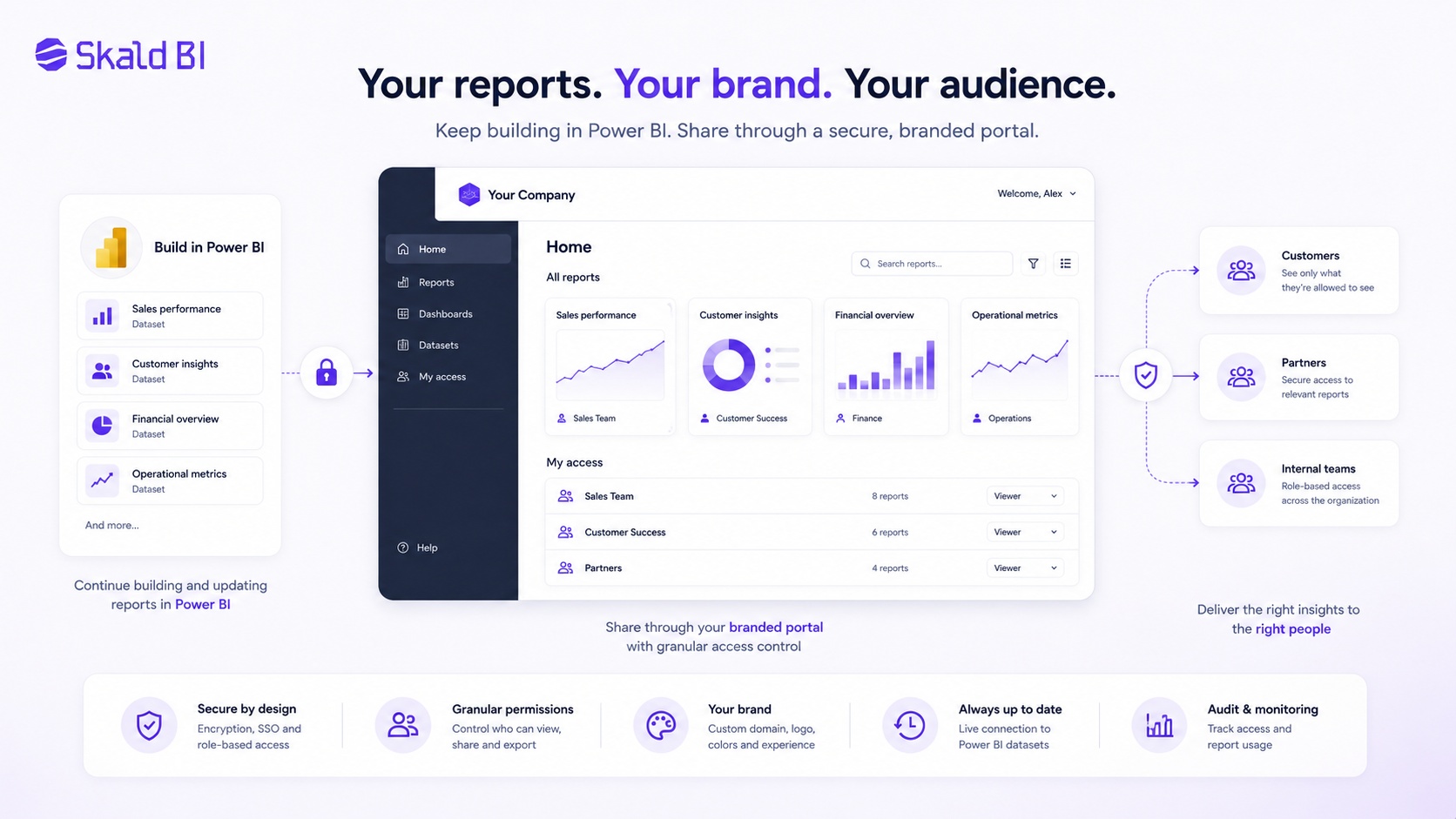
The business case for a Power BI portal is usually not only about technology. It is about making reporting easier to distribute, easier to govern and easier to use.
If reports already exist but users struggle to access them, value is being lost. If customer facing reporting requires manual work, the model may not scale. If external users receive inconsistent links or unclear access instructions, the experience weakens trust. If internal report distribution is fragmented, decision makers may rely on outdated exports or parallel spreadsheets.
A Power BI portal can help address these issues by turning report sharing into a more managed process. The value comes from better access, fewer manual workarounds, stronger governance and a more professional experience for the users who consume reports.
For many organizations, this is not a replacement project. It is a leverage project. The company has already invested in Power BI. The next step is making that investment easier to share.
Conclusion: Power BI builds the reports, the portal delivers them
A Power BI portal is useful when reporting needs to move beyond the workspace and reach a broader audience in a controlled way. It helps organizations package access, structure, branding and governance around existing Power BI reports.
Power BI remains the place where reports are created, modeled and maintained. The portal becomes the place where customers, partners, stakeholders or internal teams consume them.
For organizations that already use Power BI, this distinction is important. You do not need to replace the reporting environment to improve report distribution. You need the right layer around it.
Ready to share Power BI beyond your workspace?
Book a demo with Skald BI and see how your existing Power BI reports can be shared through a secure, branded portal for customers, partners and internal teams.
Table of contents
- What is a Power BI portal?
- Why companies look for a Power BI portal
- Power BI portal versus Power BI workspace
- Power BI portal versus Power BI Embedded
- What a good Power BI portal should solve
- External sharing and access control in Power BI
- Where row level security fits
- When a Power BI portal is a better fit than standard sharing
- How Skald BI works with Power BI
- A Power BI portal should support governance, not bypass it
- What to consider before choosing a Power BI portal
- Common mistakes when building Power BI portals
- Power BI portal for customers and partners
- Power BI portal for internal report distribution
- The business case for a Power BI portal
- Conclusion: Power BI builds the reports, the portal delivers them

About the author
Mathias Melander
As Head of Product & Analytics at Skald BI, Mathias Melander leads the platform’s product strategy, technical architecture and analytics development. His focus is helping companies distribute Power BI reports securely through scalable, customer-facing BI portals.
Related articles

What is Power BI? A practical guide for teams that need better reporting and better sharing
Learn what Power BI is, how it works and why sharing reports with customers, partners or teams often requires a better portal layer.
Read more
Power BI Portal: How to Share Reports Securely Beyond the Workspace
Learn what a Power BI portal is, when it is useful, and how to share Power BI reports securely with customers, partners and teams.
Read more
Power BI License: Costs, Sharing Rules, and Smarter Report Distribution
Understand Power BI license costs, sharing rules, external access, and how a secure portal can simplify report distribution.
Read more