
Power BI White Label Usecases: 8 Practical Examples for Customer and Partner Reporting
⏲ Read time: 6 minutes

Power BI is one of the most widely used business intelligence platforms for building dashboards, reports, and data models. It helps organizations turn data into actionable insights and distribute information across teams.
As reporting maturity grows, many organizations face a different challenge. Creating reports is no longer the problem. Sharing them efficiently becomes the next hurdle.
Customers want self-service analytics. Partners need access to operational data. Franchisees require local performance reporting. Executives want a centralized reporting experience.
This is where Power BI white label usecases become relevant.
A white label approach allows organizations to present existing Power BI reports through a branded experience designed around the needs of end users. Rather than changing how reports are built, it changes how they are distributed and consumed.
In this guide, we explore the most common Power BI white label usecases, when a white label approach makes sense, and when native Power BI sharing may be sufficient.
What Is a Power BI White Label Solution?
A Power BI white label solution allows organizations to present Power BI reports through a branded interface such as a customer portal, partner portal, SaaS application, or internal reporting hub.
The reports themselves remain in Power BI. Analysts continue to build reports using Power BI Desktop and publish them to Power BI Service. The difference lies in how end users access those reports.
Instead of directing users into Power BI workspaces, a white label layer provides a customized experience aligned with the organization's branding, user management model, and governance requirements.
The goal is not to replace Power BI.
The goal is to make Power BI reports easier to distribute, manage, and consume across larger audiences.
This distinction is important because Power BI excels at report creation and analytics. White label solutions focus on report delivery, access management, branding, and user experience.
Why Companies Search for Power BI White Label Usecases
Most organizations do not begin their analytics journey looking for a white label solution.
The typical progression looks different.
An internal analytics team builds reports. Departments begin using them. Customers request visibility. Partners ask for dashboards. Account managers start sharing reports manually. Leadership wants one destination for all reporting.
At this point, reporting becomes a distribution challenge.
Organizations start asking questions such as:
-
How can customers access reports without navigating Power BI?
-
How can partner reporting be managed at scale?
-
How can reporting be branded consistently?
-
How can permissions be managed across hundreds or thousands of users?
-
How can governance remain manageable as reporting expands?
These questions drive interest in Power BI white label usecases.
8 Common Power BI White Label Usecases
Customer-Facing Analytics Portals
One of the most common Power BI white label usecases is customer reporting.
Many companies provide analytics as part of their service offering. Logistics providers share delivery performance. Marketing agencies share campaign metrics. SaaS vendors provide usage analytics. Service organizations report operational KPIs.
Customers generally care about insights rather than reporting tools.
A branded analytics portal creates a more professional experience while keeping Power BI as the reporting engine behind the scenes.
Partner Reporting Portals
Distributors, franchisees, resellers, suppliers, and strategic partners often require ongoing visibility into operational and commercial performance.
As partner ecosystems grow, managing access through individual report sharing can become increasingly complex.
A white label portal provides a structured reporting environment where partners access relevant reports without needing to understand the organization's internal Power BI architecture.
Embedded Analytics for SaaS Products
Many software companies want analytics to feel like a natural part of their application.
Rather than building a reporting engine from scratch, organizations often leverage Power BI as the analytics layer while embedding reports into their own product experience.
This allows users to consume insights without leaving the application they already use.
Microsoft supports embedded analytics scenarios through Power BI Embedded, making this one of the most established Power BI white label usecases.
Executive and Board Reporting Portals
Executives rarely want to navigate multiple workspaces, URLs, or reporting systems.
A centralized reporting portal can provide a single destination for board reporting, executive dashboards, financial performance metrics, and operational scorecards.
The underlying reports remain in Power BI while the user experience becomes significantly more streamlined.
Multi-Client Reporting for Agencies and Consultants
Agencies and consultancies frequently deliver reporting to dozens or hundreds of clients.
Each client typically requires:
-
Separate access rights
-
Different dashboards
-
Consistent branding
-
Secure data isolation
A white label reporting portal can help standardize delivery while reducing operational overhead.
The reporting team continues to build reports in Power BI while clients receive a more polished reporting experience.
Internal Reporting at Scale
Large organizations often struggle with report discovery.
Employees may receive report links through Teams, email, SharePoint, intranets, or internal documentation. Over time, finding the right report becomes difficult.
A branded reporting portal can create a curated entry point that simplifies access while maintaining Power BI as the reporting platform.
Customer Success Reporting
Customer success teams increasingly use reporting to demonstrate value.
Instead of sending static reports or manually generated presentations, organizations can provide customers with continuous access to relevant metrics through a dedicated portal.
This creates transparency while reducing manual reporting effort.
Franchise and Regional Reporting
Franchise groups, retail chains, and multi-location businesses often need to distribute reporting across hundreds of locations.
Each audience requires different levels of visibility.
Headquarters may need full visibility. Regional managers may need access to several locations. Local operators may need access only to their own performance data.
A white label portal can simplify distribution while maintaining governance and access control.
When Should You Use a Power BI White Label Solution?
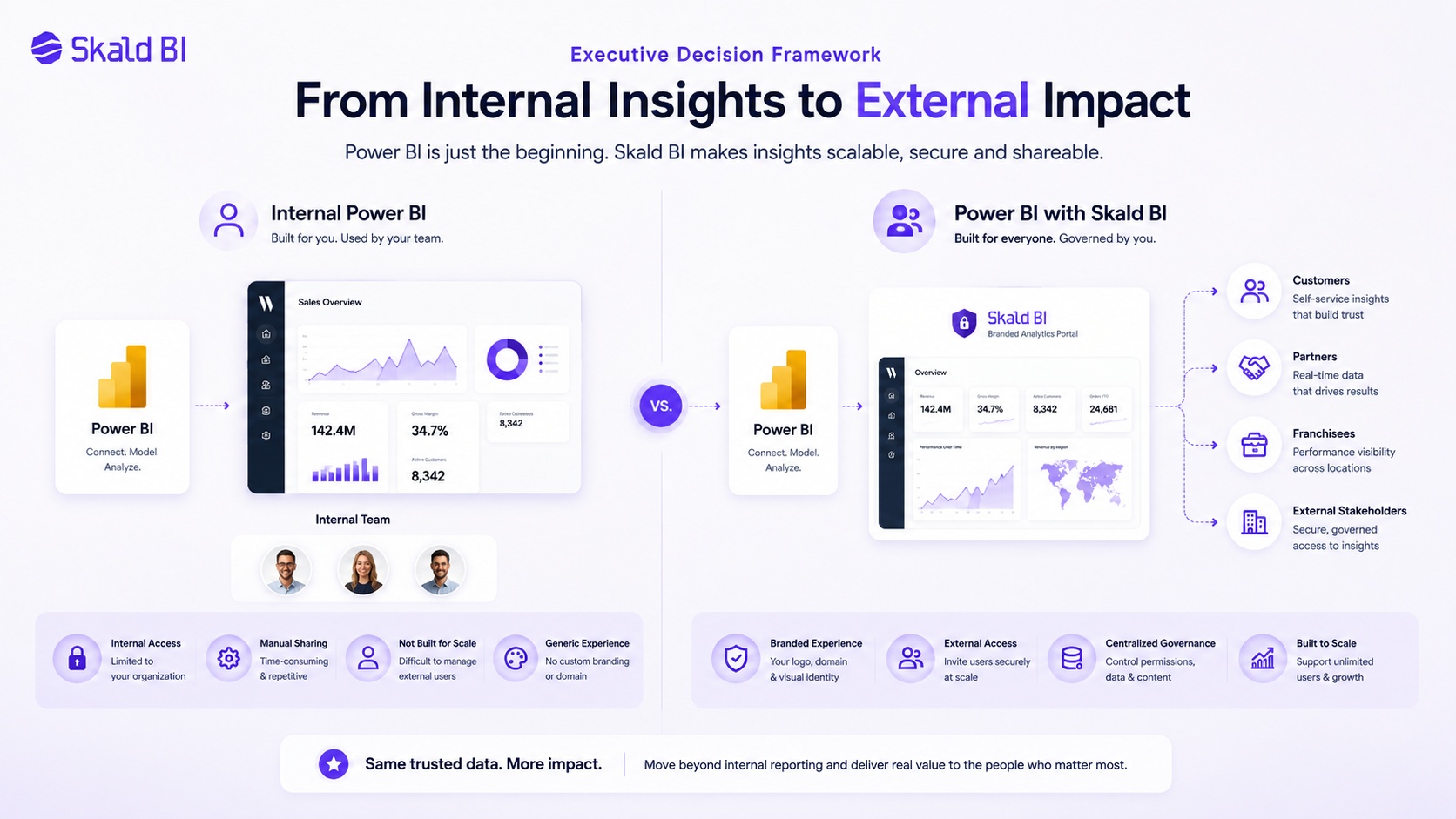
A Power BI white label approach typically makes sense when reporting is becoming part of a broader business process rather than a standalone analytics activity.
Common indicators include:
-
Reports are shared with customers
-
Reports are shared with partners
-
Branding matters
-
External user management is becoming difficult
-
Multiple audiences require different permissions
-
Reporting is part of a commercial service offering
In these situations, the challenge is often no longer report creation.
The challenge is distribution.
When You Probably Do Not Need a Power BI White Label Solution
Not every organization requires a white label approach.
Native Power BI sharing may be sufficient when:
-
All users are internal
-
The audience is relatively small
-
Users already work within Microsoft environments
-
Branding is not a priority
-
External distribution is limited
If existing sharing methods are working effectively, introducing an additional layer may create unnecessary complexity.
The objective should always be to solve a business problem rather than implement additional technology.
Power BI White Label vs Native Power BI Sharing
Organizations evaluating Power BI white label usecases often compare them against native sharing capabilities.
| Area | Native Power BI Sharing | White Label Approach |
|---|---|---|
| Report Creation | Power BI | Power BI |
| Branding | Limited | Company-branded |
| User Experience | Microsoft-centric | Custom experience |
| Customer Access | Supported depending on setup | Typically optimized for external audiences |
| Portal Experience | Limited | Dedicated portal |
| Distribution Control | Depends on configuration | Often easier to centralize |
| Governance | Depends on implementation | Depends on implementation |
The correct choice depends less on technology and more on the audience consuming the reports.
Key Considerations Before Choosing a Power BI White Label Approach
Before selecting a white label strategy, organizations should clearly define:
Who will access reports?
How will permissions be managed?
How will external users authenticate?
What level of branding is required?
Who owns report governance?
Microsoft provides multiple approaches for sharing, guest access, and embedded analytics. The optimal architecture depends on business requirements, security considerations, licensing, and user experience goals.
Organizations that answer these questions early typically avoid costly redesigns later.
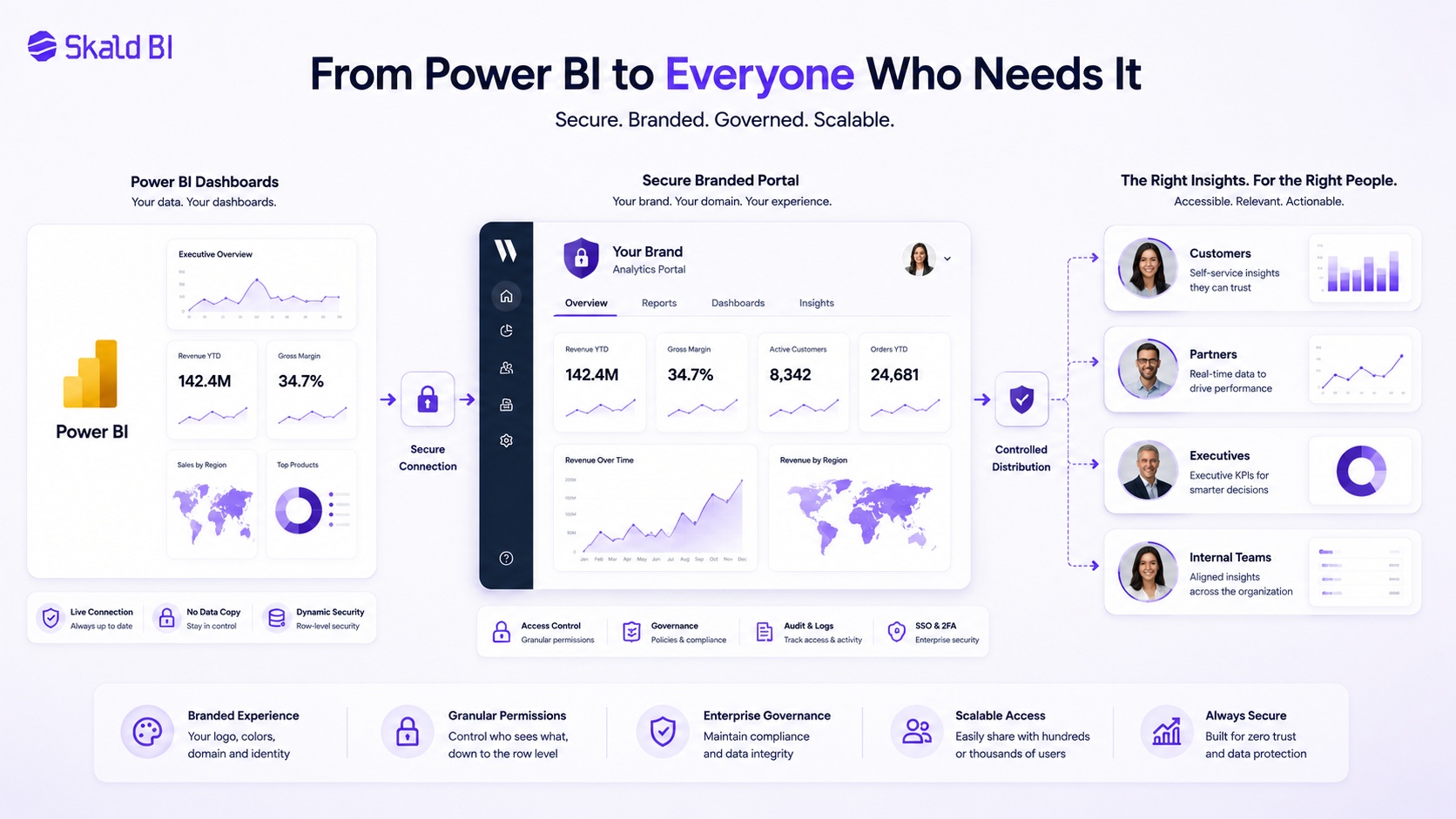
How Skald BI Supports Power BI White Label Usecase
Skald BI is designed for organizations that already use Power BI and need a more scalable way to distribute reports.
Power BI helps teams create reports.
Skald BI helps teams share them.
Rather than replacing Power BI, Skald BI adds a secure and branded portal layer around existing Power BI reports. Organizations can continue using Power BI for report development while providing customers, partners, and internal stakeholders with a more controlled reporting experience.
This becomes particularly valuable when reporting must reach external audiences, support multiple user groups, or align with a company's brand and governance requirements.
Final Thoughts on Power BI White Label Usecases
The strongest Power BI white label usecases emerge when reporting extends beyond the analytics team.
Customer reporting, partner portals, embedded analytics, franchise reporting, and executive dashboards all introduce distribution challenges that go beyond report creation.
Power BI remains one of the strongest platforms for building reports and analytics.
The question is often not how reports are built.
The question is how they are delivered.
Organizations that need a secure, branded, and scalable way to distribute existing Power BI reports should evaluate whether a white label portal approach aligns with their reporting strategy.
Ready to share Power BI beyond your workspace?
Book a demo with Skald BI and see how your existing Power BI reports can be shared through a secure branded portal for customers, partners, and internal teams.
Author: Mathias Melander
As Head of Product & Analytics at Skald BI, Mathias Melander leads the platform’s product strategy, technical architecture and analytics development. His focus is helping companies distribute Power BI reports securely through scalable, customer-facing BI portals.
Table of contents
- What Is a Power BI White Label Solution?
- Why Companies Search for Power BI White Label Usecases
- 8 Common Power BI White Label Usecases
- Customer-Facing Analytics Portals
- Partner Reporting Portals
- Embedded Analytics for SaaS Products
- Executive and Board Reporting Portals
- Multi-Client Reporting for Agencies and Consultants
- Internal Reporting at Scale
- Customer Success Reporting
- Franchise and Regional Reporting
- When Should You Use a Power BI White Label Solution?
- When You Probably Do Not Need a Power BI White Label Solution
- Power BI White Label vs Native Power BI Sharing
- Key Considerations Before Choosing a Power BI White Label Approach
- How Skald BI Supports Power BI White Label Usecase
- Final Thoughts on Power BI White Label Usecases

About the author
Mathias Melander
As Head of Product & Analytics at Skald BI, Mathias Melander leads the platform’s product strategy, technical architecture and analytics development. His focus is helping companies distribute Power BI reports securely through scalable, customer-facing BI portals.
Related articles

Power BI Portal: How to Share Reports Securely Beyond the Workspace
Learn what a Power BI portal is, when it is useful, and how to share Power BI reports securely with customers, partners and teams.
Read more
What is Power BI? A practical guide for teams that need better reporting and better sharing
Learn what Power BI is, how it works and why sharing reports with customers, partners or teams often requires a better portal layer.
Read more
Power BI License: Costs, Sharing Rules, and Smarter Report Distribution
Understand Power BI license costs, sharing rules, external access, and how a secure portal can simplify report distribution.
Read more