
How to Share Power BI Report with External Users Securely
⏲ Read time: 11 minutes

Sharing Power BI reports with external users is a common need for companies that already use Power BI internally. Customers want dashboards. Partners need operational visibility. Franchisees, suppliers, board members or regional teams may need access to selected reporting. The question is rarely whether the report can be shared. The real question is how to share it in a way that is secure, controlled, understandable and scalable.
Power BI gives organisations several ways to distribute reports and dashboards, including direct sharing, apps, guest access through Microsoft Entra B2B and embedded analytics. Each approach has a different fit depending on who the users are, how often they access the reports, what experience you want them to have and how much control you need over permissions, branding and governance.
This article explains the main options for sharing Power BI reports with external users, what to consider before choosing a setup, and when a dedicated portal layer around your existing Power BI reports can make the process easier to manage.
Power BI is where teams create reports. Skald BI is for organisations that need to share those reports beyond the Power BI workspace through a secure, branded portal.
What does it mean to share a Power BI report with external users?
To share a Power BI report with external users means giving people outside your organisation access to view Power BI content. These users may be customers, partners, suppliers, investors, agencies, consultants or other stakeholders who do not belong to your internal Microsoft tenant.
In practical terms, external sharing usually creates four questions. Who should see the report? Which data should each user see? How should they access it? Who owns the process when users change, customers churn or new stakeholders need access?
For a small number of known users, standard Power BI sharing can be enough. For a wider audience, or when reports become part of a customer service, customer dashboard or partner portal, the requirements usually grow. Access control becomes more important. Branding matters more. The user experience needs to feel less like an internal BI tool and more like a professional product experience.
That distinction is important. A Power BI report can be technically available but still difficult to distribute at scale. The report itself may be good, while the surrounding sharing process creates friction for both administrators and end users.
The main ways to share Power BI reports externally
Microsoft provides several patterns for distributing Power BI content. The right choice depends on audience, security model, licensing, branding needs and whether the report should live inside Power BI or inside another application or portal.
For most organisations, the practical options are:
-
Share reports or dashboards directly with specific users, including external guest users where the tenant setup allows it
-
Use Microsoft Entra B2B guest access to collaborate with external users in a governed way
-
Publish Power BI content through apps or workspaces for controlled distribution
-
Use Power BI embedded analytics when reports need to appear inside another application or web experience
-
Add a portal layer around existing Power BI reports when users need a simpler, branded and more controlled access experience
The differences are not only technical. They affect user onboarding, support, permission maintenance, branding and long term governance. A solution that works for five external stakeholders may become hard to manage for 500 customer users.
Direct sharing in Power BI
The most straightforward method is to share a report or dashboard from the Power BI service. This is often suitable when the audience is small, known and relatively stable. For example, a company may share a report with a specific customer contact, partner manager or board advisor.
Direct sharing is simple, but it still requires discipline. The report owner needs to know who has access, whether those users should continue to have access, and whether the underlying data is filtered correctly. When external users are involved, administrators also need to consider tenant settings, guest access and organisational policies.
This model is usually strongest for controlled collaboration. It is less ideal when Power BI reporting becomes a customer facing service. If users expect a branded login, a curated dashboard area and a simple experience outside the Power BI workspace, direct sharing can feel too internal.
Using Microsoft Entra B2B for external Power BI users
Microsoft Entra B2B allows organisations to invite external users as guests and govern access centrally. This can be a strong option when external users should collaborate with your organisation while still being managed under clear identity and access policies.
For example, a supplier, customer team or implementation partner may need access to specific Power BI content. Guest access can help manage that relationship within the Microsoft identity framework. It can also support a more controlled approach than sending reports informally or exporting static files.
The limitation is not that the model is weak. The limitation is that it may not match every business use case. Some customers do not want to navigate a Microsoft guest access flow. Some organisations do not want customer reporting to feel like internal workspace access. Some teams want a more branded and productised experience.
This is where the business question becomes more important than the technical one. Are you collaborating with a few external stakeholders, or are you delivering analytics as part of your customer experience?
Power BI embedded for customers
Power BI embedded analytics is relevant when you want to show Power BI reports, dashboards or tiles inside your own application or website. In customer facing scenarios, this is often discussed as power bi embed for customers.
Embedded analytics can be powerful because it allows Power BI content to appear within a product, portal or application experience. For software companies, customer platforms or digital services, this can make reporting feel like a native part of the product rather than a separate BI destination.
However, embedded analytics is not just a publishing button. It usually requires a clear architecture, authentication model, capacity planning and developer involvement. Microsoft describes different embedded scenarios, including embedding for your customers and embedding for your organisation. The correct setup depends on the audience and how identity, licensing and access should be handled.
For organisations with a mature product team, Power BI Embedded can be the right path. For teams that mainly want to distribute existing Power BI reports through a controlled customer portal, a dedicated portal layer may be a more practical route than building and maintaining a full custom application from scratch.
What about row-level security?
When external users access reports, it is not enough to decide who can open the report. You also need to decide what data each user should see.
Row-level security, usually called RLS, is one way to restrict data access in Power BI models. RLS can filter rows based on roles and rules so that different users see different subsets of the data. This is highly relevant for customer dashboards, partner reporting or regional reporting where one report design may serve multiple audiences.
For example, a company may have one Power BI customer dashboard but each customer should only see their own data. In that case, the security model around the semantic model, roles, identity and testing becomes critical.
RLS should not be treated as a cosmetic filter. It is part of the access design. Before sharing externally, organisations should test that each user role sees the correct data and that report pages, tables, measures and drill paths do not reveal information outside the intended scope.
The business case for a Power BI customer dashboard
A power bi customer dashboard can be valuable when reporting is part of the service you provide. Instead of sending Excel files, PDFs or screenshots, customers can access live or regularly refreshed insights in a structured experience.
This is common in service businesses, SaaS companies, logistics, retail operations, customer service, marketing performance, finance operations and partner management. The dashboard becomes part of the relationship. It helps customers see progress, identify issues and make decisions without waiting for a monthly report.
A power bi customer service dashboard is a good example. Internally, the same reporting may help customer service leaders track cases, response times, backlog, quality or satisfaction. Externally, selected views may help customers understand service performance, trends or agreed KPIs. The Power BI report may already exist. The challenge is how to expose the right version to the right audience with the right experience.
This is where many organisations hit a gap. Power BI is excellent for building and maintaining the report. But the external distribution layer often needs additional thinking.
When standard Power BI sharing is enough
Not every company needs a portal. In many cases, Power BI’s native sharing options are sufficient.
Standard sharing is often enough when the external audience is small, the users are known by name, access does not change frequently, branding is not important and the report is used for collaboration rather than as part of a customer facing service.
It can also work well when the external users are comfortable with Microsoft authentication and the organisation already has strong governance around workspaces, permissions and data ownership.
The risk is overengineering. If the real need is to share one report with three partner contacts, a portal may not be necessary. The better answer may be a clean workspace setup, clear ownership, tested permissions and good documentation.
When a branded portal layer becomes relevant
A portal layer becomes relevant when report distribution becomes operational. That usually happens when the number of users grows, when reports need to be shared with many external stakeholders, or when the user experience should reflect your brand rather than the internal Power BI environment.
This is the space Skald BI is built for. Skald BI does not replace Power BI. Your team can continue creating, publishing and improving reports in Power BI. Skald BI adds a secure, branded sharing layer around existing Power BI reports so the right users can access the right reporting in a more controlled environment.
This is especially relevant when:
-
Customers or partners need recurring access to Power BI reports
-
Internal teams want to avoid manual permission handling for every report request
-
The reporting experience should feel branded and professional
-
Access, rights and distribution need to be easier to manage at scale
-
The organisation wants to keep Power BI as the reporting engine while improving how reports are delivered
The value is not only visual branding. It is the separation of concerns. Power BI remains the place where reports are built. The portal becomes the place where reports are presented, distributed and accessed by the intended audience.
Governance matters more when reports leave the internal workspace
External sharing changes the governance problem. Inside a company, users may understand the context, internal terminology and reporting limitations. External users often do not. They need a simpler experience, clearer access and fewer chances to land in the wrong place.
Governance should cover more than permissions. It should define ownership, naming, lifecycle, audience, data sensitivity, support responsibility and what happens when a user should no longer have access.
This is where many Power BI environments become messy. Reports are created quickly, shared with good intent and then left in place for too long. Users move roles. Customer contacts change. Old reports remain accessible. New versions appear next to outdated ones. None of this is unusual. It is the natural result of successful BI adoption without a distribution model that scales.
For external reporting, the standard should be higher. If a customer, partner or stakeholder relies on your dashboard, it becomes part of your delivery. That means access, content quality and presentation need ownership.
Cost control and licensing considerations
Licensing is one of the reasons organisations search for how to share Power BI report with external users. The cost and setup can vary depending on the sharing method, user type, tenant settings, capacity and whether the solution uses native sharing or embedded analytics.
This is an area where companies should avoid assumptions. Microsoft licensing and capacity models can change, and the right answer depends on the specific setup. Before scaling external access, involve the people responsible for Microsoft administration, Power BI governance and commercial ownership.
The practical question is not only “what license is required?” It is also “what model is sustainable if usage grows?” A manual approach may look inexpensive at first but become costly in administration. A custom embedded solution may provide control but require development and ongoing maintenance. A portal layer may reduce operational friction if the main need is structured access to existing reports.
The right answer depends on the business model, audience size, report complexity and internal capability.
How to choose the right external sharing model
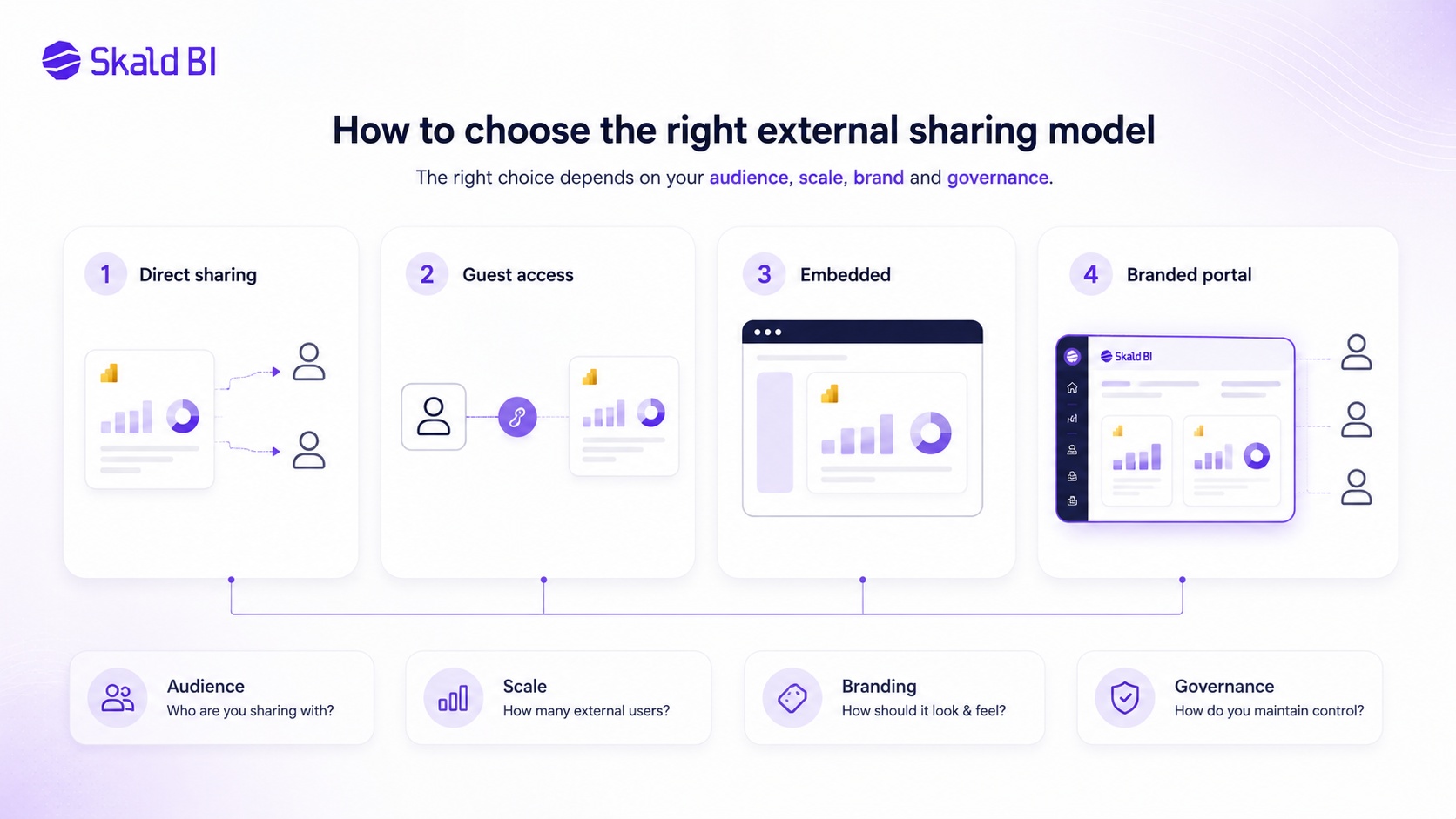
A useful way to choose is to start from the audience, not the technology. The audience determines the access model, experience and governance needs.
If the audience is a small group of named external collaborators, native Power BI sharing or Microsoft Entra B2B may be appropriate. If the audience is a large customer base inside an existing product, embedded analytics may be the right architectural direction. If the audience needs recurring access to existing Power BI reports through a branded and controlled experience, a portal layer can be the most practical fit.
Before choosing, answer five questions:
-
Who are the users, and are they internal, external or mixed?
-
Should users access Power BI directly, or should reporting appear inside a branded experience?
-
Does each user need different data access, such as customer-specific views?
-
Who will manage access when users are added, removed or changed?
-
Is this a one-off sharing need, or an ongoing reporting service?
These questions reduce the risk of selecting a solution that works technically but fails operationally.
Where Skald BI fits
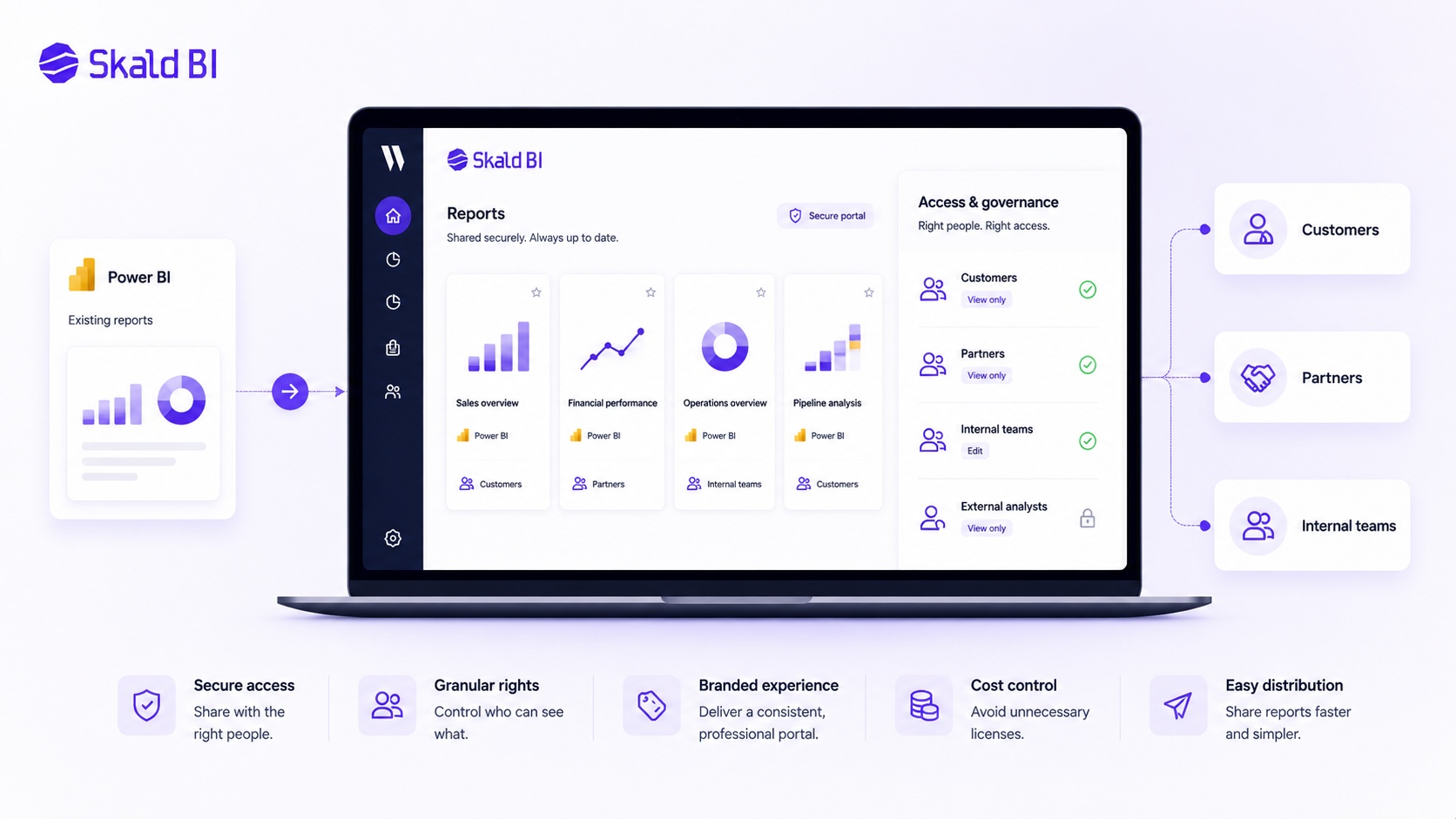
Skald BI is designed for organisations that already use Power BI and need a better way to share existing reports with customers, partners or larger internal audiences.
The core idea is simple. Power BI helps your team build reports. Skald BI helps your team share them through a secure, branded portal.
That makes Skald BI relevant when your reports are no longer only internal analysis tools. They have become part of customer communication, partner collaboration, executive reporting or operational follow-up. In those cases, the surrounding experience matters. Users should know where to go, what they can access and why the report is relevant to them.
Skald BI should not be seen as a replacement for Power BI. It is a distribution layer around Power BI. Your report builders can continue using the tools, models and processes they already know. The difference is in how the finished reports are made available to the people who need them.
Final thoughts
The best way to share Power BI report with external users depends on the situation. Direct sharing can be enough for a small group. Microsoft Entra B2B can support governed collaboration. Power BI Embedded can be right when analytics need to live inside a custom application. A branded portal layer can be the better fit when existing Power BI reports need to be distributed securely and professionally to customers, partners or broader audiences.
The mistake is to treat external sharing as a technical checkbox. It is an operating model. It affects trust, support, access control, user experience and cost.
If your organisation already has valuable Power BI reports but sharing them externally is becoming too manual, too fragmented or too hard to govern, it may be time to separate report creation from report distribution.
Ready to share Power BI beyond your workspace? Book a demo with Skald BI and see how your existing Power BI reports can be shared through a secure, branded portal.
Table of contents
- What does it mean to share a Power BI report with external users?
- The main ways to share Power BI reports externally
- Direct sharing in Power BI
- Using Microsoft Entra B2B for external Power BI users
- Power BI embedded for customers
- What about row-level security?
- The business case for a Power BI customer dashboard
- When standard Power BI sharing is enough
- When a branded portal layer becomes relevant
- Governance matters more when reports leave the internal workspace
- Cost control and licensing considerations
- How to choose the right external sharing model
- Where Skald BI fits
- Final thoughts

About the author
David Glassel
David Glassel is a Senior Partner and Consultant at Wahsel, helping companies use strategy, AI, analytics and technology to drive the CEO agenda and create measurable business impact. He has held Head of Business Development roles at Saint-Gobain Distribution Sweden and Stadium, as well as technology leadership roles at H&M Group, including Head of Business Tech EMEA and Head of Store Solutions.
LinkedIn
Related articles

Power BI sharing: how to share reports securely with the right users
Learn how Power BI sharing works across reports, dashboards, workspaces, external users, licenses, RLS and secure branded portals.
Read more
Row Level Security Power BI: A Practical Guide for Secure Report Access
Learn how row level security in Power BI works, when to use static or dynamic RLS, and how it affects secure report sharing.
Read more
Power BI Workspace Permissions: Access Levels, Report Access and Secure Sharing
Learn how Power BI workspace permissions work, how access levels differ from report access, and when a portal layer helps with secure sharing.
Read more