
Power BI Embedded for Customers: How to Share Reports Beyond Your Organization
⏲ Read time: 11 minutes

Power BI embedded for customers is often considered when an organization wants to share analytics with people outside its own Power BI workspace. That usually means customers, partners, suppliers, franchisees, members, investors or other external stakeholders who need access to selected reports without becoming part of the internal reporting environment.
The basic idea is simple. Your organization already builds reports in Power BI. You now want to make those reports available in a controlled external experience. That could be a customer portal, partner dashboard, SaaS application, extranet or branded reporting site.
The challenge is that the decision is rarely only technical. It touches licensing, access management, user experience, governance, security, branding, support and cost control. A solution that works for ten internal users may become difficult when the audience grows to hundreds or thousands of external users.
This is where many teams start searching for power bi embedded for customers. They are not questioning whether Power BI is the right reporting tool. They are trying to understand how to distribute Power BI content safely and professionally outside the normal workspace.
What Power BI Embedded for Customers Means
Power BI Embedded is Microsoft’s approach for embedding Power BI content, such as reports, dashboards and tiles, into a web application or website. Microsoft describes two main embedded analytics patterns: embed for your organization and embed for your customers.
Embed for your organization, sometimes called user owns data, is typically used when users sign in with their own Power BI credentials and already have access to the content. This is usually an internal enterprise scenario.
Embed for your customers, often called app owns data, is different. In this model, the application presents Power BI content to users who may not have direct permissions or licenses to access the content inside your Power BI tenant. The application handles the user experience around the embedded report, while a permitted embedding identity is used to access the Power BI content.
In practical terms, power bi embed for customers is relevant when you want to make reports available to users outside your internal Microsoft environment. This could include customer dashboards, operational portals, service reporting or partner-facing analytics.
The important point is that Power BI remains the reporting engine. Reports are still created and managed in Power BI. The embedded or portal layer is about distribution, access and presentation.
Why Companies Want to Embed Power BI for Customers
Most companies do not start with an embedding problem. They start with a reporting distribution problem.
A team has built useful Power BI reports. Customers want visibility. Account managers want to reduce manual reporting. Operations teams want partners to see performance data. Customer service teams want a shared dashboard instead of sending recurring Excel files or screenshots.
At that point, the organization has a few options. It can share reports directly from Power BI, invite external users through Microsoft Entra B2B, build a custom embedded application, or use a portal layer designed to make Power BI reports easier to distribute.
Each option can be valid. The right choice depends on the audience, security requirements, expected scale, brand expectations and how much development capacity the organization wants to commit.
For many B2B companies, the underlying need is not “embedding” in isolation. The need is controlled report distribution. Customers should see the right reports, in the right context, through an experience that feels like part of the company’s own service.
Common Use Cases for Customer-Facing Power BI Reports
A power bi customer dashboard can serve many different business models. The strongest use cases tend to appear when reporting is part of the customer relationship rather than just an internal management tool.
Examples include:
-
Customer portals where clients can follow sales, orders, deliveries, usage, service levels or performance
-
Partner dashboards where external stakeholders need access to shared operational KPIs
-
Supplier or franchise reporting where many users need similar reports with different data visibility
-
SaaS or service platforms where analytics should be part of the product experience
-
Customer service reporting where customers need visibility into cases, response times, satisfaction or service quality
A power bi customer service dashboard is a good example. Internally, the dashboard may help managers follow workload, resolution time and quality. Externally, selected views may help customers understand ticket volumes, service levels or improvement areas. The report logic may be the same, but the access model, branding and audience context are different.
This distinction matters. Internal BI is usually designed around employees. Customer-facing BI is designed around trust. The external user expects the data to be correct, the experience to be clear, and access to be limited to what they are supposed to see.
Power BI Sharing, External Access and Embedded Analytics
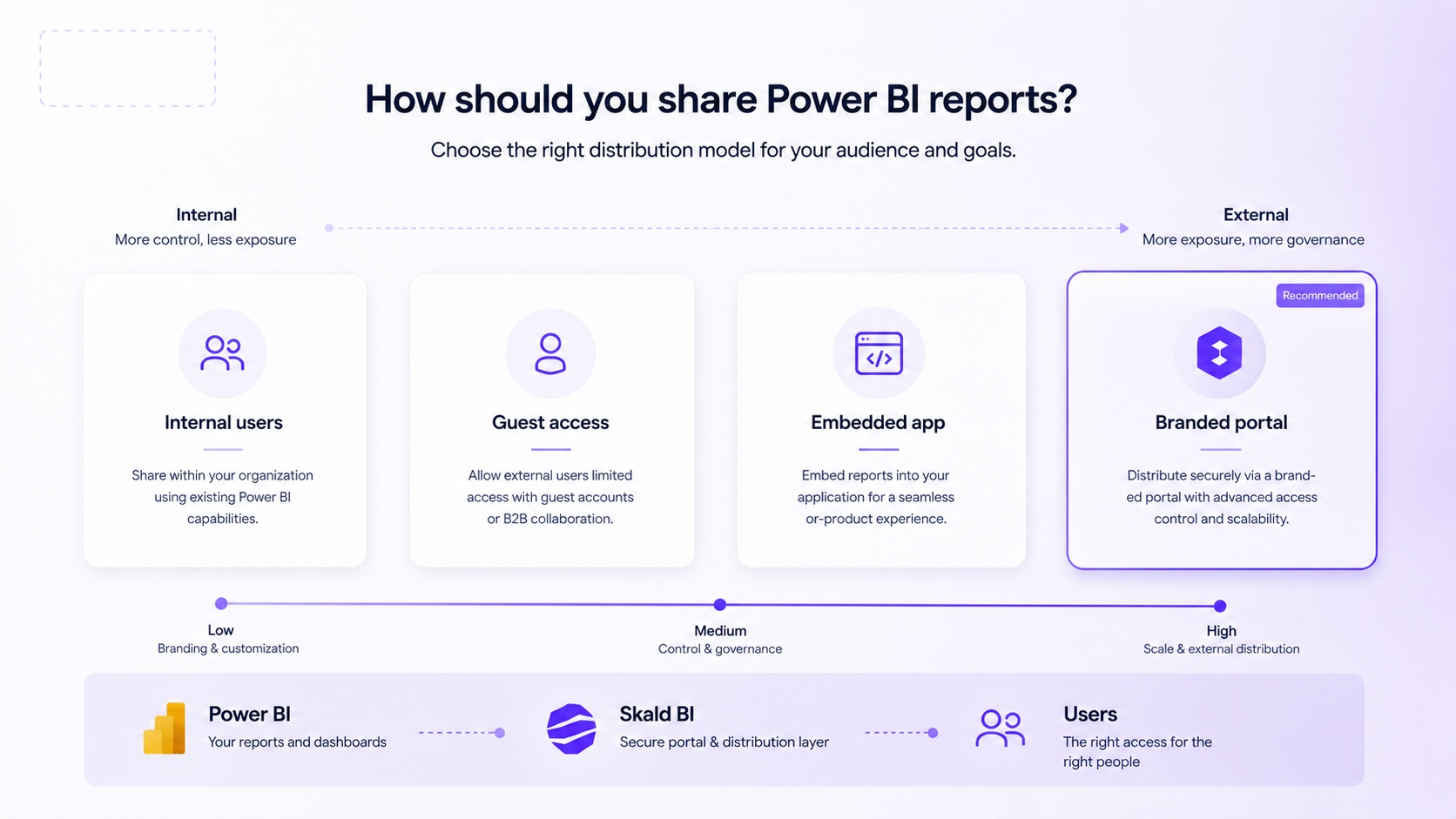
Before choosing Power BI Embedded, it is worth understanding the broader landscape.
Power BI already includes several ways to share and collaborate on content. Microsoft documents options such as sharing reports and dashboards, publishing apps, collaborating in workspaces, using Microsoft Teams and SharePoint, and distributing content to external guest users through Microsoft Entra B2B.
These tools are useful, especially for internal collaboration and controlled external sharing. But they may not always solve the full customer-facing experience. External users may need guest access. Permission management can become complex. The experience may still feel like Microsoft Power BI rather than your own product or portal. Support teams may need to explain access flows that are natural for internal users but less natural for customers.
Power BI Embedded addresses another scenario. It allows organizations to embed Power BI content in an application or website. This can create a more integrated customer experience, but it also introduces implementation work. You need to manage authentication, authorization, embedding logic, report access, environments, user mapping and ongoing governance.
The decision is not simply “Power BI sharing or Power BI Embedded”. The better question is: what distribution model fits the audience and the operating model?
When Power BI Embedded for Customers Is the Right Direction
Power BI Embedded for customers can make sense when analytics is part of the product or service experience. It is especially relevant when users should not work inside your Power BI workspace, but should still consume Power BI reports in a controlled way.
It may be the right direction when you need a customer-facing application, a high degree of user experience control, or a scalable model for external users. It is also relevant when report consumption should happen inside a product, portal or web application that your organization already owns.
However, it is not always the fastest or simplest route. Embedded analytics requires technical implementation and ongoing ownership. The team must understand how reports, semantic models, identities, access rights and user roles interact. If the organization only needs to share a small number of reports with a small number of known external users, direct sharing or B2B access may be enough.
For larger audiences, or when brand experience and access simplicity matter, a portal approach can be more practical. This is where Skald BI fits.
The Governance Problem Behind Customer Dashboards
The real risk in customer-facing analytics is not only whether the report can be embedded. The real risk is whether the organization can control the reporting environment over time.
Microsoft highlights oversharing as a common governance and security challenge in Power BI content distribution. That risk becomes more serious when reports move beyond internal teams. External users should only see the reports and data they are allowed to see. Access should be understandable, maintainable and auditable. Report ownership should be clear. Changes should not accidentally expose the wrong content.
Row-level security, or RLS, is one important part of this. RLS can restrict data access at row level so different users see different slices of the same underlying model. In embedded scenarios, RLS may also be part of how customer-specific data visibility is managed. But RLS alone does not solve the entire distribution problem.
Governance also includes who can publish, who can approve, who can access, how content is organized, how users are removed, how customers are onboarded, and how support teams understand the setup. A technically correct embedded report can still create operational risk if the surrounding access process is weak.
This is why customer-facing Power BI should be treated as a distribution architecture, not only as a report design task.
Where Skald BI Fits
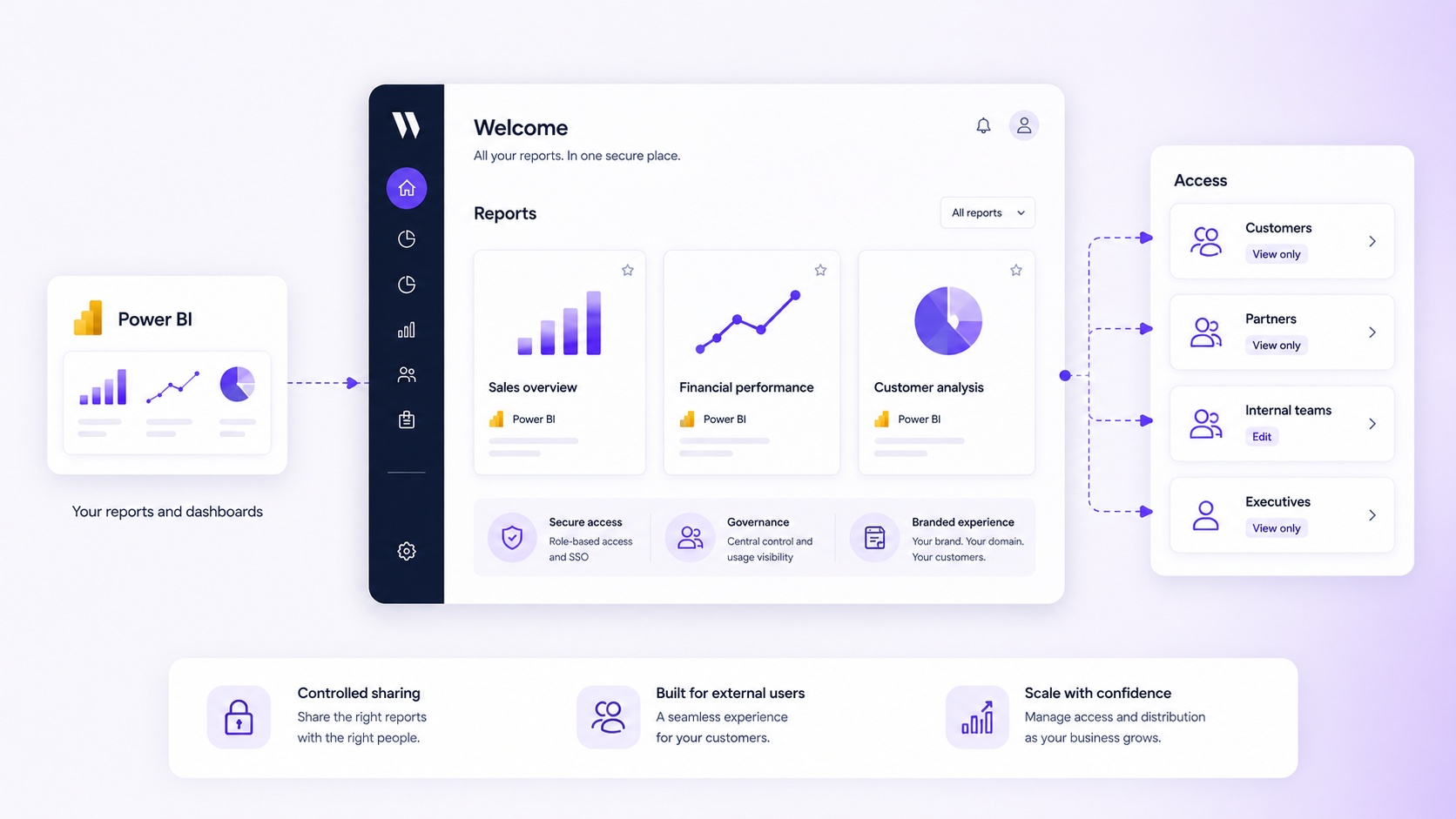
Power BI helps teams create reports. Skald BI helps teams share them.
Skald BI is relevant when an organization already uses Power BI and wants to distribute existing reports through a secure, branded portal. It does not replace Power BI. It adds a portal layer around Power BI reports, focused on access, rights, branding, cost control and simpler distribution.
That distinction is important. Many organizations have already invested in Power BI skills, models, dashboards and reporting processes. They do not want to rebuild reporting in another tool. They want to keep building in Power BI, but improve how reports reach customers, partners or broader internal audiences.
With Skald BI, the commercial and operational question becomes easier to frame. Instead of asking the BI team to become a full external portal development team, the organization can use Power BI as the reporting foundation and Skald BI as the sharing layer.
For a company considering power bi embedded for customers, this can be a practical middle ground. The organization keeps Power BI at the center, while creating a more controlled and branded way to distribute reports beyond the workspace.
Power BI Customer Dashboards Need More Than Visuals
A strong customer dashboard is not only a report with good charts. It is part of the customer experience.
The user should know where to go, what they are looking at, which data is included, how often it is updated and what they are allowed to do. If the dashboard is difficult to access, confusingly branded or buried inside an unfamiliar workflow, the value of the report drops.
This is especially true for customer service dashboards. A customer may not care how advanced the underlying Power BI model is. They care whether they can quickly understand open issues, performance trends, agreed service levels and where action is needed.
The same applies to sales dashboards, delivery dashboards, project dashboards and partner reporting. The external user needs clarity, not just analytics capability.
That is why the portal layer matters. It gives the organization a way to package Power BI reports into a more coherent experience. The report remains important, but the surrounding access, navigation, branding and user structure determine whether the dashboard is actually used.
Key Questions Before Choosing an Approach
Before investing in embedded analytics or a portal layer, leadership, BI and IT should align on a few practical questions:
-
Who are the users: customers, partners, suppliers, internal teams or a mix?
-
Do users need access to Power BI itself, or only to selected reports?
-
How will access rights be assigned, reviewed and removed?
-
Should the experience look like Power BI, or like your own branded portal?
-
Who will own support, governance and report distribution over time?
These questions prevent the discussion from becoming too narrow. A developer may focus on whether embedding is possible. A BI team may focus on report quality. A commercial team may focus on customer experience. All three perspectives are needed.
The wrong choice often happens when one group optimizes for its own problem. A technically elegant solution can become too expensive to operate. A fast sharing setup can become hard to govern. A branded portal can fail if report ownership and data security are unclear.
A good Power BI distribution model balances all three: user experience, governance and operational maintainability.
Power BI Embedded vs a Branded Portal Layer
Power BI Embedded and a branded portal layer are not necessarily opposing choices. They solve related but different parts of the problem.
Power BI Embedded is about making Power BI content available inside an application or website. It is a technical capability and implementation pattern. A branded portal layer is about how users access, navigate and experience reporting. It can include branding, user access structures, report organization and distribution workflows.
For some organizations, building a fully custom embedded application is the right path. This is more likely when analytics is deeply integrated into a proprietary product and the company has strong internal development capacity.
For other organizations, the core need is simpler. They want to share existing Power BI reports externally, in a secure and professional way, without turning the BI distribution challenge into a custom software project. In that case, a portal layer around existing Power BI content may be more appropriate.
This is the practical space Skald BI is designed for. Keep Power BI as the place where reports are built. Use Skald BI to make distribution easier, safer and more aligned with the customer experience.
Cost Control and Licensing Considerations
Licensing and cost control are often part of the reason companies explore power bi embedded for customers. External reporting can become complicated if every user needs to be managed in a way that does not fit the customer relationship or the expected scale.
Microsoft’s licensing and embedding models should always be reviewed against the specific tenant, capacity, user audience and use case. This is not an area where assumptions are safe. The right setup may depend on whether users are internal or external, whether they authenticate with Power BI, how content is hosted, what capacity is used and how the organization governs access.
From a business perspective, the important point is to avoid designing external reporting only around today’s pilot group. A solution that works for five customers may not work for 500 customer users. Access administration, support questions, report sprawl and licensing complexity tend to increase as adoption grows.
A portal-led approach can help make the operating model clearer. It does not remove the need to understand Microsoft licensing, but it can make the user experience and distribution structure more manageable.
A Practical Decision Model
For most organizations, the decision can be simplified.
If the audience is internal and already works in Microsoft tools, native Power BI sharing, apps, Teams or SharePoint may be enough. If the audience consists of a small number of known external users, Microsoft Entra B2B sharing may be appropriate. If the audience is external, larger, customer-facing or brand-sensitive, a more controlled portal or embedded experience becomes more relevant.
The more customer-facing the reporting becomes, the more the organization should think beyond the report itself. The key questions become: who gets access, what do they see, how do they enter the experience, what does it look like, who supports it and how does the model scale?
That is where Skald BI should be considered. Not as a replacement for Power BI, but as the layer that helps existing Power BI reports reach the right users through a secure branded portal.
Final Thoughts
Power BI embedded for customers is not only a technical search term. It is a signal that an organization has reached the next stage of analytics maturity.
The reports already exist. The internal value is proven. Now the question is how to share analytics beyond the workspace without losing control of access, brand, governance or cost.
Power BI is a strong platform for creating reports and dashboards. But customer-facing distribution introduces a different set of requirements. External users need a simple way to access the right content. Internal teams need a maintainable way to manage rights, reports and scale. The business needs an experience that reflects the quality of the service.
Skald BI is built for that gap. It helps organizations that already use Power BI share existing reports with customers, partners and teams through a secure, branded portal.
Ready to share Power BI beyond your workspace?
Book a demo with Skald BI and see how your existing Power BI reports can be shared through a secure branded portal, without replacing the Power BI environment your team already uses.
Table of contents
- What Power BI Embedded for Customers Means
- Why Companies Want to Embed Power BI for Customers
- Common Use Cases for Customer-Facing Power BI Reports
- Power BI Sharing, External Access and Embedded Analytics
- When Power BI Embedded for Customers Is the Right Direction
- The Governance Problem Behind Customer Dashboards
- Where Skald BI Fits
- Power BI Customer Dashboards Need More Than Visuals
- Key Questions Before Choosing an Approach
- Power BI Embedded vs a Branded Portal Layer
- Cost Control and Licensing Considerations
- A Practical Decision Model
- Final Thoughts

About the author
David Glassel
David Glassel is a Senior Partner and Consultant at Wahsel, helping companies use strategy, AI, analytics and technology to drive the CEO agenda and create measurable business impact. He has held Head of Business Development roles at Saint-Gobain Distribution Sweden and Stadium, as well as technology leadership roles at H&M Group, including Head of Business Tech EMEA and Head of Store Solutions.
LinkedIn
Related articles

Power BI Embedded: What It Is and When to Use It
Learn what Power BI Embedded is, when it makes sense, and when a branded Power BI portal may be a better fit.
Read more
Power BI sharing: how to share reports securely with the right users
Learn how Power BI sharing works across reports, dashboards, workspaces, external users, licenses, RLS and secure branded portals.
Read more
How to share Power BI report with free users
Learn when you can share Power BI reports with free users, what licenses are needed, and when a branded portal may be a better option.
Read more