
White Label Reporting with Power BI: Buyer’s Guide
⏲ Read time: 11 minutes

White label reporting with Power BI means presenting existing Power BI reports through a secure, branded consumption experience for a defined audience. It changes how reports are distributed and accessed, not how they are built. Power BI remains the reporting platform. The decision is whether to use native Power BI sharing, Microsoft Entra B2B, a custom embedded application or a ready-made distribution layer.
The distribution problem starts after a report is ready. Customers, partners or larger internal audiences need controlled access to approved content. The decision then concerns identity, permissions, data separation, licensing, branding and operational ownership. The right model is the simplest one that meets those requirements.
What is white label reporting?
White label reporting delivers reports through an experience associated with the provider’s own brand and service. In Power BI, the reports and semantic models remain in Power BI. The distribution layer determines how customers, partners, franchisees, suppliers or internal teams find and consume them.
It means more than adding a logo and colors. Branding can reduce uncertainty and make reporting feel like part of the service, but the solution must also control sign-in, report access, data visibility and offboarding.
White label reporting is a distribution model
The core job is controlled delivery. If trusted semantic models, report owners and Power BI competence already exist, rebuilding those assets in white label BI software creates cost without solving the distribution problem. A distribution layer instead organizes existing reports for defined audiences. See these Power BI white label use cases.
What white label reporting does not replace
White label reporting does not replace report design, data modelling, data pipelines, semantic-model governance or analytical logic. It also does not make immature reports ready for external distribution. If ownership or data security is unclear, a branded front end can conceal risk rather than remove it.
Where Power BI remains the core platform
Power BI remains where analytical content is created, published and maintained. A portal or embedded application becomes the consumption layer. This protects existing Power BI competence and separates distribution from report development.
When native Power BI sharing is enough
Native Power BI distribution should be the starting point. It is often sufficient for known users who are appropriately licensed or covered by suitable capacity and comfortable in Microsoft environments. Microsoft documents direct access, links, workspaces and Power BI Apps, with requirements that vary by license and capacity.
Direct report sharing
Direct sharing fits a defined set of people who need a specific report. Requirements depend on how the content is hosted and shared. Microsoft notes that sharing a report can grant access to its underlying semantic model, so report permissions and data security must be designed together. See this overview of Power BI workspace permissions.
Power BI Apps
Power BI Apps package approved content for broader consumption, and app audiences can expose different content to different groups. Apps are often strong for internal distribution because they use the standard Power BI operating model. Viewing requirements still depend on the workspace license or capacity.
Microsoft Entra B2B guest access
Microsoft Entra B2B supports governed sharing with external guests. It can fit a stable partner or client group when Microsoft sign-in, invitations and provider-tenant access are acceptable. Tenant settings, processes and licensing still require correct configuration. See how to share Power BI reports with external users.
When the standard Power BI experience creates friction
Friction appears when the audience becomes more external, dynamic or commercially important. Users may need help with invitations, tenant context and report links. Administrators may face many customer accounts, changing users and different report sets. Native sharing has not failed, but the requirement may now include a customer-facing entry point, clearer branding or frequent onboarding and offboarding.
White label reporting options for Power BI
There are four main routes for live interactive reporting. Static exports can still be useful for scheduled or archival communication, but a PDF or spreadsheet is not equivalent to an interactive white label reporting portal.
| Option | Best fit | User login experience | Viewer licensing or capacity consideration | Branding control | Access-control flexibility | Development requirement | Administration requirement | Scalability | Main limitation |
|---|---|---|---|---|---|---|---|---|---|
| Native Power BI sharing and Apps | Known internal or Microsoft-native audiences | Power BI and Microsoft sign-in | Depends on user licenses and qualifying capacity | Limited to the native experience | Strong within Power BI permissions and app audiences | Low | Low to moderate | Strong when identity and groups are well governed | Less tailored for a customer-facing service |
| Microsoft Entra B2B guest access | Stable external groups that accept guest access | Microsoft identity and tenant context | Depends on the guest, provider and capacity setup | Limited | Uses Entra and Power BI controls | Low to moderate | Moderate as guest volume changes | Good for governed partner collaboration | Invitation and tenant experience can create friction |
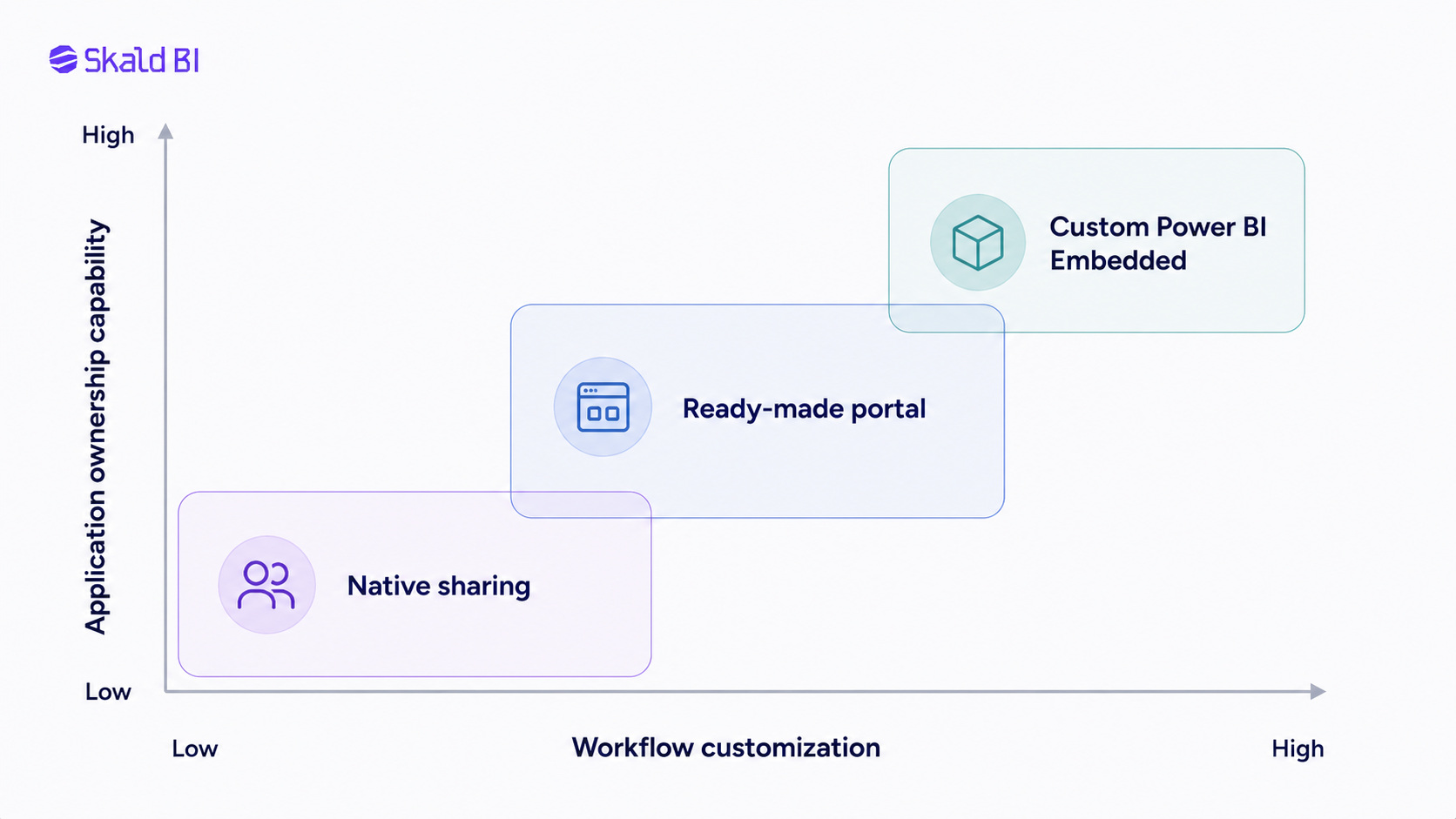
| Custom Power BI Embedded application | Analytics integrated into a product or workflow | Controlled by the application | Production customer embedding requires suitable capacity | High | High, if engineered correctly | High | High | High with suitable architecture and capacity | The organization owns the surrounding application |
| Ready-made white label reporting portal | Existing reports needing structured external distribution | Defined by the chosen portal and identity design | Depends on portal architecture and Microsoft setup | Typically higher than native sharing | Evaluate report, group and organization controls | Lower than a custom application in typical cases | Shared between buyer and vendor | Depends on product, capacity and governance design | Less suitable for deeply custom product workflows |
Power BI Embedded integrates Power BI content into applications. A ready-made portal packages more of the surrounding distribution layer. They are related, but not identical. Read what Power BI Embedded is and when to use it, or compare Power BI Embedded alternatives.
What white label reporting software should actually solve
White label reporting software should make report distribution controllable as an ongoing business process. Logo placement and colors are visible, but the harder requirements sit underneath the interface. A buyer should evaluate whether the proposed model covers:
- Identity: authentication, and whether SSO and MFA requirements can be met in the intended architecture.
- Access: users, organizations, groups, report-level permissions, onboarding, offboarding and recurring access reviews.
- Data security: validated RLS or other data-separation controls, including how identity is passed to Power BI.
- Experience: branding, domain requirements, navigation, report discovery and a clear support route.
- Operations: auditability, ownership, capacity, performance monitoring, lifecycle management and vendor responsibilities.
Not every platform will solve every item in the same way. Microsoft’s Power BI security planning guidance also treats security as a set of governance and implementation decisions. Some responsibilities remain with Microsoft, some with the portal provider and some with the customer. The evaluation should produce a responsibility map, not merely a feature comparison.
Identity, report access and RLS are different layers
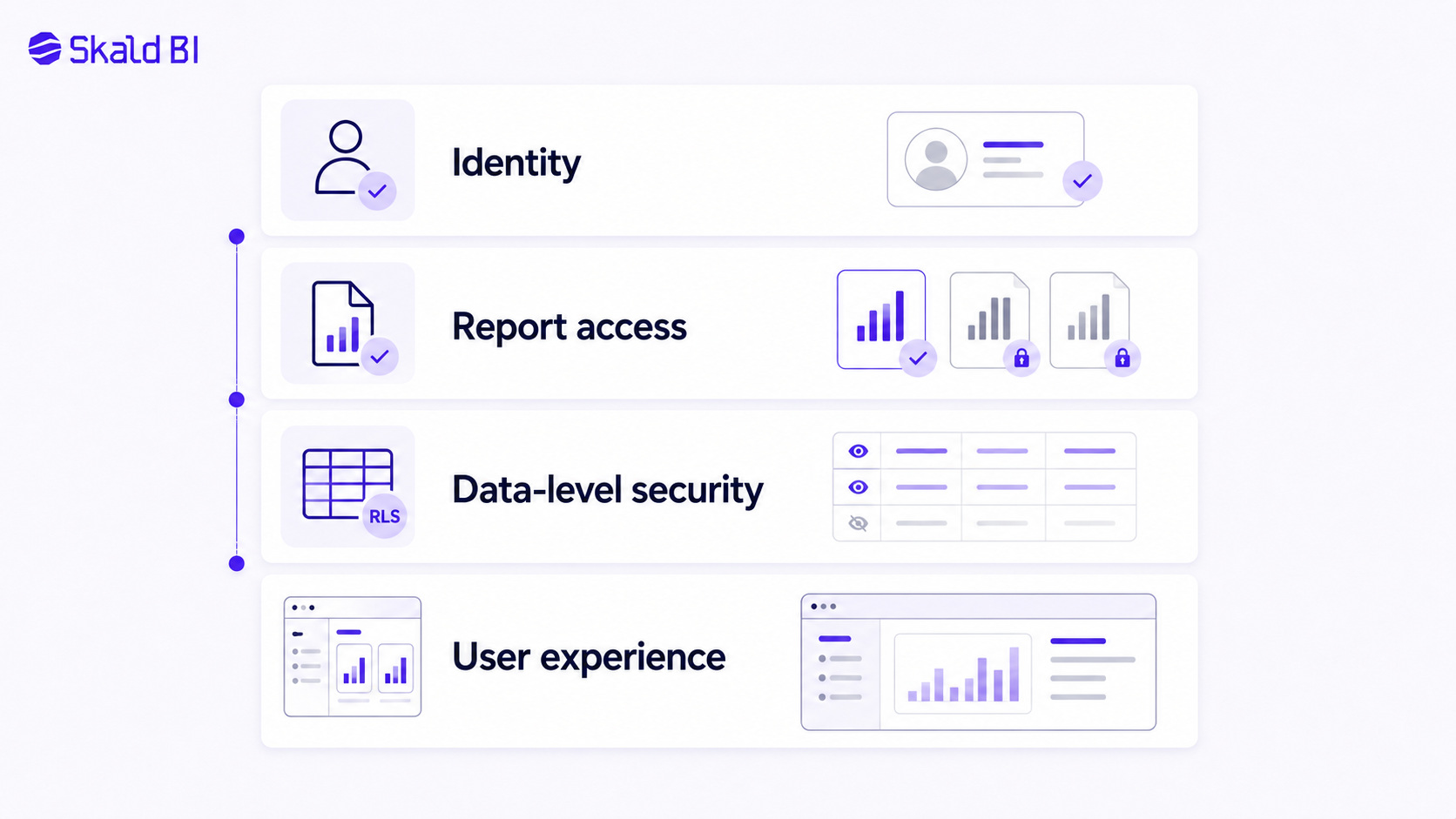
Secure white label data analytics depends on four separate decisions. Treating them as one permission setting is a common source of design errors.
| Layer | Question it answers | Typical control | Common mistake |
|---|---|---|---|
| Identity | Who is this user? | Identity provider, authentication, SSO and MFA policy | Assuming a valid login automatically grants correct report access |
| Portal or report access | Which reports may this user open? | User, group, organization, app or report permissions | Using navigation visibility as the only access control |
| Data-level security | Which data may this user see inside a report? | RLS, OLS or model-level rules where appropriate | Assuming report access automatically separates customer data |
| User experience and branding | How does the user find and consume approved content? | Portal navigation, information architecture and brand presentation | Treating visual branding as security |
Microsoft defines RLS as restricting rows in a Power BI semantic model for specific users. In workspaces, RLS applies to Viewers, not Admin, Member or Contributor roles. In customer embedding, the application can pass an effective identity and roles with the embed token. Test these controls against the intended identity flow.
Portal permission does not replace RLS because report access and row access answer different questions. RLS does not replace onboarding, report assignment or offboarding. See this guide to Row-Level Security in Power BI.
Build versus buy
The build-versus-buy decision concerns differentiation and ownership. A custom application offers control and permanent responsibilities. A ready-made portal reduces the application surface the buyer owns, within the product’s design boundaries.
When a custom Power BI Embedded application is justified
Custom embedding is justified when analytics is integrated with transactions, approvals or product-specific workflows. The organization needs engineering capability to own authentication, authorization, embed tokens, capacity, monitoring, releases, incidents and support.
Microsoft’s customer-embedding model lets the application authenticate to Power BI non-interactively while managing its own end-user authentication. Production also requires capacity. Custom embedding is therefore an application architecture decision, not a report-sharing shortcut.
When a ready-made portal is more efficient
A ready-made Power BI portal is relevant when existing reports meet the analytical need and distribution is the problem. It can reduce the need to maintain another application stack while organizing access, branding and administration across users or organizations. Buyers must still confirm identity, access hierarchy, Power BI architecture and operational fit.
Hidden maintenance and governance costs
Authentication changes, capacity needs monitoring, user mappings drift, reports are replaced and permissions accumulate. Someone must own those tasks after implementation. The highest-cost option is often the one whose long-term operating model has no explicit owner.
[CTA BLOCK]
Start with one existing Power BI report
Bring one report and one real audience. Skald BI can help map the recommended access, branding and distribution model before you compare implementation routes.
How to calculate the total cost of white label reporting
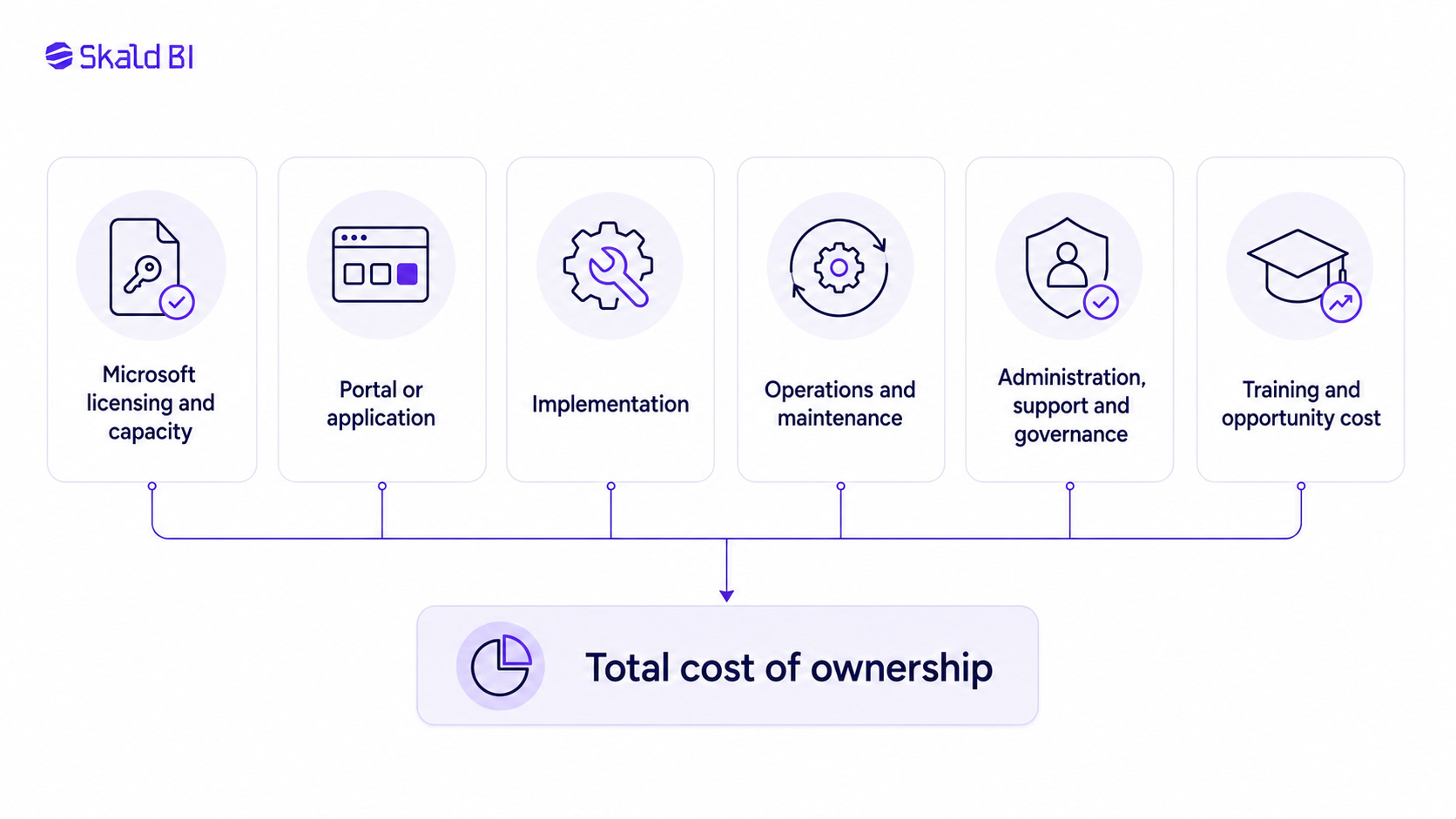
Compare total cost over the same period and service level. No universal viewer count makes native licensing, custom embedding or a portal automatically cheaper. User mix, usage, capacity, support and development ownership change the result.
TCO equals Microsoft licensing and capacity, plus portal subscription, plus implementation, plus ongoing operations, plus user and governance overhead, plus opportunity cost.
| Cost area | What to include | Measurement question |
|---|---|---|
| Power BI creators and publishers | Licenses required to create, publish and manage content | How many people need authoring or publishing rights? |
| Viewers and capacity | Viewer licenses where relevant, Fabric or Embedded capacity where relevant | Which delivery model applies to each user group and workload? |
| Distribution layer | Portal subscription or application platform costs | Which services are included and which remain the buyer’s responsibility? |
| Initial implementation | Configuration, development, identity, access mapping, testing and migration | What must be built once before the first audience is onboarded? |
| Ongoing operations | Maintenance, monitoring, releases, user administration and report-distribution work | How many internal hours are required each month? |
| Support and governance | Support tickets, security reviews, access reviews, training and audits | What does a safe and supportable service require? |
| Opportunity cost | Analytics and engineering work displaced by distribution administration | What higher-value work is delayed by this operating model? |
Use actual contracts and Microsoft’s current licensing and capacity guidance. A public list price multiplied by viewer count is not a complete comparison. This guide to Power BI license types and cost is a starting point, but validate the design for the organization’s tenant, region and agreement.
Which model fits your business?
The same technology can be appropriate in one operating model and inefficient in another. Use the audience and service relationship as the starting point.
| Business model | Typical reporting need | Main access challenge | Likely starting option | When a dedicated portal becomes relevant |
|---|---|---|---|---|
| B2B SaaS company | Product usage, outcomes and account analytics | Mapping product users and tenants to reports and data | Custom Embedded if analytics is inside the product; portal if it is a separate service | When existing reports need a customer-facing destination without a full product integration |
| Consulting firm or agency | Recurring client performance reporting | Many client accounts, changing users and consistent presentation | Guest sharing for a small portfolio | When client onboarding and report assignment become repetitive operations |
| Service provider | Operational KPIs delivered as part of a contract | Reporting must feel like part of the service | Native sharing for a few strategic customers | When branded reporting becomes a standard customer deliverable |
| Partner or supplier network | Commercial, stock, service or performance visibility | Different organizations need different reports and data | Entra B2B where guest collaboration is accepted | When the network is large, dynamic or needs one branded entry point |
| Franchise or multi-location organization | Local, regional and central performance reporting | Hierarchical access and reliable data separation | Power BI Apps for internal locations | When external operators or mixed identities make native administration difficult |
| Large internal audience | Curated access to approved enterprise reports | Discovery, permissions and support across functions | Power BI Apps and governed groups | When a unified branded entry point solves a proven discovery or administration problem |
When you probably do not need a white label reporting portal
You probably do not need a portal when users are internal, the audience is stable, branding is unimportant and Power BI Apps, groups and permissions work well. Another layer would add cost and administration.
A portal is also premature when report ownership, semantic models or RLS are not ready for broader distribution. First define official reports, owners, data separation and access reviews. If users can find the right content and administration is controlled, native Power BI may remain the better choice.
Where Skald BI fits
Skald BI is relevant when existing Power BI reports need more structured distribution. Reports remain created and maintained in Power BI. Skald BI sits around them as a secure, branded portal layer focused on access, rights, cost control, simpler distribution and reduced administrative friction.
Skald BI is not a report-authoring tool, replacement semantic layer or general BI platform. Power BI builds and manages the reports. Skald BI provides the distribution layer.
The strongest fit is ongoing customer, partner or broad internal reporting where the delivery experience forms part of a business relationship. The weakest fit is a small internal team already served well by native Power BI sharing.
Implementation checklist
A controlled implementation starts with reports and audiences, then moves to technology:
- Inventory the existing Power BI reports proposed for distribution.
- Identify the business and technical owner for each report.
- Map audiences, customer organizations and user groups.
- Decide how each audience will authenticate.
- Define report-level access independently from data-level security.
- Validate RLS and any other required data separation.
- Document branding, navigation and domain requirements.
- Compare licensing, capacity and full TCO using the same scope.
- Assign ownership for administration, support and incidents.
- Pilot with a limited, representative audience.
- Test onboarding, role changes and offboarding end to end.
- Establish recurring access reviews and report lifecycle reviews.
The pilot should test more than whether the report loads. It should confirm that the correct user can find the correct report, see only the permitted data, obtain support and lose access promptly when the relationship changes.
Ready to share Power BI beyond your workspace?
Bring one existing Power BI report. We will map the recommended access, branding and distribution model for your users, and show how it could work through Skald BI.
Table of contents
- What is white label reporting?
- White label reporting is a distribution model
- What white label reporting does not replace
- Where Power BI remains the core platform
- When native Power BI sharing is enough
- Direct report sharing
- Power BI Apps
- Microsoft Entra B2B guest access
- When the standard Power BI experience creates friction
- White label reporting options for Power BI
- What white label reporting software should actually solve
- Identity, report access and RLS are different layers
- Build versus buy
- When a custom Power BI Embedded application is justified
- When a ready-made portal is more efficient
- Hidden maintenance and governance costs
- How to calculate the total cost of white label reporting
- Which model fits your business?
- When you probably do not need a white label reporting portal
- Where Skald BI fits
- Implementation checklist

About the author
David Glassel
David Glassel is a Senior Partner and Consultant at Wahsel, helping companies use strategy, AI, analytics and technology to drive the CEO agenda and create measurable business impact. He has held Head of Business Development roles at Saint-Gobain Distribution Sweden and Stadium, as well as technology leadership roles at H&M Group, including Head of Business Tech EMEA and Head of Store Solutions.
LinkedIn
Related articles

Power BI White Label Usecases: 8 Practical Examples for Customer and Partner Reporting
Explore 8 practical Power BI white label usecases and learn when a branded reporting portal makes sense for customers and partners.
Read more
How to Use Power BI: A Practical Guide for Teams That Need to Share Reports
Learn how to use Power BI to build, publish and share reports, with practical guidance on workspaces, access, licensing and secure distribution.
Read more
White Label Power BI Portal: Sharing Reports Securely Beyond the Workspace
Learn what a Power BI portal is, when it is useful, and how to share Power BI reports securely with customers, partners and teams.
Read more